Buy anything from 5,000+ international stores. One checkout price. No surprise fees. Join 2M+ shoppers on Desertcart.
Desertcart purchases this item on your behalf and handles shipping, customs, and support to Poland.
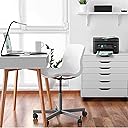
🖨️ Elevate your home office game with pro-quality prints and smart wireless freedom!
The Epson Workforce WF-2930 is a versatile all-in-one inkjet printer designed for the modern home office. It delivers professional-quality prints at 5760 x 1440 dpi, supports wireless printing from smartphones and tablets, and features automatic duplex printing to reduce paper waste. With built-in scanning, copying, faxing, and an auto document feeder, it streamlines your workflow. Voice-activated printing via Alexa and Siri adds hands-free convenience. Note: uses only genuine Epson cartridges to maintain warranty and performance.


| ASIN | B0BDD46HFV |
| Additional Printer Functions | All In One |
| B&W Pages per Minute | 10 ppm |
| Best Sellers Rank | #9,806 in Office Products ( See Top 100 in Office Products ) #20 in Ink Tank Printers |
| Brand | Epson |
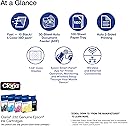
| Built-In Media | WorkForce WF-2930 All-in-One Printer, power cord, 4 Claria® 232 Ink Cartridges (1x Black, 1x Cyan, 1x Magenta, 1x Yellow), Quick Setup Guide |
| Color | Black |
| Color Depth | 48-bit input, 24-bit output Bits |
| Color Pages per Minute | 5 ppm |
| Compatible Cartridge | T232 |
| Compatible Devices | Smartphones |
| Connectivity Technology | USB, Wi-Fi |
| Control Method | Push Button |
| Controller Type | Amazon Alexa |
| Customer Reviews | 4.0 out of 5 stars 583 Reviews |
| Dual-sided printing | Yes |
| Duplex | Automatic |
| Hardware Interface | USB |
| Ink Color | Black |
| Item Dimensions D x W x H | 22.7"D x 14.8"W x 9.5"H |
| Item Type Name | Inkjet Printer |
| Item Weight | 11.5 Pounds |
| Manufacturer | Epson |
| Maximum Copy Resolution Black and White | 600 x 600 dpi |
| Maximum Copy Resolution Color | 5760 x 1440 dpi |
| Maximum Copy Speed Black and White | 10 ppm |
| Maximum Media Size | 8.5 x 14 inch |
| Maximum Print Resolution Black and White | 5760 x 1440 Dots Per Inch |
| Maximum Sheet Capacity | 100 |
| Maximum print Resolution Color | 5760 x 1440 Dots Per Inch |
| Model Name | WorkForce 2930 |
| Model Number | C11CK63201 |
| Model Series | WF-29 |
| Number of Trays | 2 |
| Other Special Features of the Product | Auto Document Feeder, Auto-Duplex, Energy Star |
| Paper Size | Letter, A4, Legal, 8" x 10", 5" x 7", 4" x 6", 3.5" x 5", Executive, Half Letter, A6; User Defined: 2.2" x 3.4" to 8.5" x 47.2" Inches |
| Power Consumption | 12 Watts |
| Print media | Paper (plain) |
| Printer Connectivity Type | USB, Wi-Fi |
| Printer Output Type | Color |
| Printer Type | Inkjet |
| Printing Technology | Inkjet |
| Resolution | 5760 x 1440 |
| Scanner Type | Flatbed, Sheetfed |
| Special Feature | Auto Document Feeder , Auto-Duplex , Energy Star |
| Total Usb Ports | 1 |
| UPC | 010343968554 |
| Unit Count | 1.0 Count |
| Warranty Description | 1-year limited warranty |
| Warranty Type | Limited |
| Wattage | 12 watts |
K**.
Excellent product and just does the job!
Easy hardware setup and software setup too. I've been an Epson fan for a long time because they build quality products. They are dependable and just run. Couldn't ask for better at this price point.
G**Y
Careful
Works great. Be careful of the updates, it will not recognize ink cartridges from other companies only from Canon.
K**R
A lot of caveats
Printer works well. It is compact and easy to use and the print quality is very good.. Downside: the printer came with ink cartridges that were less than half full. Apparently the ink provided was for set up and alignment only. Had to buy ink right away. Could not buy re manufactured ink. The printer is programmed to use only Epson ink or so they say..The printer came with a warning that the ." Epson printing system is specifically designed to be used with Epson Genuine Cartridges." It also stated that the "Use of non-genuine ink could cause damage not covered under the Warranty" .The Epson website on Amazon made no mention of this nor did they let it be known that the ink provided was for set up and ink had to be bought right away. ink.Epson Brand ink is very expensive, had I known I would have chosen another another brand rather than Epson. I finally gave up on this printer and returned it. Spent close to $90 on ink. Every time I used the printer it seemed like one of the ink tanks was empty. $52 on 4 little skinny cartridges of ink. Had to align the printer twice, using tons of ink and still the print quality was not good. Color printing was dull and looked smudged. I tried different print settings and still . I gave up.
W**N
Great Buy
Great item, good price and Easy Setup
N**O
Very functional price performance option
First time an Epson customer and the experience unboxing this product was quite a journey as I had to remove 23 tape used to secure printer parts which consume time. The setup process was flawlessly and straight forward using an Epson App on my phone. Cartridges installation was easy as well. Now why 4 and not 5, mainly because the difference between what you see in the pictures vs what you get. You really get a very cheap and filmsy printer that honors it's price. Looks like if you are not extra careful it will break right away so be aware otherwise it delivers what is offered in terms of printing and scanning features. Really like how seamless is the setup process for tablet and mobile phones
J**N
Thank you Epson!
Worked good for me!!! I have an older operating system and I downloaded an universal driver from Epson. It worked perfectly and saved the day!!! No Problems! Thank You Epson!!!
G**L
Easy to set up and use.
Replacement for a 10 year old Epson wf-2830. Set up and use is super easy...even for a 75 year old granny. I love the remote printing feature.
J**X
Ink Thirsty and Expensive Cartridges
I got this primarily for occasional color printing since I had an older Samsung laser printer for every day. Then the Samsung choked on a jam and was unrepairable by me. The Epson works fine - I hooked it up via USB. It scans and prints perfectly. The only issue is the insane cost of replacement ink. I know this is not a new issue and it's how the manufacturer actually makes money. So, I was about to order cartridges and read reviews on the non-OEM cartridges stating that when the printer updates the non-OEM cartridges stop working. So I am going to order the Epson cartridges and buy a $139 Brother laser printer. My son works at a company using ink jet printers, buys them cheap then throws them away when they need ink, and get another printer.
M**S
Excelente compra
Fue una excelente compra, funciona bastante bien. Es indispensable instalar el controlador para un óptimo funcionamiento.
J**E
Excellent and User Friendly
Best printer I have ever owned!! Prints beautifully, scanning is so easy, to change the ink is so fast and easy! Very user friendly! Highly recommend!!
K**I
Impresora multifuncional de buena marca, a buen precio
Excelente impresora para quien busca un multifuncional con fax y copiadora a un precio muy atractivo.
S**A
inefficiency of the Ink and the printer ( does not worth)
i purchased this almost a year ago, first it says it prints hunderends of pages even in black and white, I printed 70 pages in black and white and not only black cartridge was out but other colorful ones were out, I purchased one authorised only black ink and installed but the printer notyfies that you should buy again the color ones too which mean only black is not working so this printer can not work with only black cartridge even if you want to only print in black and white. In addition, without installed inks, the printer does not scan anything that should not be related to the inks. So overall, this product is not usable for me, and I would rather print outside. Moreover, the cost of the inks is equal to the cost of one printer.
D**S
Imprimante Epson
Excellent Qualité et en bon état et bien reçue merci .
Trustpilot
2 weeks ago
2 months ago