We remain fully operational. Our teams are working around the clock to ensure your deliveries continue safely.

DOWNLOAD THE APP


Customer Services
Copyright © 2025 Desertcart Holdings Limited
DOWNLOAD THE APP





💼 Elevate your iPad mini to a mini laptop powerhouse—work smarter, type brighter!
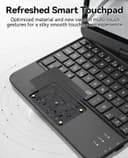
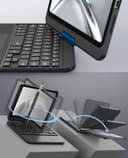
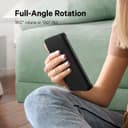
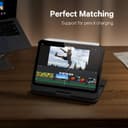
The GreenLaw Keyboard Case transforms your iPad mini 6 & 7 into a versatile productivity machine with a robust 360° rotating hinge, customizable 7-color backlit keyboard, and a precision multi-gesture trackpad. Designed for professionals who demand style and function, it offers fast Type-C charging with up to 60 hours of battery life and an auto sleep feature to maximize efficiency. Perfectly tailored for the latest iPad mini models, this case delivers a premium laptop-like experience wherever you go.


| ASIN | B0B397JWRV |
| Additional Features | 360° Roate/ 180 Flip, Backlit, Smart Trackpad |
| Antenna Location | Business, Education, Everyday Use, Gaming, Multimedia, Personal, Student |
| Best Sellers Rank | #84 in Tablet Keyboard Cases |
| Brand | GreenLaw |
| Built-In Media | Keyboard Case for iPad mini 6, User Manual |
| Button Quantity | 78 |
| Color | Black |
| Compatible Devices | for iPad Mini 6 2021 8.3 inch (Model: A2567/A2568/A2569), for iPad Mini 7th 2024 A17 Pro-8.3 inch(Model: A2993, A2995, A2996) Compatible Devices for iPad Mini 6 2021 8.3 inch (Model: A2567/A2568/A2569), for iPad Mini 7th 2024 A17 Pro-8.3 inch(Model: A2993, A2995, A2996) See more |
| Connectivity Technology | Bluetooth |
| Customer Reviews | 4.3 out of 5 stars 3,180 Reviews |
| Enclosure Material | Acrylonitrile Butadiene Styrene |
| Hand Orientation | Ambidextrous |
| Item Dimensions L x W x H | 9.84"L x 6.5"W x 0.98"H |
| Item Type Name | Keyboard Case |
| Item Weight | 515 Grams |
| Keyboard Backlighting Color Support | Single Color |
| Keyboard Description | Wireless |
| Keyboard Layout | QWERTY |
| Language | English |
| Manufacturer | GreenLaw |
| Model Name | T83 |
| Model Number | T83 |
| Number of Keys | 78 |
| Power Source | Rechargeable Battery |
| Processor Count | 1 |
| Recommended Uses For Product | Business, Education, Everyday Use, Gaming, Multimedia, Personal, Student |
| Series Number | 6 |
| Special Feature | 360° Roate/ 180 Flip, Backlit, Smart Trackpad |
| Style Name | Contemporary |
| Theme | Business, Education |
| Unit Count | 1.0 Count |
| Water Resistance Level | Not Water Resistant |
K**E
BEST Quality Keypad for my iPad Mini A17 Pro!
I just updated from iPad 4 mini to the iPad mini a17 Pro. I’ve had this brand’s Bluetooth keypad case for the iPad mini 4, in black, and it’s been great. Now with my new iPad mini, I’ve come back to get a new keypad case, and I selected the lavender color. This keypad has backlighted, with colors and three levels to dim. Something new is a built in touch mouse pad- I still need to learn how this touch pad works. USB C is needed for recharging the keypad, but no charging cable included, not a big deal to me since my new iPad mini came with the USB C cable and wall charger. This keypad case is strong with a center (metal) connection that allows you to swivel 360 degree and turn the screen completely around, then fold it over the keypad making it easier to use your iPad without the keypad. There is a magnetic strip for an iPad pencil to mount on the iPad, and it will charge it too. Soft pads on the bottom & more soft pads to protect your iPad screen when you close it. With my previous iPad mini 4, I had tried a few other keyboard brands, before this brand, and they failed by cracking at the hinge and breaking. This brand is the ONLY keyboard case I can truly trust after years of use because the quality is top-notch. It’s like a mini laptop and I highly recommend this product!
A**R
The best case! I have a mini laptop
Works amazing with my iPad mini! Hasn't gave out on me, and I've had it for over 6 months. I love how durable it is, and how the keyboard changes colors. I wish the actual apple Magic Keyboard did that for my iPad Air 13 inch. It feels like an actual laptop. I do like it more than apples keyboard. It stays charged for a long time. It is heavy, but I'm okay with that. The iPad is securely in the laptop case so you would have to tug to take iPad out. I wouldn't recommend taking iPad in and out of keyboard case. I leave it in full time.
J**S
Almost perfect keyboard case for iPad Mini 7!
I have an iPad Mini 7 in purple, so of course I had to find an iPad case in purple. I wanted a keyboard case. I spent a long time shopping around on Amazon to find one that I liked best. I’ve had this case now for exactly 3 months and I have to say that this is the best keyboard case I’ve had for an iPad. Pros: - its weight (not extremely light like other keyboard cases) - the deep and clicky keys (a MAJOR plus and a big reason I bought this) - the color options for backlight along with the brightness options for it - the trackpad works well and doesn’t lag - gestures on the trackpad work perfectly - the hinge works well overall Cons: - needing to press the function key for an apostrophe and other symbols - some oddly placed keys (minor issue) - the material of the back of the case (it rubs off) - can’t tilt back all the way or it topples over (can only tilt the iPad back about 90 degrees or slightly over that) - I wish there were a slot for the Apple Pencil instead of just relying on the magnets Overall, this is a great keyboard case and I would buy it again in a heartbeat! I think it’s fully worth the cost and it’s held up very well so far. If possible, maybe a newer version could be made where the material is fixed and maybe some of the key issues (especially the apostrophe problem).
L**O
A very nice keyboard case... with some minor problems
The look of the backlit keyboard is spectacular! Once paired, the bluetooth is flawless. I haven't tested it but the battery hasn't gone dead on me. I plug it in when I think of it. The clam shell case protects the iPad mini 6 well (there is an opening at the top for the ApplePencil and on the side for USB-C charging). The touchpad is like an Apple Touchpad (you can't click it anywhere) but that doesn't bother. I can double tap to launch an app with a full click press. The build quality is excellent especially for the price. For minor problems: It's a little thick but I suppose that can't be helped. The keyboard is a little cramped but that also can't be helped. If you're expecting an Apple-like keyboard forget it. The travel on the keyboard is deeper than a Mac keyboard which may or may not be a problem for some. The single and double quote is fn o and fn p respectively which is a little difficult getting used to. Finally, the backlight on the keyboard shuts off a little too soon for me (likely to save battery). For some, the above mentioned problems could be a deal breaker but I like it! Again, the backlit keys are gorgeous!
M**N
Good protection outweighs the key variations
First off, this keyboard is quite good! The touch is definite, ....BUT it is highly sensitive, and many of the keys are in different locations from the standard keyboards.......that said, once you get used to the key placements, it works! I notice sensitivity to random touches which seem to displace the cursor and must be very observant of what appears after a keystroke, or I must erase a long row of jibberish where the cursor popped up at random. I have yet to figure why I would need the screen to swivel at all. BUT it is the best neatest tidiest iPadMini case I have, and Ive purchased several so far. I have two iPadMinis, and this is the only case with a keyboard, which makes it quite convenient, even with the unstandard set of keys. I figure I will get used to the locations of the keys I normally use. In typing this, Ive made various corrections, may fail to correct others....but forgive me. Dont let your hand move too far off the keys, or the cursor will disappear unexpectedly. It is worth trying however. At the time I type this, I cannot locate the apostrophe key.....thus its absence where I use contractions.....but no time now to learn its location. THAT is an example of the issues you will encounter. My hands are not small, they are used to hard work, have some age related neuropathy affecting the sensitivity of my fingertips....but younger folks should fly through their typing. When the case is closed, it presents a solid protection for the tiny iPadMini. It does not fall open accidentally, and the white one I chose stays pristine even when I sweat. Since you WILL make typos, learn first where the DELETE key is on the keyboard.....and be ever mindful of that aggravating CURSOR which can jump without provocation!!!! As more apps allow dictation input, this keyboard issue shoould be less and less as we learn to dictate to the Mini. The case gives good protection to the Mini, and that is of primary importance. I slide it into my bag with no problem alongside my wallet, and even my car keys cannot scar the screen of the Mini. There is a learning curve to remembering where the keys are now found--like the apostrophe, which I seem to use a lot, but I just found it so will practice a bit to see how quickly my hands remember that particular motion.
R**N
Annoying Touch Pad that can't be turned off; otherwise great
I had this keyboard brand for my iPad Mini 5th Generation and now have it for the iPad Mini 7 A17 Pro. I just must have an actual keyboard, rather than an onscreen one. I am so fully acquainted with the need to use the Fn key for the quote (apostrophe) and double quote keys that I sometimes find myself trying to do this on other devices! I haven't had issues with pairing with my iPad as long as I remember that I have to press the Fn and C keys together to do the pairing. I preferred the button to push that my old keyboard had. The new way of pairing is not what has kept me from giving this keyboard a 5 rating rather than the 1 I am giving it. It's not even the annoying touch pad, which I finally figured out how to turn off. It's the total lack of ways to contact GreenLaw customer support. My "t" key has stopped working. I need to get warranty information. The manual refers to Support and tells users to contact them with any problems. But there is no information on how to contact them - no website, email address, phone number, or even snail mail address. So I am stuck with needing to use the onscreen keyboard just to type this one letter! The warranty link on this Amazon product page does not go anywhere. Amazon customer support links also go nowhere. It's a shame, because this is otherwise a great product.
T**T
Great all round tool!
Just what I was hoping for! Keypad is very responsive, easy to use, seems excellent quality for the price. Lots of thoughtful touches like the magnetic top for the pen, and its ability to swivel and turn back on itself makes it a great all-round tool.
A**E
Disappointed
I am going to start off with the positives... Very light weight. Hinge feels incredible. The plastic is high quality. I love the case. Keyboard is very tactile and clicky and the lights are just amazing. No lag with the keyboard. I already had people at my job asking what kind of laptop I had and how it was so tiny. Now for the fat negative. The track pad is awful. Like it's the worst trackpad ever. It's like barely registers my touch at all sometimes it will others times it won't. I am not sure if I am doing something wrong. That's the main reason I got this case. I wanted a slim keyboard case that didn't have any unnecessary attachments for the apple pencil and one with a trackpad. I might return it but am not 100% yet. Disappointed to be honest
Trustpilot
3 weeks ago
3 weeks ago