Buy anything from 5,000+ international stores. One checkout price. No surprise fees. Join 2M+ shoppers on Desertcart.
Desertcart purchases this item on your behalf and handles shipping, customs, and support to Poland.
โจ๏ธ Elevate your workspace with the keyboard that works as hard as you do.
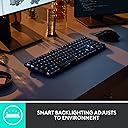
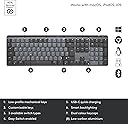
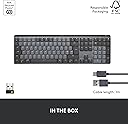
The Logitech MX Mechanical Mini is a premium wireless mechanical keyboard featuring tactile quiet switches for a fluid, low-noise typing experience. It supports multi-device Bluetooth and Logi Bolt connectivity, compatible with macOS, Windows, Linux, iOS, and Android. The keyboard boasts smart backlit keys that illuminate on hand approach and adjust to lighting conditions, a durable metal frame, and USB-C fast charging offering up to 15 days of battery life with backlighting enabled. Designed for professionals seeking ergonomic comfort and customizable workflow enhancements, it combines style, function, and sustainability with recycled plastic components.


| ASIN | B07W4DHKZJ |
| Antenna Location | Office |
| Best Sellers Rank | 3,098 in Computers & Accessories ( See Top 100 in Computers & Accessories ) 33 in Keyboards (Computers & Accessories) |
| Box Contents | USB Cable |
| Brand | Logitech |
| Brand Name | Logitech |
| Button Quantity | 19 |
| Colour | Graphite |
| Compatible Devices | Android Devices on Android 8.0 or later, Chromebook, Mac, PC, iPad on iPadOS 14 or later |
| Compatible Operating System Family | Windows |
| Compatible devices | Android Devices on Android 8.0 or later, Chromebook, Mac, PC, iPad on iPadOS 14 or later |
| Connectivity Technology | Bluetooth, Logi Bolt |
| Connectivity technology | Bluetooth, Logi Bolt |
| Country of Origin | China |
| Customer Reviews | 4.4 out of 5 stars 812 Reviews |
| Enclosure Material | Metal |
| Hand Orientation | Ambidextrous |
| Item Dimensions L x W x H | 43.4L x 13.2W x 2.6H centimetres |
| Item Type Name | Mechanical keyboard |
| Item Weight | 1160 Grams |
| Keyboard Backlighting Color Support | Single Color |
| Keyboard Description | Mechanical |
| Keyboard Layout | QWERTY |
| Keyboard description | Mechanical |
| Language | English |
| Manufacturer | Logitech |
| Manufacturer Part Number | SYktcjgs |
| Minimum Required Operating System Version | Windows 10 |
| Model Name | Logitech MX Mechanical Wireless Illuminated Performance Keyboard |
| Model Number | 920-010756 |
| Number of Keys | 104 |
| Number of Sections | 1 |
| Power Source | Rechargeable Battery (USB-C) |
| Product Features | Customizable Display Keys, Easy-switch, Perfect stroke keys, Smart backlit keys |
| Product Warranty | 2 year manufacturer |
| Recommended uses for product | Office |
| Series Number | 920010756 |
| Special feature | Customizable Display Keys, Easy-switch, Perfect stroke keys , Smart backlit keys |
| Style Name | Full Size |
| Switch Type | Tactile Quiet, Clicky, Linear |
| Theme | Graphite, Tech |
| Unit Count | 1.0 count |
| Water Resistance Level | Not Water Resistant |
M**M
Beautiful premium feeling keyboard
I received my Logitech MX Mechanical Mini and was immediately surprised by the quality. It has a good heft to it and has a nice metal border around the keyboard that screams quality. The backlit keyboard is a really nice touch that illuminates as your hands reach towards the keyboard. I have had no issues with connectivity, plug and play, easy as that. Cannot say much about battery life yet but seems to be solid so far with around 10 days of usage. The quality of the keys is really nice, they have a soft touch feel and usability is really comfortable. I returned the Nuphy Air 75 on the feel of this keyboard alone. A couple of things to call out to be aware of: Noise - These are not the quietest of keys however have a nice feel of feedback. The noise is fairly satisfying. If you want a quiet keyboard, this might not be the one for you. Keyboard layout - This is the 75% layout version and the keys are nicely sensitive however there is a learning curve to get used to the layout. A few days in, I am feeling more comfortable with it. The arrow keys in particular are right on the edge which takes a little getting used to. I have, however, come from using a laptop keyboard. Ultimately, it feels really good to type if you are looking for a mechanical keyboard.
L**M
All round excellent keyboard
I can't think of anything I don't like about this keyboard. I've heard a lot of people saying the letters rub off, or the keys get marked with finger grease. If this is happening to mine, it's not something I notice. I work from home, so use it for upwards of eight hours a day, and have had it for six months. I came from an Apple keyboard, and various Apple macbook pros, since 2013. I always like chiclet keyboard, and moved to an MX Keys, which was also good, and nice to type on that the new Apple keyboards that come with the Mac Pro. I then replace the MX Keys with the MX Mechanical, and haven't looked back. It makes a really satisfying noise, but isn't obnoxiously loud. I can type at about 80wpm on it, about the same as the MX Keys, but I enjoy it more on this one. The backlighting is good, and responsive -- to the point that my mac pro keyboard now seems sluggish because you have to actually tap a key to make it light up. The wireless connection is very good. Keep in mind that only the USB dongle will work with bitlocker/filevault, or entering bios, otherwise, on mac and pc, bluetooth won't work until the OS boots. I ended up buying a spare USB dongle, and have one in my mac and one in my PC. Every so often, the keyboard goes a bit weird, laggy and repeats keys, and I have to power cycle it. Maybe once a month. Battery is great, much better than the MX Keys. I can't be charging it more frequently than once a month, I don't think. I spent a long time on the fence about this keyboard. If you are too, buy it. It is expensive, but worth it. I like it so much, I left this really long review.
S**E
Fantastic keyboard
The only reason I ain't giving 5 stars is the sheer cost of the thing. Maybe that's unfair as my mindset is still stuck in 2000 prices when I paid ยฃ30 for a keyboard and mouse which still work, but overall I'm super happy with it. I wanted a mechanical keyboard as I wanted that tactile feel, which you defiantly get without it being too clacky and loud, it's just right. It's wireless and the backlighting is great, if this had fingerprint built in it would be perfect. The fact you can customise all the buttons is great, the software is really simple and quick, mind I've not used it for the keyboard as everything is set out as I'd expect (coming from a mac magic keyboard). I did use the software for the mouse though and having copy-paste configured on quick buttons has been awesome so can say the software works well. I would consider the negative reviews and take them with a pinch of salt, as complaints of no print screen button etc seem a bit odd to me as I don't really know anyone who uses print screen over shift+cmd+4 for snipping just what you need, you can always shift+cmd+3 for full screen or you can use the software to remap buttons to whatever you want so anyway. If you want a mechanical keyboard but also want wireless, I think (as you can see from all reviews) this is the one. I was on the fence about getting it over a new magic keyboard, but after years on Apple's super low profile keys I realised I wasn't actually very comfortable using it, if I'm honest I was getting Apples keyboard just cos I knew it would work and looks nice. Happy to report this has worked flawlessly out of the box, I haven't used anything other than Bluetooth and setup took about 1 minute. It looks dare I say it, nicer on my desk as well! Its lovely to use and I'm super happy I switched. So if you have the money you will be really happy going with this.
M**I
Perfect Combination with My MacBook M2: Logitech MX Mechanical Mini for Mac Review
I recently upgraded my setup with the Logitech MX Mechanical Mini for Mac Wireless Illuminated Keyboard, and it has proven to be an exceptional addition, especially when paired with my MacBook M2. Hereโs my detailed review. **Design and Build Quality:** The Logitech MX Mechanical Mini is beautifully designed to match the aesthetics of Apple devices. The Space Grey finish complements my MacBook M2 perfectly, creating a seamless and stylish look on my desk. The keyboard is compact yet solidly built, with a high-quality aluminum top case that gives it a premium feel. The low-profile design is sleek and modern, fitting well with the minimalist design of Apple products. **Typing Experience:** This keyboard features low-profile performance switches with tactile quiet keys, which offer an excellent typing experience. The keys provide a satisfying tactile response without being overly noisy, making it ideal for both work and leisure use. Typing on the MX Mechanical Mini feels smooth and responsive, with each keypress registering accurately. The keyboard layout is well thought out, and the spacing between the keys is just right, ensuring comfortable and efficient typing. **Backlighting and Functionality:** One of the standout features of this keyboard is its backlighting. The keys are illuminated with adjustable brightness, making it easy to type in low-light conditions. The backlighting is even and consistent, enhancing the overall look and usability of the keyboard. Additionally, the keyboard includes Mac-specific function keys, providing quick access to essential shortcuts and functions. This integration with MacOS enhances productivity and streamlines workflow. **Connectivity and Compatibility:** The MX Mechanical Mini connects effortlessly via Bluetooth and also supports USB-C for wired use, offering versatility in how you choose to connect it to your devices. Pairing the keyboard with my MacBook M2 and iPad was quick and straightforward. It supports multiple device connections, allowing seamless switching between devices with the press of a button, which is a significant advantage for those who work across different platforms. **Battery Life:** Battery life on the MX Mechanical Mini is impressive. It lasts for several weeks on a single charge, even with the backlighting on. The USB-C charging is convenient and quick, ensuring minimal downtime. The long battery life and efficient power management make it a reliable choice for daily use. **Price and Value:** While the Logitech MX Mechanical Mini is on the higher end of the price spectrum, it offers exceptional value for the quality and features it provides. The combination of premium build, excellent typing experience, and seamless integration with Apple devices justifies the investment. For anyone looking for a high-quality wireless keyboard for their Mac setup, this is a top contender. **Conclusion:** The Logitech MX Mechanical Mini for Mac is an outstanding keyboard that complements the MacBook M2 perfectly. Its sleek design, tactile quiet keys, excellent backlighting, and robust connectivity options make it a joy to use. Whether youโre typing up documents, coding, or just browsing, this keyboard enhances the overall experience with its responsive and comfortable keys. If youโre in the market for a premium keyboard to match your MacBook M2, the MX Mechanical Mini is an excellent choice. Highly recommended!
S**A
Excellent product - takes a day or two to get used to
This is an excellent keyboard for everyday people just trying to do some work. I have originally used the MX Keys which honestly is also an excellent keyboard (if you're deciding between either of them you can't go wrong). I have never had a mechanical keyboard and I'm just a regular person. I'm not a gamer. I work from home some days and from the office other days and I primarily use word, excel and power point. I'm also not someone who is going to remove keys or switches. Online, there are a lot of complaints that you can't change switches easily and that the space bar is not a standard size. Whilst it's annoying the space bar is not standard (in case you wanted to change keys), the target market is not people who want to do those things. The keyboard has a good typing feel. It took me about 1.5 days to get used to the typing. I had a LOT of typos on the first day and I wondered why anyone would want a mechanical keyboard. It does feel great and springy though, so I get the appeal. I'm using this at home rather than the office, so the noise should not bother, although my husband has commented on how loud it is compared to the MX Keys. So keep this in mind. If you've never used mechanical before, despite these being "quiet tactile", they are loud. I appreciate the following: - Good typing experience. I can type quickly on this. - Great lighting. This is better than the MX Keys because you can have different modes. My favourite is contrast which highlights some of the keys but not others. - Different angles are available on this. - Great short cut buttons. For example screen shot. These things are used on a regular basis. Personally I don't use some like emojis or dictation but this may be different for others. One thing to keep in mind, as this is higher than a membrane keyboard may be, you do need some sort of wrist rest. And the one provided by Logitech for MX Keys will be too short for this. The Mini size is very good for those who don't have to access the number pad on a regular basis. It is more wide than the MX Keys Mini but it does have extra buttons such as Page Down/Page Up etc. All in all this is a great product. Fast, easy to use, and no typos. Great for "regular" non mechanical keyboard people. If you're into mechanical keyboards and love switching things around, then you're already aware this product is not for you. If you want to try it out, or want something you obviously won't tinker with, this is a great way to go.
J**N
Whats going on with the layout and the enter key
I've been on the hunt for a really nice keyboard for while as I program all day. I currently use a happy hacking keyboard (which is quite a different type of keyboard and to adjust to). I bought the mx keyboard as it's a really professional looking keyboard. Trying it out, It's got a really nice "quiet" click to the keys, they respond really nicely. It's really nice. Trying out this keyboard it has a really lovely "not annoying" sound for a mechanical keyboard and really nice typing experience. The lighting is amazing,in a low light level environment it really is amazing. The keyboard senses where your fingers are and lights up, just really nice. My only issue is the layout is different to the screenshots. I'm use to a small enter key. but the actual keyboard delivered is massive. I'm finding when I press the "back" button, I'm selecting the "enter" by mistake. I'd rate this keyboard 100% but for one annoying issue. The enter key is massive and right next to the back button. Imagine making a typing mistake and going to press the back space, but pressing the enter key instead. I've fallen into this issue quite a lot. The images on amazon don't tie up with the actual keyboard delivered. I suppose for most people, this wouldn't be an issue, but for me, I just found when sending slack messages, I pressed the wrong key and the worst wrong key is the enter., which sends. So to summarize, the keyboard is silky smooth, really nice and quiet, the automatic lights are terrific in a darken room whilst working onto the early hours. But for me, the chance of sending things when pressing enter when going for the enter key is just a bit too much. Maybe blame all the keyboard makers. I haven't got a screenshot, but check out the other reviews and you'll notice the enter key is twice the side of the official images.
W**L
Very Good Keyboard - If the price is right
Purchase : August 2023 Review Date : October 2023 Keyfeel : 7/10 I've owned many a different keyboard in the 40 years I've been computing. I've yet to find a keyboard that is 10/10, maybe one day. So, a 7/10 is a very good score from me. The keys are solid, very little wobble. Nice tactile feedback. Good key travel. You can type softly, or bottom out. This is entirely dependent on your typing experience. The keys seems a little crowded to my liking, and I would prefer them to be about 2 mm apart from each other. However, this is sold as a compact keyboard. Noise : 7/10 It's a mechanical keyboard, so if you're looking to use this in a quiet environment, think again. You can lessen the noise if you type gently. But if you bottom out the keys, you can certainly hear it. It will wake up people late at night, and it will annoy people in the same room as you. It's quite a satisfying sound though, if you're into mechanical keyboards. Build Quality : 9/10 It's a very chunky little monkey. Very compact. It's absolutely lovely to look at, and the white version which I have, certainly blends in with all my other Apple products. It has no flex, is holding up well. It doesn't slide around my desk. It has a bit of weight to it, so you may no want to take it on the go with you. Value for Money : 5/10 at RRP, 9/10 at the price I paid. At point of purchase this device is going for around ยฃ150. (RRP). I managed to pick it from the Warehouse for half that. At that price I am more than happy. I do think the RRP is a little overpriced at ยฃ150, and I wouldn't have given it the review I did if I had paid full price for it. Especially as this is the ten keyless version. There are better alternatives at that price range.
C**S
Great keyboard, just not for me
Giving five stars because the build quality is really good and the connectivity with the usb dongle is great for pre-os input. I returned though because the key switches weren't for me, it felt a bit squishy and not very satisfying. I also wasn't a massive fan of how all the keys were placed right next to each other. The F keys have no spacing which really messed with my muscle memory, which is going to prevent me from buying a more thocky variant of the keyboard.
B**S
Qualidade excelente!
Sim, รฉ um teclado caro, mas a sua utilizaรงรฃo รฉ excelente o toque nas teclas pode ser suave e ele aceita tudo e gosto muito do conceito de tecla nรฃo metida dentro, ajuda imenso na limpeza e conservaรงรฃo do teclado.
S**N
git
suoper
A**C
Mediocre good - would not buy again
Mediocre good. MX Keys mini is a superior choice, specially for the money. Pros: nice form factor, a bit heavier than expected but not overencumbering. Good battery when not using backlight. Bluetooth connection up to 3 devices. You can adjust the lighting style and settings and remap keys in the Options app. Cons: mediocre battery life when using backlight. It is not silent, not in the likes of K120s. The keys have a noticeable audible tap. Heavier to type than on a standard / laptop keyboard. After longer sessions of typing I get discomfort in my hands. The loss of media track control buttons in favour of a useless emoji and voice button is a sin in my books. Thought I'd give it a chance but ended up using it only because I missed the return window. Lack of linux software to remap the keys. NO HOT SWAPPABLE KEYS -- not fit for gamers.
J**O
Best keyboard
Is the best keyboard that use. Mechanical and low profile keys together is a must
W**T
Ottima tastiera
Ottima tastiera. Materiali di qualita' e piacevolissima e comoda la resistenza alla pressione dei tasti. Ho avuto difficolta' per il fatto che e' "inglese", a differenza della precedente che possedevo, per cui risulta difficoltoso l'utilizzo dei caratteri accentati. Molto utile per me la retroilluminazione dei tasti.
Trustpilot
3 weeks ago
3 days ago