

Buy anything from 5,000+ international stores. One checkout price. No surprise fees. Join 2M+ shoppers on Desertcart.
Desertcart purchases this item on your behalf and handles shipping, customs, and support to Poland.
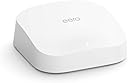
🚀 Elevate Your Wi-Fi Game with eero Pro 6!
The Like-New Amazon eero Pro 6 is a tri-band mesh Wi-Fi 6 router that covers up to 2,000 sq. ft. and supports speeds up to a gigabit. It allows for over 75 connected devices, integrates seamlessly with Alexa as a Zigbee smart home hub, and features a user-friendly setup process through the eero app. With automatic updates and a 1-year limited warranty, this refurbished device offers premium performance and security for your home network.
| Title | Amazon eero Pro 6 mesh wifi router |
| Wifi coverage | Covers up to 2,000 sq. ft. |
| Type | Router (connects to modem as primary router) |
| Supported speeds | Best for internet speeds up to a gigabit. |
| Wifi connectivity | Wi-Fi 6 tri-band concurrent 2:2:4 (802.11ax), compatible with older wifi standards |
| Wired connectivity | Two auto-sensing gigabit Ethernet ports for WAN and/or LAN connectivity |
| Speed rating | AX4200 |
| Smart home connectivity | Works with Alexa, Amazon Frustration Free Setup, 802.15.4 radio (Zigbee, Thread), Bluetooth Low Energy 5.0. |
| Electrical Rating | 100-240V AC, 50-60Hz |
| Processor, memory, and storage | 1.6 GHz quad-core processor, 1 GB RAM, 4 GB flash storage |
| Network security and services | Profiles, WPA3 (eero Labs feature), WPA2, TLS v1.2+, VPN passthrough, IPv6, NAT, UPnP, port forwarding, DHCP, static IP, and cloud connectivity |
| Required for setup | Supported iOS or Android device and internet service (with cable or DSL modem, if required). See requirements. |
| Temperature Rating | Operating: 0˚C- 40˚C / 32˚F - 104˚F Storage: -25˚C- 60˚C/ -13˚F - 140˚F Operating humidity: 0%-90%, non-condensing Operating altitude: <3000m |
| Dimensions | 5.6 in x 5.4 in x 1.9 in (142 mm x 138 mm x 48 mm). Actual size and weight may vary by manufacturing process. |
| Warranty and Support | 1-year limited warranty and service included. Use of Security Cameras is subject to the terms found here. License information can be found here. This device receives the same limited warranty as a new device. Learn more about Like-New Amazon devices. |
| Subscription | 30-day eero Secure trial is limit one per new eero customer account. Additional terms apply, see the eero Secure Terms of Service for more details. |
| Software Security Updates | This device receives guaranteed software security updates until at least five years after the device is last available for purchase as a new unit on our websites. Learn more about these software security updates. |
| Legal Disclaimer | Some features require linking your Amazon account, and downloading the Alexa application or using a compatible Alexa device. Internet connection speeds and availability depend on your internet service provider; if your internet service provider does not provide you with the maximum supported speed, you will not experience that maximum speed. Maximum wireless signal rates are derived from IEEE 802.11 standard. Specifications assume wired Ethernet connection; your experienced speed may vary when connected to an eero device that is configured as a wireless extender. Coverage estimates are based on normal use conditions. Actual range and performance can vary, and maximum supported speeds may not be available to all customers, due to factors such as local regulations (including power limits), network configuration, interference, connected devices, device usage, building materials, and obstructions. Specifications are based on use of a Wi-Fi 6 or later generation client device. For more information about eero performance, visit support.eero.com. |
X**R
Love my eero!
This was my first eero device I’ve ever owned. I was so used to using the ISP provided routers and I got tired of the lack of customization options they give you. So wanted to get the eero because it seemed jammed packed with features and options to choose from. The setup was a breeze, the app walks you through it with pictures and directions, it’s super fast, I have about 56 devices on my network which it handles them all perfectly fine, I think you can have up to 75 with just one router but the ability to add more eeros on at a later time to create a mesh is great! Tip for anyone doing this though! Make sure if you do add on any additional eero devices as nodes that they are additional pro 6 models or newer because if you add any less capable router into the mix this will prevent the pro 6 from being able to utilize its full speeds and abilities, your output capabilities would default to the older devices techs using that devices max output values which would be a lot lower than what the pro 6 is capable of. This router runs smoothly, updates itself overnight or at a time of your choosing, helps you keep track of devices on your network, allows you to create a separate guest network keeping your main network secure. None of my devices ever loose coverage and my media players don’t buffer and this is using multiple devices at once. Love eero! Will def be looking to get the eero 6e or eero 7 in the future
T**S
It. Just. Works. Period.
I've read most if not all of the reviews about the 'best wifi mesh systems 2022', and I've tried some of the top contenders, and returned all of them except the Eero Pro 6. They literally just work, and the setup was the easiest of all of them. No setup glitches, the app (I used the iOS version) found all Eeros (I got 4 in total) and configured them without any issues, and updated their firmware too. All 100% flawless. Why is this impressive? Because setting up a Linksys Atlas 6E system wasn't nearly as smooth, and setting up a Netgear Orbi Pro mesh network is clunky and error prone as it gets (the only thing "pro" in Netgear Orbi Pros btw is the VLAN support, which most residential home users don't use anyway, it doesn't have an app to configure, so you'll have to use a browser with a archaic configuration website which looks like from 2005). And then both the Linksys mesh and the Orbis kept loosing their connections between the mesh nodes due to "weak wifi connections". Hello? That's WHY I bought a mesh wifi network TO BEGIN WITH!!! No such problems with Eero, the nodes stay connected, and roaming around different rooms to different Eeros associates the device with the closest Eero as expected (instead of devices staying stuck with a node in the living room when you're actually in the bedroom with a node there too, which is what I noticed with the Linksys mesh...). So Eero it is!!! About the ONLY 'issue' I have with the Eeros is that there is seemingly no way to disable the remote access to the network from the internet. You can check the status of your network away from home, which CAN be convenient, but it also means that your home network is potentially vulnerable for outside hack-in attempts. Nevertheless, the chances for that to happen are very low, and the fact that the Eero system works 100% flawlessly outweighs that concern. 5 stars! If you're tired of playing network admin at home fixing dropouts or weak wifi... this is your solution.
T**.
User Friendly and works like a dream.
I replaced a faulty 6 mo old TP Link mesh system with this unit based on recommendations from the fiber optic technician who installed our line several mos ago. He was not wrong! Far superior product! Installation was a breeze. The phone app is off the charts amazing. Again, my only comparison for Wi-Fi 6 mesh is with the TP Link Deco. This eero says it will cover a 2000 square-foot house and that is exactly what it does. Had a little trouble with the back patio and security camera so I did buy an extender to put downstairs. That definitely helped to get us coverage outside. All of my appliances/devices connected very easily. If you have trouble connecting devices that will only run off of 2.4 you can temporarily pause the 5 MHz while you set it up. I only had to do that for one device. Everything else automatically connected to whatever it normally runs off of like robo vacuum etc. And I have not had to use customer service for anything so hopefully all of that will be good. The reason I am replacing the TP Link deco is it failed only five months after purchase and warranty support was a nightmare. This is an Amazon company product and I know they stand by their product so I am not worried. I have been using this for about a month now and it has been perfect. Very user friendly for those not tech savvy. Literally plug n play out of the box. Again, the phone app is a dream!
R**S
Good speed for the refurbished price
Worth getting if you can get it refurbished and like the Eero ecosystem with its privacy issues and lack of customization. The speed is a big upgrade from anything before the WiFi 6 standards. I've got essentially double the speed or more over WiF as the old Eero Pro; I get about 425mbps+ from 40 feet away and through a wall out of 600mbps total. Also, no issues when I have a couple of TVs streaming 4k in other rooms while I'm working remote. From tech reviews it seems this model may perform the same or better than the 6E version when you have lots of devices connected. It will be slower than WiFi 7, but that's OK as I don't have a fast enough connection or devices that would take advantage of it.
G**A
Works well
I am using this for over a year now. Works perfectly fine.
I**O
The Pro is the way to go!
Our Internet service provider gave us the Eero Plus which didn't cover our whole home so I bought this to create a mesh and capture a larger area. This Pro unit is so much better! It covers our entire home all by itself, even reaching outside into the yard fairly well. The speeds it can achieve are also significantly higher. We pay for 500mb and the Plus unit would only deliver 320ish when in the same room as the router while the Pro is 470-510 in the same room and 310 on the extents of our house (about 1200sqft on the main level). The Pro unit is definitely worth the added cost.
P**R
This is the Larry the Cable Guy of Mesh WiFi, but is better looking.
I have three of these in my house. The missing one obviously is connected directly to the cable modem, I place one in the basement to give my parents reliable coverage then I needed one more in the main bedroom to provide reliable coverage on the opposite end of the house and up a floor. Every device in the house gets speeds that can support 4k video with spatial surround or ATMOS audio, and there is no lack of devices demanding the bandwidth. Fortunately this Mesh WiFi system can support up to 1Gbps downloads in total and supports cellular over WiFi nicely. Of you don’t have greater than 1Gbps service for your home internet you don’t need more than this model, you may need more than one to cover your home, but this model will do the job quite handily. The one draw back I found is of you activate the guest network function the speeds are not reliable for the family/trusted network.
H**P
Very unreliable, forced updates, overheating problems reported for >5 yrs
Forced updates that disconnect your network the day of, 10+ times a year- every device overheats horribly and has high reliability issues. Used to recommend but it has gotten worse and their support refuses to provide solutions. Most tools to help diagnose track and monitor network are paywalled.
Trustpilot
2 weeks ago
2 months ago