Desertcart purchases this item on your behalf and handles shipping, customs, and support to Poland.
🚀 Elevate your workspace with lightning-fast, cloud-smart WiFi!
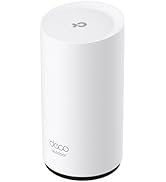
The Omada EAP650 is a Wi-Fi 6 AX3000 dual-band access point delivering up to 2976 Mbps speeds with advanced wireless tech like WPA3 and seamless roaming. It features free cloud management via Omada Essentials, a sleek ceiling-mount design, and flexible powering options including PoE+. Ideal for modern offices and homes, it offers centralized network control, robust security, and a 5-year warranty for reliable, future-proof connectivity.


| ASIN | B0B12R9CYH |
| Antenna Location | Home |
| Antenna Type | Internal |
| Best Sellers Rank | #1 in Computer Networking Wireless Access Points |
| Brand | TP-Link |
| Built-In Media | Ceiling/Wall Mounting Kits, EAP650, Installation Guide, Power Adapter |
| Color | PVC |
| Compatible Devices | Personal Computer |
| Connectivity Protocol | Wi-Fi |
| Connectivity Technology | Ethernet |
| Control Method | App |
| Controller Type | Cloud-Based Controller, Hardware/Software Controller |
| Coverage | Wide/Extended |
| Customer Reviews | 4.5 out of 5 stars 701 Reviews |
| Data Transfer Rate | 3000 megabits_per_second |
| EU Spare Part Availability Duration | 5 years |
| Frequency Band Class | Dual-Band |
| Item Dimensions L x W x H | 6.3"L x 6.3"W x 1.32"H |
| Item Type Name | Access Point |
| Item Weight | 0.39 kg |
| LAN Port Bandwidth | 10/100/1000 megabits per second |
| Manufacturer | TP-Link |
| Maximum Upstream Data Transfer Rate | 2976 megabits_per_second |
| Mfr Part Number | EAP650 |
| Model Name | EAP650 |
| Model Number | EAP650 |
| Number of Antennas | 1 |
| Number of Ports | 1 |
| Operating System | Linux, Microsoft Windows XP, Vista, Windows 7, Windows 8, Windows10, Windows 11 |
| Other Special Features of the Product | WPS |
| RAM Memory Installed | 256 MB |
| Router Network Type | client |
| Security Protocol | WPA3, WPA2 |
| Special Feature | WPS |
| UPC | 840030703546 |
| Unit Count | 1 Count |
| Voltage | 12 volts |
| Warranty Description | Limited Lifetime Warranty |
| Wi-Fi Generation | WiFi 6 |
| Wireless Communication Standard | 802.11ax |
| Wireless Compability | 802.11ax |
T**.
Great item
The TP-Link EAP650 Ultra-Slim Wireless Access Point delivers strong, reliable Wi-Fi performance in a sleek, modern design. Its ultra-slim profile makes it easy to mount in various locations, blending seamlessly into any environment. The device offers impressive dual-band speeds and wide coverage, making it suitable for both home and office use. Setup is straightforward, and the Omada app allows for easy management and monitoring of the network. With features like MU-MIMO technology and seamless roaming, the EAP650 ensures smooth connectivity for multiple devices. Overall, it's a high-performing, discreet access point ideal for boosting wireless networks.
G**M
WiFi speed that match a hardwired connection
I needed to get better WiFI coverage in my office. This did the trick. You need a Power on Ethernet (PoE) switch and of course, you need to run an ethernet cable nearby. But once that is done, the access point works perfectly. The great thing about PoE is you don't have to have AC power nearby making installation more feasible. The access point is fast and my computer speed test showed the maximum speed provided by my ISP even though is a WiFi connection. Getting WiFi speeds that match a hardwired connection was not expected. I am very pleased with the result.
C**D
Router.
Works wonderfully! Easy to set up.
C**N
EZ setup, works with xfinity, guest network works with desired protection, speed, range.
I just wanted a simple guest network for my kiddo and guests to use with my leased Xfinity Innomedia MTA6328 box and couldn't find any coherent advice whether this would be possible or compatible nor any advice what to buy. After struggling 6 hours unsuccessfully then returning a new WAS210 then unsuccessfully trying an old EX7000 I bought and tried this TP-link EAS650. It took literally 20 minutes to configure and install without experiencing a single obnoxious timeout! A single 650 in a corner of the house next to the modem now covers the entire 1300sqft 3br 3ba 2 story townhouse with a separate guest network to replace the beyond awful unreliable marketing "hotspot" built into my leased Xfinity/Comcast box. https://tp-linkeap.net did not connect to the config page for configuration, so I had to use the Xfinity app on my phone to find the DHCP assigned IP address to use to setup the 650. I ignored the Quick Setup pamphlet which was useless and did not even mention Guest mode, and the QR videos which I couldn't access, I used "standalone mode" to configure the 650 without using any controller and without any Omada App and without bridge mode. I have the Network ID and pw set the same for both frequencies and guest mode is turned on for both frequencies. Devices on the 650 see the internet but cannot seem to see each other nor see any resources connected to the Xfinity box upstream of the 650 which is exactly what I want on for security on the guest nw. The Xfinity box speed is 1.3Gb download/100Mbps up. My cellphone on the 650 from the opposite corner of the house gets 350Mbps download / 40up even when my son is gaming. I should now be able to watch streaming movies in a lounge chair at the pool downstairs while sipping Margaritas!!! :P Thank you for a fabulous product and a wonderful configuration experience TP-Link I wish I could give you more than 5 stars!!! Thank you thank you thank you!!!
B**.
Works fine we have 7 of them
We have over 66 of these TP link Wi-Fi access points all over our house. They look like they are working fine, but I just want this one to add to it for the places that we have drops in our Wi-Fi. I guess they work fine. We do have a very large house in different floors and over 50 devices connected to Wi-Fi.
D**L
I love my wireless access points
I had been planning on upgrading my home Wi-Fi, I have two access points in the house and one in the shed in the back. I'm using a power over Ethernet multi gig switch and the omada controller, being able to control the Wi-Fi from anywhere is fantastic, we never lose signal and have excellent coverage using the roaming feature of the device. We have a ton of connected devices and gigabit data, most devices can pull 600-700 Mbps with very low ping so the speed is solid. Their app is great and full of features. I had some issues with being connected to the wrong access point in the beginning and very unstable connections, but I reached out to customer service and I love that they were able to remote into my cloud controller and fix what I screwed up, now the stability is perfect. I recommend this brand without question
K**S
Good access point that is easy to configure
Very nice access point. Has VLAN support and is completely configurable locally. No need for a separate app or going online to configure it. I do not have to constantly reboot it due to memory issues. Easy configuration to have it do what you want it to do.
Q**R
Great signal strength
Easy to use in stand-alone mode without a controller (if you choose to use it like that). Amazing signal strength! One of these covers the entire house.
F**D
ممتاز
ممتاز سعل التركيب
M**D
واي فاي 6
من افضل الاكسس بوينت اللي شفتها ، يدعم تقنية المش والتنقل السلس ، تقدر تشبكة عن طريق محول الطاقة او عن طريق كيبل الاثيرنت اذا عندك السويتش يدعم POE ، راح تستغني عن محول الطاقة . وحجمة صغير وجميل على السقف افضل من الاصدارات السابقة
D**R
Good replacements for Netgear Orbi
I was running an older gen Netgear Orbi mesh which was end-of-life, decided to upgrade to these - I have 5 of these around the house, all using wired baclhaul, as part of an Omada controller managed setup. Work fine, good signal.
V**V
Massive Jump in Wireless Speed and Quality from Tplink Deco
Upgraded from Deco M5 due to high ping times at random intervals and spotty wireless quality and teams/zoom were unstable. After upgrading i can max out 5G at 160MHz with 2400Mbps. 2.4G max speed is 600Mbps. When I'm far away it uses 80MHz 1200Mbps link speed and massively reduced connection drops and all issues. Completely standalone and no cloud stuff.
H**K
Excellent speed and easy install. Works with Poe.
Excellent purchase. Very easy installation and configuration through Omada app was breeze. We were able to install two in the ceiling in less than half hour. It fitted nicely on the gang box after removing blank plate. Installing the EAP in mount by sliding and rotating is little tricky but we could do after couple attempts. I clocked 850 Mbps. Signal drops a bit though. My farthest unobstructed point on ground floor is around 30 feet in living room where I get just 350 Mbps. It perfectly works for me but just to be aware. I powered it with a Poe switch with no issues.
Trustpilot
2 months ago
3 weeks ago