🚗 Decode your drive, dominate the road.
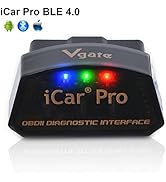
The Vgate iCar Pro Bluetooth 4.0 OBD2 scanner is a compact, ultra-low power diagnostic tool compatible with most 12V petrol and light diesel vehicles post-1996. It connects seamlessly to iOS, Android, and Windows devices via Bluetooth Low Energy, enabling real-time fault code reading, sensor data monitoring, and code clearing through popular OBD apps. Designed for professional-grade diagnostics with effortless plug-and-play operation, it supports firmware upgrades and works with a wide range of apps, making it an essential gadget for millennial managers who demand smart, efficient car care on the go.


| ASIN | B06XGB4873 |
| Automotive Fit Type | Universal Fit |
| Best Sellers Rank | #1,994 in Automotive ( See Top 100 in Automotive ) #21 in Code Readers & Scan Tools |
| Brand | Vgate |
| Customer Reviews | 4.5 4.5 out of 5 stars (8,244) |
| Date First Available | March 6, 2017 |
| Is Discontinued By Manufacturer | No |
| Item Weight | 2.11 ounces |
| Item model number | 8542040060 |
| Language | Spanish |
| Manufacturer | Vgatemall |
| Manufacturer Part Number | BLE 4.0 |
| Model | ICAR PRO BLE4.0 - Android, iOS & Windows |
| OEM Part Number | PRO4.0 |
| Operating System | Android, iOS & Windows - NOTE: We DO NOT au-thorize the sel-ler "Happy Lucky Land" to sel-l our Vgate products., NOTE: We Vgatemall DO NOT au-thorize the sel-ler "Happy Lucky Land" to sel-l our Vgate products. we are not res-ponsible for the af-ter-sale ser-vice of the products purchased from this sel-ler. |
| Product Dimensions | 1.85"L x 0.94"W x 1.06"H |
| UPC | 611536698410 |
| Voltage | 12 Volts |
M**T
Works with JScan
So here’s the rundown that led to my well-spent purchase of this adapter. Thanks to a collision with a deer, I had swapped the headlights on my 08 Grand Cherokee to the SRT8 style because I wanted projector low beams and not long after, I was still unimpressed with how halogen bulbs perform in projectors. I say STILL because I drove a 14 Sierra for some time and the halogens were so lackluster in the projectors I didn’t like driving it at night, despite how good the cutoff and spread on the projectors were. So I bought a set of Fahren LED bulbs. The performance and color was a stark improvement, but it left me with the downside that when the bulbs are turned off, they stay lit very dimly and flicker until the Jeeps accessory circuit is off for so many seconds. I then learned that OBD JScan was a thing and it could help my situation. It listed this as one of the recommended so I ordered it and then bought the $20.99 license on JScan waiting for it to ship. Upon receiving the adapter, I plugged it in with JScan open and paired to it almost immediately. I will say that it has worked without issue since I got it. I do find that even if the adapter sits idle (red LED lit) for a long time, it never drains the battery. But that is where the good of it ends, at least for solving my problem. According to videos and bits of info I came across, enabling the High Intensity Discharge option as well as the Quad Headlamps option will fix it. Now as my luck would go, my Jeep is an oddball.. the HID option was already enabled, despite it having the 9006/9005 wiring, not the D1S/9005 wiring. So I enabled the Quad Headlamps and then only my right low beam would come on and still flicker once turned off. So I disabled both options and then they were back to normal but the fans were no longer screaming like a mad demon escaping hades for the entire time they are on. So I left that as is and invested in those in-line resistor wiring harnesses and now both low and high beam LED bulbs shut off completely within maybe two- or three-tenths of a second of turning them off. Not instant but still faster than a halogen at full intensity can dim to off. So although this didn’t solve my problem, I did come across a resolution and this still has a ton of use for me. I don’t have to worry about getting a code scanner because I can see all stored and active codes on my phone through JScan. Plus there’s a lot of features on JScan that you don’t have access to through your personal settings in the EVIC. I enabled the “premium” TPMS display in the EVIC so I can see what PSI the sensors are reading. Interestingly enough, for the Illuminated approach, on top of the 3 available options, there’s also a 5 sec. option which I ended up settling on. I got to enable daytime running lights on the lighting circuit of my choice. The choices being: fog lamps, turn signals, low or high beams. I guess that’s one upside to the vehicles lighting relying on CANBUS. You don’t necessarily have a dedicated DRL circuit like a lot of GMs and most new vehicles, meaning you can go for the Tacoma look using the turn signals, or if you want to go with what seems to be the default option for the Chrysler umbrella of brands that came enabled with it in North America, use the high beams. Overall, it may not have worked for what I needed, but it paid for itself with all the things I was able to change and see. Plus being able to see live sensor data through JScan and also being able to high idle the engine when trying to jump someone else’s dead dead battery. And knowing that I don’t need anything expensive or have to go anywhere to be able to see and clear CEL codes makes life a lot easier. But with JScan, ahh endless possibilities. I see I got into a bit of a ramble, but it might come of use for future reference. To wrap it up, most likely if you’re needing an adapter like this, I would suggest going with this one. It’s well worth the cost, and from what I hear works with most all mobile apps and it looks to be the highest rated BLE4.0 adapters. I’ve had no issues and with Prime free shipping, I got it quick and on time. The ONLY con I have for this adapter is the LEDs. The red Power On LED is fine and the green Communication LED is fine, but the blue Bluetooth LED is what annoys me. At night, the continuous flashing on and off is so bright and distracting. If anything, it should flash while it’s pairing to the device/app then stay lit solid while it’s connected to the device/app. I hate trail driving at night using my phone dimmed down to keep an eye on all my temps etc. and yet I can see that blue flash light up a lot of the interior. Other than that, it’s a flawless product I can’t recommend enough.
M**E
Great tool for jeeps
Connected easily, works great for Jscan if you are working on a jeep. Great value, small size. Received very quickly
S**N
Works quick - easy and accurate!!!!
Very intuitive and easy to use even for an old guy. Quick blue tooth connection and after setup with my new gear ratio and larger tires my speedometer was very accurate. Solid purchase!!!
J**H
JScan compatible
I bought this for my 2015 Jeep Wrangler to use JScan. It works perfectly and connects with ease. I am now able to make changes to tire size and other ECM related items. We’ll worth the money if you don’t need bi-directional functions.
F**N
Did not work as described in instructions
1) I have a OnePlus 6T phone which is an Android based phone 2) Attempted connection to OBD using phone Bluetooth a) Phone saw both Vlink IOS and Vlink Android devices for connection b) Tapped on Vlink Android and no blinking blue light on OBD, and no action on phone c) Tapped on Vlink IOS (blue light blinking) and phone connected right away 3) Even though phone didn't indicate that it was connected yet, Vgate connected to OBD Auto Doctor app through the app. 4) Downloaded “Car Scanner” app and it saw the connection and I was getting data from my car right away 5) Second day, would not connect to my cell phone at all today. Attempted same as item 2 above. 6) Tried to connect on my Windows 10 laptop. It only saw the Vlink Android, but it would not connect. THESE ARE COMMENTS FROM CONNECTING THE SECOND Vgate UNIT (I had another unit sent to me on plans to return the first unit) 7) Attempted connection to OBD using phone Bluetooth d) Phone saw both Vlink IOS and Vlink Android devices for connection e) Tapped on Vlink Android and no blinking blue light on OBD, and no action on phone f) Tapped on Vlink IOS (blue light blinking) but phone wouldn’t connect this time g) Phone wouldn’t even connect through the Auto Doctor app 8) Attempted connection to OBD using Windows laptop h) Laptop saw Vlink Android device and connected to this unit i) Used trial version of Auto Doctor program for Windows 10, and it connected with no problems Although the Vgate unit didn't perform as expected, I found it workable enough where I can use it as a small portable OBD scanner with my Android phone while driving. I seemed to have the best results with the Car Scanner app (paid $4.99 for full featured app), even though Vgate was supposed to work well with the OBD Auto Doctor app. I gave up on getting it to work with my laptop. Vgate customer service was quick to respond to my concerns at all times. I just didn't get the expected results from the device. I would still highly recommend this device as it is a nice, portable Bluetooth OBD scanning device that can work well with a phone app. It was money well spent and worth the price! I had purchased an Innova OBD2 code scanner (only reads and resets) a few years ago, and I believe I paid around $200 for it at the time. Vgate for $32 and Android App for $5 and you can see the big cost difference already and ability to get more features for diagnostic work. This device and the Car Scanner app with it's features did help me to diagnose my car troubles and make the repairs for a lot cheaper than it would have been to take it to a repair shop.
C**E
Well worth the money
Works perfect, download the JScan app and you’re inside the brain of your car. I was able to make some adjustments with no issues at all.
D**N
Long distance with Forscan
Works great with Forscan. I'm able to plug this into a vehicle in my garage, close the (metal encased) door and use this in my kitchen about 40 feet away. Pretty nice I can sit in the comfort of my home and take my time exploring the software. Able to get all the data I need and access and edit all the modules.
R**A
Flawless and convenient
Item promptly delivered within hours of ordering. Box has a clever flip-up lid, a nice touch. I am using this in my Nissan Leaf with the iOS LeafSpy app. Once I found the location of the OBD port, the rest took less than a minute. Bluetooth recognition was instantaneous and flawless within the app. Wireless OBD scanners have come a long way in the last several years. Previous versions I used were clunky and unreliable. Vgate is the exact opposite so far.
S**S
Einwandfreies Produkt
L**S
Funkar till Nissan Leaf 2016 med LeafSpy Pro.
G**S
I use this in conjunction with the Torque Pro app for real time monitoring of my coolant temp and STFT/LTFT (short + long-term fuel trims) on my older BMW E46. I have used it to read and clear codes, but do not expect this to provide more detailed information or in-depth scanning. You will need a much more expensive scan tool for that purpose. This is good for basic diagnosis and engine sensor monitoring only. It is also not compatible with Bimmercode which was a disappointment as I planned on using this for coding certain features as well. However, I have been using this permanently tethered to my car's OBD2 port to provide real-time data while I'm driving for the past 4 months, and for that purpose it has served me well. I was able to track the LTFT data daily which reached 10% a few weeks ago, notifying me of a few vacuum leaks due to a torn intake boot and a 20 year old fuel filter that hadn't been changed since it rolled off the assembly line in 2002. Monitoring LTFT is crucial in alerting you to vacuum leaks, issues with your fuel system, and lean/rich conditions overall.
E**R
منتج ممتاز ويعمل مع ايفون واندرويد ويؤدي الغرض المطلوب
K**V
Fonctionne tres bien sur iPhone avec l’application Car Scanner. Le problème de ma voiture a pu être facilement et rapidement détecté, très bon produit
Trustpilot
2 weeks ago
3 weeks ago