Shop for COLORWING PC products at the desertcart.co.uk Stationery & Office Supplies store. Review: Good label machine - Easy to use. Can choose different fonts/symbols in app and print out how many labels you want. Either 1 or in a batch. Connects to Bluetooth well. Review: Thermal printer - Product prints well easy to use Valuefor money


| ASIN | B09MT8YXZC |
| Are Batteries Included | No |
| Best Sellers Rank | 80,980 in Business, Industry & Science ( See Top 100 in Business, Industry & Science ) 482 in Label Makers 837 in Labels & Labelling Equipment |
| Compatible devices | Smartphones |
| Connectivity Type | Bluetooth |
| Customer Reviews | 4.4 4.4 out of 5 stars (37) |
| Date First Available | 11 Feb. 2022 |
| Dual-sided printing | No |
| Guaranteed software updates until | unknown |
| Included components | Thermal Paper Roll, Charging Cable, User Manuals |
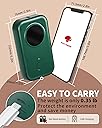
| Item Weight | 160 g |
| Item model number | D30 |
| Manufacturer | COLORWING |
| Max copy speed (black and white) | 72 ppm |
| Max input sheet capacity | 1 |
| Maximum Supported Paper Size | 12x40mm |
| Operating System | Android, iOS |
| Print media | Labels |
| Product Dimensions | 15.2 x 4.2 x 8.4 cm; 160 g |
| Scanner type | Portable |
| Sheet size | 1.2 centimeters |
| Warranty type | limited warranty |
A**A
Good label machine
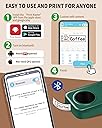
Easy to use. Can choose different fonts/symbols in app and print out how many labels you want. Either 1 or in a batch. Connects to Bluetooth well.
M**K
Thermal printer
Product prints well easy to use Valuefor money
M**.
Really Handy and Easy to Use
This little D30 Thermal Printer arrived nicely packaged in a strong cardboard box which was sealed in shrink-wrap plastic. When I opened it I thought that it had been sent without any labels, but the label reel was inside the printer (but not loaded). The box contains: • The printer itself. • 1 reel of 12mm x 40mm white labels (inside the printer). • Charging cable (Micro-USB). • Instruction manual (multi-lingual). I don’t know how much charge was in the battery when it was shipped but I put it on charge immediately after unpacking and it took around an hour to charge fully. The label reel is easy to install and a single press of the button aligns it correctly. At first I installed the associated app (Print Master) on a tablet. I did this for security reasons as the Google Play web page says the app wants some permissions that simply don’t seem necessary for the printer to work (access to microphone and record audio, device ID and call information etc.). However, it would appear that the only permission you have to approve for the app to work is ‘Location’ (on Android). The other permissions can be denied without affecting the performance of the app. The app also invites you to register when it first launches but you can skip this and it works fine without registration. The ‘Lite’ mode is great for printing simple labels and the ‘Creation Mode’ is easy and intuitive to use if you want something more (multi-line labels etc.). Once the label is printed it (with the backing strip) tears off the machine easily. I find this is extremely useful for printing labels for cable identification, labelling boxes of screws, nails, electronic components etc. I’m a vaper, so I also find it convenient for labelling bottles of home made juice. It is much more convenient than loading sheets of labels into the desktop printer and then setting it all up just to print a couple of labels. Also, when a couple of labels are printed on an A4 sheet there is a real risk of fouling the printer if you put the same sheet through again with a couple of labels removed. If you only want one or two labels at a time this ‘one-at-a-time’ on demand sort of printing is really handy. Its small size and light weight make it extremely portable. I’m very impressed with this little printer. It’s extremely versatile and I’ve only just begun to explore its possible uses. Worth every penny and recommended!
S**N
Print your own labels!
This is an amazing product, essentially a handheld printer for printing out labels! As with any unknown brand product, I really didn't know what to expect. In a few minutes of setup, following the easy-to-read manual, I was professionally printing labels. This becomes a handy tool to have around the house when you realise the transparency labels bring to all boxes. The label printer arrives in this resplendent teal colour, with a pre-supplied label roll and USB charger. I love the compact size and shape, small enough to fit in the hand and cute when you think about this being a mini-printer. The label printer comes with an instruction manual which to great relief, I found easy to understand and follow. You will there is only one button to this entire mini-machine, a button to power this on. All functionality depends and is processed through the "Print Master" app (found on Google Play store, made by Quinn LLC). The manual demonstrates clearly how to insert the small roll into the label printer, encouraging you to leave a small length of the roll end to hang. I was pleased to see an app with a clear layout and smooth functionality. The label maker machine pairs via Bluetooth as prompted through the app. I had no trouble discovering the device and in seconds got connected. Once paired, you get the option to print away immediately. What I most appreciate from the app is the split between a "Lite Mode" and a more detailed "Creation Mode". The Lite Mode makes printing labels just a matter of common sense- type in your text, select how many copies and print! A smart, fine feature I am sure everyone would appreciate for quick and easy printing. On the other hand, the Creation Mode offers broader printing options, from text, icons, barcodes and QR codes. In all modes, you get the option of choosing the label size which I presume in some larger sizes will need a longer label roll. Altogether, these two modes for both quick and detailed printing, all done through the app, makes this a complete printing package. While I have no professional use for this label maker, I find the print quality also impressive. For such a small device, the text comes out clean and perfectly aligned across the centre of each label. I went ahead and printed various labels to finally organise my screw boxes. In all, this is a nifty handheld printer- and yes this is a real printer of text and more through an app to a sticky label.
A**R
A compact label printer for your phone that works well
The is one of the new style of bluetooth thermal label printers, which works via a phone / tablet app. It will not work via PC or Mac. First-time setup is simple, although you need to install the tape yourself, it is not pre-loaded. The app is available on iPhone and android and is simple to use. Label designing is simple, although you may have to add in spaces to make it line up centrally. A bit of trial and error is involved. Charging is via a microUSB to USB-A cable and is reasonably quick. The printer uses very little power in operation. The best thing about this printer is being able to change typeface and size easily, and seeing it on the app before you print. Much better than the old style dymo printers. Overall I have been impressed by this unit and it seems to compare well to other models at this pricerange. Recommended.
Trustpilot
3 weeks ago
5 days ago