


Desertcart purchases this item on your behalf and handles shipping, customs, and support to Poland.
🎧 Upgrade your mic game—because your content deserves to be heard loud and clear!
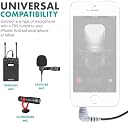
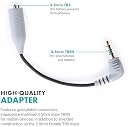
The Movo MC3 is a compact 3.5mm TRS to TRRS adapter designed to connect professional microphones to iPhone and Android smartphones or tablets. It enables superior audio capture by converting a 3-ring TRS plug into a 4-ring TRRS plug, ensuring compatibility with most mobile devices. Lightweight and durable with a gold finish, it supports a 1A current rating and comes with a 1-year warranty, making it an essential tool for vloggers, podcasters, and live streamers seeking high-quality sound.






| ASIN | B01N9CJDVE |
| Best Sellers Rank | #4,705 in Musical Instruments ( See Top 100 in Musical Instruments ) #187 in Microphone Cables |
| Brand | Movo |
| Color | grey |
| Compatible Devices | Cellular Phones, Tablet |
| Connector Type | 3.5mm TRS (Female) |
| Current Rating | 1 A |
| Customer Reviews | 4.5 out of 5 stars 3,575 Reviews |
| External Testing Certification | 177202201739 |
| Finish | Gold |
| Finish Type | Gold |
| Item Weight | 9.07 g |
| Manufacturer | Movo |
| Mfr Part Number | MC3 |
| Model Number | MC3 |
| Number of Items | 1 |
| Number of Ports | 1 |
| Package Quantity | 1 |
| Power Plug Type | No Plug |
| Specific Uses For Product | Microphone |
| UPC | 604888903950 |
| Unit Count | 1 Count |
| Warranty Type | 1-year warranty |
D**T
THIS WORKS! RECORD FROM AUDIO SOURCE DIRECTLY INTO IPHONE
What I bought this for: I have an iPhone XS with IOS 14.5 installed. I have several old family videos on VHS tape and I want to digitize them without paying a company to do it for me. Putting my iPhone on a tripod with iPhone adapter (both from Amazon), the iPhone remains still enough to record from the TV - and it does it really well - even for long video tapes. When I tried this before, the audio got messed up by the occasional loud car driving down my street, or dogs barking across the street. I tried several times very late at night, but something always interrupted the audio. The only solution to that was for the audio to come directly from the TV headphone jack into the iPhone instead of using the TV speakers and iPhone mic. I used a Male to Male "TRS" headphone cable (from Amazon) - nothing special - it's basically a 3.5mm stereo headphone extension cable with a male connector on each end. Each male connector should have 3 connection points (which is often described as "TRS" - or otherwise referred to as 3 rings. One end of this male to male extension cable goes in the TV headphone jack or your other audio source. The opposite end goes into the female connector of this "TRS to TRRS" device, which you would plug into your iPhone 3.5mm headphone jack. Doing this, you should be able to record audio into your iPhone - but read on if your iPhone is newer that an iPhone 6 series. Note: If your iPhone doesn't have a 3.5mm headphone jack, you need a "Lightening to 3.5mm" jack from Apple. If using the Apple "lightening to 3.5mm" adapter, there is a connection sequence you have to follow or this won't work. First make sure your iPhone is turned on, then plug the Apple "lightening to 3.5mm" into your iPhone. That has to be plugged in to the iPhone FIRST without anything plugged into it for this to work. Connect one end of your 3.5mm stereo headphone male to male cable into your TV headphone jack if you haven't already done so, then connect the opposite end of the 3.5mm stereo headphone male to male cable into the female end of this "TRS to TRRS" adapter. Then, plug the male end of this "TRS to TRRS" device into the Apple "Lightening to 3.5mm" adapter. Doing these steps, in that order - should let you play audio from your TV (or other audio source) and record it directly into your iPhone using the iPhone camera video app. The audio is recorded in "mono" - not stereo. My VHS tapes are recorded in mono audio. If you are recording from a stereo source, you will need another 2 adapters so that you record both the left and right audio channels into a single mono channel. Those adapters are sold by Amazon. They are: #1: 3.5mm Stereo to Mono Adapter, 2 Pack Gold Plated 3.5mm 1/8" TRS Stereo Male Plug to 3.5mm 1/8" Mono Female Jack. and #2: 3.5mm Mono to Stereo Adapter, 2 Pack 3.5mm 1/8" Mono Male Plug to 3.5mm 1/8" TRS Stereo Female Jack RF Adapter for Radio, Headphone . The first adapter "#1) has a female "mono" socket (and a male stereo plug - and the second adapter #2 has a male "mono" plug and a stereo female socket. You need to plug the male "mono" connector into the female "mono" socket. This leaves you with a stereo female socket at one end and a stereo connector at the other end when these are plugged in together correctly. Now, unplug the male headphone "TRS" stereo cable from your TV (or other audio source) and plug the male stereo plug end of this 2 adapter combination into the TV headphone jack, then plug the male headphone "TRS' stereo cable into the female jack of the 2 adapter combination. That converts stereo into mono so that you get both stereo channels into a signal mono channel. If this seems confusing - I apologize. I'm good at figuring things out - but not always good at explaining how I did it. If you do this, you will need to turn your TV volume down pretty low. Mine is set a 10% and that is perfect for the iPhone. Any louder and the sound will distort or cut out on the iPhone. I tried using a different "TRS to TRRS" adapter and it didn't work. I suspect it was wired wrong or was defective. When I tried again using this MOVO MC3 "TRS to TRRS" adapter, it worked perfectly and I was able to record audio directly into the iPhone using both the Voice Memo app, and the Camera Video app while recording my home videos playing on my TV.
K**R
Records great
Does what it says! Proper audio recording jack i use from dj equipment to phone USBc adapter.
E**L
Bought this to streamLive my DJ sets with my iphone Xs+
The moment i got this in the mail, i tried it out by connecting it to the headphone adapter that came with the iphone. From there i connected a 6ft TRS to TRS cable to the MOVO (on one end) and the other end to the TRS-headphone input on my RANE62 dj mixer. I then checked the volume adjustment by using VoiceMEMO on the iphone. It shows the sound gain with the soundWaves while adjusting the heaphone gains on the mixer. After that i recorded a sound sample from the VoiceMemo and checked the volume if it was soft or distorted and it was a little soft but clear so i brought up the gain on the headphone more and it was PERFECT. Next step i switched over to the video mode on the iphone and recorded a short clip with music playing from the mixer to the MOVO to the iphone headphone adapter. Then i checked the recording and it sounded great. I guess i connected everything correctly and now i'm ready for them livestream Quarantine DJ sets Lol. I hope this review helps. Good Luck guys!
D**R
Allows direct input from a mixer or external mic into android phones
It works. I took a line out of my headphone output of my mixer (drums) and can direct input sound into the phone. It DOES NOT (nor does it imply) that it in any way attenuates the signal so as to not cause clipping or distortion on your recording. I recommend setting a level, record a short video with your camera and the sounds being played as you like. Listen to the video and see if you need to turn down your output level on your mixer or headphone out. DO this before doing a live video on Facebook or Youtube and the results should work.. Because it is a TRRS connection, it allows the use of external mic. I cannot plug my headphones into this to listen back. i must pull this plug and insert my headphones into the phone. A separate step. Oh well. not the fault of the product. Prolly need a TRRS connector on my headphones. None are like that. Again, Oh well.
A**.
Works great with my mic/iPhone 11 Pro
I purchased a Shure VP83 Lenshopper shotgun style mic for use with my DSLR a few years ago and wanted to use that mic with my iPhone. This cable works perfectly with the Shure Lenshopper and my iPhone 11 Pro using the official Apple lightening dongle. I recorded a few test videos and the audio on all of them came out great using this combo. I initially purchased a similar cable from another brand that was supposed to do the same thing as this cable but, that one did not work. There was (likely) nothing wrong with the cable itself however, there was a technical issue with it that prevented it from working. I only learned that after I contacted Shure to see if they knew of a reason it may not be working. It comes down to how the TRS to TRRS cable is wired. This one is wired in the correct way to work with my mic/iPhone combo using the lightening dongle. The cable the Shure rep links to below is this one. The following is Shures’ reply for anyone who may need to know this information. SHURE: The most likely issue is the way the TRS-to-TRRS adapter is wired. The 3.5mm TRS connector on the end of the VP83 cable is wired in this way: Tip = (mono) audio Ring = (mono) audio Sleeve = ground/shield The earphone jack on iPhones (and most Android phones) is a 3.5mm TRRS jack. This jack is wired according to the CTIA standard which is: Tip = Left earphone out Ring 1 = Right earphone out Ring 2 = earphone common and microphone ground Sleeve = microphone input This wiring also is used in the Apple Lightning-to-earphone adapter. This wiring is also used in many computers that have a single 3.5mm jack that is used for both earphones and a microphone. Some 3.5mm TRS-to-TRRS adapters are made to adapt TRS earphones to TRRS mobile 3.5mm jacks strictly for listening, with no provision for a microphone input. These are wired in this fashion: TRS TRRS Tip > Tip Ring > Ring 1 Sleeve > Ring 2 Sleeve (no connection) A proper 3.5mm TRS-to-TRRS adapter for connecting the VP83 to a mobile device would be wired in this fashion: VP83 iPhone Tip > Sleeve Ring > Sleeve Sleeve > Ring 2 Ring 1 (no connection) Tip (no connection) An adapter that seems to satisfy this wiring scheme is this: https://www.amazon.com/Movo-MC3-Microphone-Adapter-Smartphones/dp/B01N9CJDVE/ref=sr_1_1?crid=2920ZD3JAK5SP&dchild=1&keywords=3.5mm+trs+to+trrs+adapter+-+microphone+adapter+for+iphone+and+android&qid=1598370405&sprefix=3.5mm+TRS+to+TRRS+adapter%2Caps%2C168&sr=8-1 Since the VP83 has its own power via the internal battery, it should work with this adapter into the typical CTIA-wired TRRS connector found on most mobile devices.
A**R
Works Great!
This was exactly what I needed to go from my wireless lav mic setup to my iPhone13 3.5mm/lightning MFI dongle. If you have an iPhone 10 or newer, make sure you ALSO buy a Made For iPhone (MFI) dongle that's for Apple iPhone iOS 10+. The white 3.5mm dongle that goes into the bottom of the iPhone that Apple shipped hundreds of millions of, doesn't work with iOS 10+. This TRS/TRRS dongle didn't work until I bought the newer MFI dongle too and then it all works great!
L**L
Excellent
Excellent
F**E
double check it is compatable
had to return not compatable
F**N
Cumple con su funcion
Comprado para usar un micro externo en un iPhone 11 y cumple con su cometido. Por contra el cable no parece muy resistente a tirones pero teniendo algo de cuidado no tendria por que romperse. Recomendado.
M**A
Excelente producto
Si me funciono con mi iphone
C**N
Ras
Fonctionne parfaitement sur smartphone android
A**R
Great product
Works as described for iPhone audio. A little pricy but good quality.
E**O
Consigliato
Ottimo prodotto come da specifiche, ho un iPhone 11 Pro ed avevo bisogno dell’audio che usciva da un interfaccia audio ed andasse in diretta Instagram/Facebook con l’adattatore per lightning aux e questo cavo ho risolto il problema, avrei preferito fosse stato più robusto ma lo consiglio lo stesso
Trustpilot
2 months ago
1 month ago