๐ฏ Master your devices with one remote โ because multitasking just got stylish.
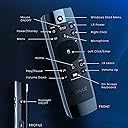
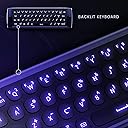
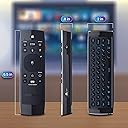
The Azulle Lynk Multifunctional Remote Control is a compact, wireless 5-in-1 device combining a full Windows keyboard, mouse, remote control, swivel wheel, and microphone. Featuring 6-axis motion sensing and universal compatibility across PCs, gaming consoles, and smart TVs, it offers backlit keys for low-light use and integrated speech recognition for seamless voice commands and chats.


| ASIN | B01N1PD7BG |
| Additional Features | Backlit, Universal |
| Battery Type | Alkaline |
| Brand | AZULLE |
| Built-In Media | 1 Lynk Multifunctional remote control, user manual, and a customer service card |
| Button Quantity | 10 |
| Color | Black |
| Compatible Devices | PC, Android, XBox One, PS4, Linux, Mac |
| Connectivity Technology | USB |
| Controller Type | Button Control |
| Customer Reviews | 3.6 out of 5 stars 267 Reviews |
| Global Trade Identification Number | 00853685006351 |
| Item Type Name | Azulle A-1068-AL Lynk Multifunctional Remote Control, Backlit QWERTY, Wireless Mouse, AI Learn Buttons, Black |
| Item Weight | 3.2 ounces |
| Manufacturer | Quantum Suppliers |
| Max Number of Supported Devices | 1 |
| Maximum Number of Supported Devices | 1 |
| Maximum Range | 10 meters |
| Mfr Part Number | A-1068-AL |
| Model Name | Lynk Multifunctional Remote Control |
| Model Number | A-1068-AL |
| Number of Items | 1 |
| Special Feature | Backlit, Universal |
| UPC | 853685006351 |
| Warranty Description | Azulleโs brands and its products are owned and operated by Azulle. To honor this limited warranty, you must present a valid, proof of purchase of the product. This warranty is void if the company deems, in its discretion, that the product may have been damaged through modification, improper use, end user negligence, water damage, or tampering of the bar code of the product unit. If the product hasโฆ |
J**R
Well Built, Solid Remote
This remote is well built with the exception of the battery door latch. On my unit the latch must be manually moved into the locked position. It is designed to snap into the locked position but lacks the tension to move into locked position with batteries installed. This is a minor point, but when you first use it be prepared to pick up the batteries until you figure out the latch. It feels solid in your hand, does not feel cheep. The keys on the reverse side are stiff and require an affirmative push to register the entry. This seems like a minor issue until you use a program without a spell checker (KODI, search function). You may be making your entries twice... or you will find yourself slowing down during keyboard entries to look up to confirm the entry was registered. The air mouse function is really cool. although sometimes you will need to "center up" the cursor. I just run the cursor to the side of the screen and keep moving the remote. This explanation may be difficult to visualize but once you use the air mouse and you find your self reaching to to odd angles to control the cursor, you will immediately know what I mean. I have not used the AI or voice functions yet but I have heard from credible sources that they are cool. Tech support from Azulle is good. I had to use support not for the remote but for the Byte Plus which I like (that issue turned out to be a windows issue not a hardware issue). I have compared the Lynk next to a Rii. Results of the side by side test: the Rii is collecting dust on a shelf.
L**N
Good enough, but could be better
First, I'd highly recommend reading M. Smith's review - it covers a lot of what you need to know and I won't try to repeat too much of what's been covered. After doing some cursory research in some forums (Nvidia, XDA, reddit) I ordered this remote to try to consolidate the functions I needed to one remote, which after some futzing, I was able to do. The hardware I have is as follows: * Nvidia Shield 2017 * LG CX TV * Topping DX3 Pro DAC * Yamaha A-S301 integrated amplifier I've been using the Shield's default remote since I've gotten it a few years ago (fine except for occasional lag/unresponsiveness), but I'd recently upgraded my home AV equipment and gotten CEC working well with my TV and the Shield remote's IR working with my Yamaha amp's volume control, but despite having a setting for it, it didn't seem to want to turn it on/off the amp with the Shield. My main goal was mainly to be able to assign an IR button to control my amp (and possibly my DAC, although I ended up just leaving it alone). I was able to use the IR blaster directions (and confirm with an online video on how to do it) to do what I needed, but it was very finicky in the learning phase. I was (eventually) able to assign TV on/off, Amp on/off, and volume up and down. You can assign IR functions to basically any button, but once that's done, you have to swap between IR/RF overlays to use them and there's only a momentary LED that shows you which mode you're in. Sadly, there doesn't seem to be any cheap remote that lets you mix and match RF/IR buttons freely, although for my case, I may end up trying the Rii I25/K25 (which has 5 fixed IR buttons at the top) to make my life easier if I can't get used to the constant swapping. "Button Mapper Pro" from the Android TV Play Store solved the Home button issue for me. I also had to set the Windows Button manually to bring up the Google Assistant instead of search to get (2-button) voice control activated. Note, one of M. Smith's gripes was that he wasn't able to access the Power Menu via a long press of the power button. I wasn't either, but I'm able to access the Power Menu by default with the "Input" button. I also agree with the rest of his gripes, but my top one would have to be the aforementioned constant swapping for the IR functions. This remote is the same price as the 2019 Shield Remote, and honestly, while I can see how having a keyboard might be useful, for me, the more flexible IR is my only reason not to get that remote, so it's a bit disappointing that in practice, the IR functionality is so clunky. Another minor gripe for me is that the backlight does not automatically turn on when picked up/flipped, like the Zyf Z10/WeChip W2 Pro do (this was a remote I thought would have been a great choice, but it turns out the IR functions on the Z10/W2 Pro are completely disabled when the USB RF transceiver is plugged in. Ridiculous!). I haven't been paying attention much to the AV space, but I'm actually a bit astounded that in 2020 there still isn't anything in between these cheapish fixed function $10-30 IR/RF remotes and the $200+ fully programmable Harmonies. I think there'd be a decent market (and a big selling point amongst a sea of clones) for something that just had a bit more programmability/customizability (like mixed IR/RF, irdb loading, programming key codes via USB, etc).
S**T
The best attempt at a windows gyro mouse + keyboard so far, but wait for version 2.
A terrific failure. This remote has a lot of promise and for a first attempt and isnt bad. But I cannot recommend this to anyone. After spending a few days with this remote, I can say the gyroscope remote is terrific, everything else is poor. The Play/Pause button does not work with any of my windows Media Apps. The A.I. function is just the ability to learn infrared signals from other remotes. As such it should just be called IR not AI. The menu button does nothing in Windows and when the On Screen Keyboard is launched, you can literally see it bringing up the run command and entering the command for the on screen keyboard. The mouse immediately stops working when you use the directional pad. This should not be the case. At the very least there should be an option to switch between behaviours. The home button in Windows should bring up the web browser. It does not do that. The USB RF receiver has a cover... Why? I have no clue. Maybe so we can more easily lose it. It should have been tethered to the reciver by some sort of lanyard. The buttons on the keyboard require far too much pressure to register a keypress. As such there is no possibility of typing with any sort of adequate speed. The remote needs an actual desktop application like Logitech has their SetPoint for Windows so users can customise buttons and behaviour for this remote. Lastly the cover for the battery is incredibly stupid and difficult to open. I had to take a knife to pry it open. If the creators of this product are reading my review they need to do this for version 2: - more tactile keyboard for typing with better feedback - more dedicated media keys, stop, track forward, track back - dedicated back button - ability to use directional pad and mouse simultaneously - better cover for the batteries - better quality microphone - use of bluetooth low energy for better battery life and better microphone audio quality - ability to manage IR learning through a desktop application (similar to logitech harmony)
R**O
Looks Good and Feels Good. But Falls Far Short Of Greatness.
So I've been connecting a PC to a TV or large monitor and using some sort of media center software for over a decade. Consequently I've been searching for the perfect remote control for at least as long. I've gone through a lot of keyboards, mice, and remote controls and I always seem to come back a cheap, peanut shape Adesso branded Windows Media Center remote that I might have cost me maybe $8. I was really excited about this Azulle Lynk remote because it seemed to have all the ingredients for a perfect remote: a simple handheld remote control, a full qwerty keyboard, and it's backlit for use in a darkened room. Hello movie night! While the remote itself is a little boxier than I would like, it mostly feels good in the hand and the soft, rubbery buttons feel good on my fingers. The backlighting is soft and pleasant purple (for the remote) and blue (for the keyboard) light. While the Lynx has plenty of great sounding features like the ability to switch between radio and IR technologies, AI learning, voice control, and a handy dedicated Windows key, one glaring omission stands out. It has no dedicated back button. For me, this single button is far more useful than all these other features and really hurts this gadgets usability. It doesn't totally cripple it however as I can just flip over the remote and use the Backspace key on the keyboard. But this also make using the device more awkward. You open a folder, select your video, it ends, and now what do you do? On a remote with a dedicated back button, you just press the back button to get out of the folder. On the Lynk, you would need to flip the remote over, rotate the keyboard 90 degrees in your hand, press the Backspace key, and decide whether or not to flip the keyboard over to get to the remote or continue navigating with the keyboard. As for the keyboard itself. Having it is a good idea but the implementation is disappointing. While the keys feel good, they are not very responsive, making typing something of a chore even by tiny keyboard standards. As a result, instead of replacing both my remote and my tiny keyboard, the Lynk has instead joined them as yet another option sitting on my nightstand, occasionally being used but not nearly as often as my regular decade old remote. While this review might seem more negative than positive, this remote is very close being what I've always wanted. Add a dedicated back button to the remote control, improve the keyboard. And maybe make the corners rounder for comfort. That would make this gadget perfect. As it is however it feels like a swing and a miss.
A**R
I like the Lynk controller because it makes it easier to ...
I like the Lynk controller because it makes it easier to control my television. I had 3 to 4 remotes at any given time, so having 1 is convenient. The lynk is a airmouse which reminds me of my Wii remote, fun to use when playing games. I can turn over the remote and use the keyboard to type in the name of the movie or check my emails. What I also really like about the lynk is the lighting for the keys, so if Iโm watching a movie in the dark, I donโt have to put on the lights or use my cell phone light. My wife uses the Lynk when she speaks to her family on Skypeโฆthe lynk has a mic, so sheโs able to chat with her mom. My son uses my lynk for his computer..the instructions say it can work with Windows, Linux and Android. I have not tested it with Linux but it does work greatly with Windows, Android and also my daughters Mac Ios.
U**X
Disappointed by IR-mode and D-pad disabling mouse
So disappointed in this air mouse IR learning remote! On paper, it looked absolutely perfect to work with my home theater PC (Win 10), with its dedicated Windows button (I have the start screen setup to act like the main menu of the HTPC) and its IR teachable plus & minus buttons (something most other air mouse IR remotes don't have). PROS: 1) Nice, comfortable size. 2) Decent qwerty keyboard layout. 3) Buttons have a nice tactile feel, satisfying *click*, and the backlight shines through nicely without being too bright. 4) Windows button. I love the inclusion of a dedicated Windows button. Since I use this on my Win10 HTPC, and my start screen is used as the PC's main menu, it's nice to have this function. CONS: 1) My biggest complaint about this air mouse is that, the moment you click any of the directional buttons on the mouse side, it disables the mouse function and requires you to click the "Mouse on/off" button to re-enable it. This wouldn't be SO bad (though still undesirable) if the "Mouse on/off" button was easier to click, but you have to stretch your thumb and reposition your hand just for one button you shouldn't need to press as often as you do... Since I use this air mouse on my HTPC, I routinely use it on the Netflix and other sites/apps that are not optimized for remotes, where you can scroll up and down with the directional buttons but still need a mouse to scroll through each row and to make a selection. So, with my previous air mouse, I was able to scroll down the page with the up/down buttons while remaining in mouse-on mode so I could easily move the mouse and make a selection, too. But with this air mouse, the moment you begin scrolling with the up/down buttons, the mouse function is disabled and must be turned back on before you can make a selection. 2) The way this remote handles IR commands is with an IR-Mode, separate from normal computer remote mode. While I can understand and appreciate the attempt to retain every IR-programmed button's original function for the computer, this functionality just makes it more cumbersome and confusing to use. I was very excited to find a remote where the +/- buttons (for volume) could be taught IR commands. On my previous air remote, I could only map IR commands to 4 nondescript color buttons, and the volume buttons were reserved for computer volume. I don't know how everyone else uses their HTPC, but I prefer to have my PC volume always at 100% and adjust the volume with my AV receiver. And if I absolutely NEED to adjust the PC volume, it's an air mouse, so I can click the volume icon and adjust it that way. So I taught the Azulle air mouse my receiver's volume codes, but was quickly disappointed when I realize that I have to SWITCH to IR-Mode. I can't just change the volume on the fly. If I try to do that, it adjusts the computer's volume, which I don't care about. I have to press an additional IR-Mode button to adjust the receiver volume, then the IR-Mode button again to switch back to using it as a computer remote. This might be nice, even preferable, for some who want to be able to control their PC volume AND their receiver volume with one remote, but it's just overly cumbersome for me and confusing and unintuitive for anyone else to tries to use it with my HTPC. 3) Button location & on-screen keyboard button. First, let's address the "on-screen keyboard" button. What's the point? That's the beauty of using an air mouse with a full qwerty keyboard on the backside, you don't need cumbersome, unintuitive input methods like the on-screen keyboard, just flip the remote over and there's a full keyboard! This button could have been much better utilized with another more useful function... Now the button locations. The remote layout is not ergonomically designed at all. Mainly because the "Mouse on/off" button (as discussed above) is so hard to reach for how often it is needed. The Windows button is also quite a stretch, but that's only needed when changing activities on the computer, so it's not that big a deal. But perhaps the on-screen keyboard button could be replaced by an easier to reach mouse on/off or Windows button. 4) Unused, functionless button. The "Menu" button, on the left just above the directional buttons, at least in Windows, appears to have no function at all. I can't figure out anything that it does. On an Android box, I would hope that it would bring up the menu of whatever app you're using at the time, but I haven't tested this. It seems strange to have a button completely unused by Windows when the remote has a dedicated Windows button at the very top, suggesting it should work fully with Windows. 5) Backwards keyboard (at least for right-handed me). When I'm using the remote as a mouse & remote and switch to the keyboard, it makes ergonomic sense to me to just rotate my wrist to flip it over then slide my hand to the right and grab the left edge with my left hand. But if I do that, the keyboard is upside down. I think that if a left handed person was using this, it would actually work nicely for them. So if you're left handed and tired of right-handed keyboard remotes, this might be the one for you, if you can see past all the other cons I've listed above.
A**R
Easy to use with a pc stick
Great remote to use to navigate your pc stick. The buttons may feel hard to press, but overall I like the lit keyboard (works well while in dark). While this can serve as a full keyboard, most may find this insufficient to use for everyday computing needs like typing a full Word document. I think while one can use it to type and navigate(in replacement of a mouse) through a pc stick, if you want the functionality and convenience of a full regular keyboard this may not be it for you. Nonetheless, there's still a bit of learning curve as one gets used to the tiny keys and combination keys that one need to know to accomplish several tasks. One side serves as a keyboard while the opposite side serves as the mouse. To use the mouse one needs to point the remote to your TV.
K**M
Works like a Charm
I cannot sing this things praise enough. I bought 6 other "remotes" of this exact make up. Keyboard on one side, remote on the other. They all said they had "ir learning". Not a single one of them worked with both the IR learning and worked with the 2.4 rf. The others are crude knock offs of this one. The manuals were all in terrible translations from Chinese. This one is in perfect English, and full color. So its very easy to understand and program, basically push 3 buttons and boom its done. Do not hesitate to buy this thing. Don't buy the other imitations. This one is cheap enough to be worth every penny. I use it to control my Window Air Conditioner, my Tv, and Fire TV (the Pendant one, I think its the 4k model).
C**N
Muy bueno
Muy practico
C**Y
Fjncional
Funcional
Trustpilot
3 days ago
1 month ago