Buy anything from 5,000+ international stores. One checkout price. No surprise fees. Join 2M+ shoppers on Desertcart.
Desertcart purchases this item on your behalf and handles shipping, customs, and support to Poland.
๐ Unlock your garage, upgrade your lifestyle.
This dual-pack universal garage door remote by CreaCity offers seamless compatibility with LiftMaster, Chamberlain, and Craftsman openers from 1993 onward. Featuring advanced rolling code security, a 120-foot operating range, and a 3-button design to control multiple doors or gates, itโs the perfect upgrade for multi-car households or anyone needing a reliable, easy-to-program remote solution.


| ASIN | B098SP6RJ9 |
| Additional Features | Universal |
| Battery Type | Lithium |
| Best Sellers Rank | #131 in Tools & Home Improvement ( See Top 100 in Tools & Home Improvement ) #1 in Garage Door Keypads & Remotes |
| Brand | CreaCity |
| Button Quantity | 3 |
| Color | Black |
| Compatible Devices | Garage Door |
| Connectivity Technology | Radio Frequency |
| Controller Type | Button Control |
| Customer Reviews | 4.4 out of 5 stars 18,464 Reviews |
| Item Dimensions L x W x H | 3.18"L x 1.75"W x 0.6"H |
| Manufacturer | CreaCity |
| Max Number of Supported Devices | 10 |
| Maximum Number of Supported Devices | 10 |
| Maximum Range | 36 Meters |
| Mfr Part Number | GR052V |
| Model Name | 893max |
| Model Number | 893max |
| Number of Batteries | 1 Lithium Metal batteries required. (included) |
| Smart Home Compatibility | Not Smart Home Compatible |
| Special Feature | Universal |
| UPC | 788934788323 |
| Unit Count | 2.0 Count |
M**W
Works with our old Liftmaster garage opener
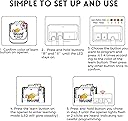
Needed another garage remote for our additional car. We have an old LiftMaster opener. If anything, the instructions included with the remote was a lifesaver and VERY easy to understand. The learn buttons are color coded and you follow the directions based on the color of your learn button on the garage opener. I was able to program my remotes and use them immediately. I did not realize I had pushed the learn button too long and reset the existing remotes and had to reprogram them too. Once you get a hang of it, the process is really easy. Comes with a clip that you can put on the front visor. The remote is is small and does not take much space. It is a great replacement and functions well.
J**X
Works perfectly; Great value for price paid.
Super easy to program for my Chamberlain orange button garage door. Great value for money and is very portable. I have never had any issues with connectivity, and they work from at least 30 meters away. Definitely very happy with this purchase!
S**.
Great Quality Product at a Great Price
Excellent Product. Simple to program. Works Perfectly, Fraction of the cost of the LiftMaster Brand. This is a great quality product at a great value.
B**O
Works perfectly with my 2017 Sears door opener.
Works better than the original remote that came with the garage door. Programming is clearly described for the remote, but it was a little bit of trial and error to get the opener to respond. ONE gripe. No info about replacing the battery. Rufus said to look for a screw to open the case. NO SCREW. If you put a quarter coin in the side opening it pops open easily. The opener comes with a battery installed but at some time it will need replace ment.
H**S
What's in a lock?
Shipment received on time. Easy to install price worth it
R**.
Great garage opener
Loved this product. It was very easy to link with our garage opener and it worked on the first try for both
M**L
Easy setup and work great
Was looking for another garage door remote that was easy to set up. Directions are straightforward based on the color of the button on the back of your garage door unit. Took me less than a minute to pair this with the two doors in our garage. Works great and highly recommend.
J**S
Make sure you program all three buttons to the correct color code.
I'm Stoopid.... I missed the part about programming EACH button for a color code (step #3). So the remote only worked on the big button that I had programmed to color code 1 (yellow). I was about to give up and send them back when I re-read the directions for the 5th time and suddenly it clicked in my head... So I turned a 30 min job into a couple hours. I had three different doors with identical openers 12' to 15' in the air. Once I figured them out they work fantastic! Very happy with them.
ๆ **ๅฝฆ
ไฝฟใใชใใใฟใณใใใ
Liftmasterใฎ87504-267Door Openerใซไฝฟ็จใใพใใใใ3ใคใฎในใคใใใฎๅ ไธ็ชๅณใฎในใคใใใ ใใ็ป้ฒๅฏ่ฝใงใใใ ไธ็ชๅคงใใชๅทฆๅดในใคใใใฏ็ป้ฒใงใใพใใใงใใใ ไธๅฐใใ็ป้ฒไธ่ฆใชใฎใงใไฝฟ็จใซใฏๅ้กใใใพใใใใ
A**H
Excellent product
Excellent and easy to set up
K**M
Perfect
Works better than my original opener. Range is again better than my original opener and was easy to program. Hopefully it last!
P**M
Very good remote
100% compatible with my Craftsman door opener, easier to setup than another remote that's 5 times more expensive. Got the items within the window provided in checkout.
D**X
Solid device, tip for connection
I was a bit weary because of the reviews talking about the problems with connecting more than one door - but decided I'd give it a go. Glad I did. It works well and the setup was easy. There is only one thing in the instructions I find confusing. First they describe how to teach the remote to send the signal matching your door opener - click this many times on the button for that colour of the button on your opener - this is all crystal clear, steps 1-4 in the printed instructions. So at that point you have the remote programmed and it will work as if you got the remote dedicated to your opener. Now your opener needs to learn to obey your new remote. Simple process - first press the Learn button on the opener, and within thirty second or so press the button on your remote. Easy - and written clearly on my opener, and probably most of them. This is the final step 5 in the printed instructions and it is where there is some ambiguity. it says: "Press the learn button on the back of the opener, after the learn LED glow steadily, press and hold the remote button..." This "after the learn LED glow steadily" just says that your click will be acknowledged by the LED going on. If you take it to mean press the button and hold until the LED glows steadily - it is still strictly speaking correct, as the LED will go on right away. The video instruction are even more suggestive - the "Make sure the LED stays on" caption is shown and the motion of the video is paused for a second, presumably to give you a moment to read it. So what is the problem here? Well, if you just reach for your learn button by stretching yourself from the ground - you may not see the LED going on. And if you keep holding the button for long enough - 6 seconds or whatever your opener says - you will erase all info, disconnecting all previously connected remotes. I recommend this product. It is a solid device, and a good value. I also recommend the vendor to change the instructions for the step 5 to read "Press the learn button on the back of the opener BRIEFLY. The learn LED will glow steadily. Press and hold the remote button..."
Trustpilot
1 day ago
2 weeks ago