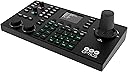
🎬 Own the shot, command the scene — PTZ control redefined.
The PTZOptics SuperJoy is a professional-grade joystick controller designed for seamless, multi-brand PTZ camera operation via IP, NDI, and serial connections. Featuring a large LCD and 1080p HDMI video preview, it offers low-latency, real-time control with customizable buttons and three user modes to fit any production skill level. Ideal for live streaming and broadcast setups, it supports complex multi-camera presets and automatic triggers, empowering managers and creatives to streamline workflows and elevate video production quality.


| ASIN | B08W5FNNH6 |
| Best Sellers Rank | 54,997 in PC & Video Games ( See Top 100 in PC & Video Games ) 1,734 in Dome Cameras 11,484 in PC Consoles, Games & Accessories |
| Customer reviews | 3.8 3.8 out of 5 stars (52) |
| Item model number | PT-SUPERJOY-G1 |
| Product Dimensions | 17.91 x 35.41 x 10.11 cm; 1.7 kg |
A**R
Ultimately when I got this to work, it was just as the other reviews left by other users were: very easy to implement, and responsive. Couldn't believe it. And the panning is super-smooth. However, things to know before implementing this: -If you're planning on putting this on your network, DO NOT do so if you have networked security cameras on the same network switch as your PTZ camera and the Superjoy controller. I had 2 weeks of pure frustration and almost returned this because, I couldn't control the PTZ camera. The WebGUI picked up the camera fine, I could take snapshots from the web interface, and even return camera to its default position. But I either couldn't control the camera, or had to go through a weird procedure of turning the PTZ camera off, restarting the network switch, then the SuperJoy controller to finally get it going- and and not necessarily in that order. I was terrified of turning of the Superjoy, else I wouldn't have control of it again. I only got hint of a solution pouring over forums concerning the SuperJoy not connecting via network (of which there aren't many); and I got tipped off when someone was complaining they couldn't get their Super Joy controller to work on their network as well- and he happened to mention he had security PTZ cameras. I resolved my issue by putting the security cameras on its own router connected to the network switch- so the SuperJoy couldn't 'see' them. after that, the controller has been a breeze to use. -The focus tends to change on a whim, so things will suddenly get blurry on you. So I've learned to keep a finger on the focus button, to bring things back into focus -Also, the HDMI out doesn't work on all monitors, especially if you're using a VGA-to-HDMI adapter attached. You'll get the "Out of range" message on your monitor. I went through three monitors and finally got it going on a much older [and square] 17" monitor. Not ideal, but at least it works
K**R
I have been waiting for this SuperJoy Joystick release for some time now. I finally got it two weeks ago and it was a breeze to setup. I just connected it to my POE switch with an Ethernet cable and it powered right up. I got a regular 22" monitor w/HDMI hooked up to it and now I don't have to look at the streaming software to set up the shots. My favorite feature is that the "Auto Focus Lock" button, which flashes green when enabled, and I know the focus will not go hunting every time the subject makes the slightest move. I like how easy it is to set the presets by just holding down a numbered key for a few seconds and it is set. This one feature helps me a lot of time because the band does not set up in the same spot each week and I can quickly move each camera and save change the preset before every stream. I'm still learning all the features, but this was worth the wait. Well done PTZOptics!
A**.
It’s a great buy! Expensive, but worth it.
A**R
sony work around does not work never again will i buy from a 3rd party it is Going to cost me $300 cad to send it back, scam rip off
B**L
Great equipment. Does just what it's supposed to do. Wish the focus was a little faster
Trustpilot
1 day ago
2 months ago