Buy anything from 5,000+ international stores. One checkout price. No surprise fees. Join 2M+ shoppers on Desertcart.
Desertcart purchases this item on your behalf and handles shipping, customs, and support to Poland.
⌨️ Elevate your workspace: Type smarter, not harder.
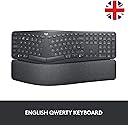
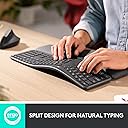
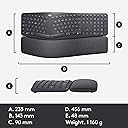
The Logitech ERGO K860 is a wireless ergonomic keyboard featuring a split, curved keyframe and pillowed wrist rest that reduces wrist bending by 25% and increases wrist support by 54%. Designed for natural typing posture, it includes Perfect Stroke scooped keys for precision and quietness, adjustable palm lift with three tilt angles, and multi-device Bluetooth plus USB connectivity. With a 2-year battery life and integrated number pad, it balances comfort and high performance for professional users.
| ASIN | B07W6JLQCY |
| Additional Features | Ergonomic, Wrist Rest |
| Antenna Location | Büro, Gaming |
| Best Sellers Rank | #30,135 in Computers ( See Top 100 in Computers ) #773 in Computer Keyboards |
| Brand | Logitech |
| Built-In Media | USB Cable |
| Button Quantity | 87 |
| Color | Dark Grey |
| Compatible Devices | PC |
| Compatible Operating System Family | Windows |
| Compatible Tablet Computer Models | AAUB P30 |
| Compatible devices | PC |
| Connectivity Technology | Bluetooth, USB |
| Connectivity technology | Bluetooth, USB |
| Customer Reviews | 4.4 out of 5 stars 685 Reviews |
| Enclosure Material | Plastic |
| Hand Orientation | Ambidextrous |
| Item Dimensions L x W x H | 45.6L x 23.3W x 4.8H centimeters |
| Item Weight | 1160 Grams |
| Keyboard Backlighting Color Support | Single Color |
| Keyboard Description | Standalone |
| Keyboard Layout | AZERTY |
| Keyboard description | Standalone |
| Manufacturer | Logitech |
| Mfr Part Number | 920-010107 |
| Model Name | 920-010107 |
| Model Number | 920-010107 |
| Number of Batteries Required | 2 |
| Number of Keys | 104 |
| Number of Sections | 1 |
| Power Source | Battery Powered |
| Recommended uses for product | Büro, Gaming |
| Series Number | 920010107 |
| Special features | Ergonomic, Wrist Rest |
| Style Name | contemporary |
| Switch Type | Scissor mechanism |
| Theme | No Theme |
| Unit Count | 1 Count |
| Water Resistance Level | Not Water Resistant |
A**N
This is UK layout ERGOK860
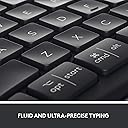
The ERGOK860 is a fantastic keyboard. However, if you are purchasing this particular product, you need to keep in mind that this product has a UK keyboard layout. The difference between US and UK keyboard layouts is important especially for those purchaisng this product from outside the UK. What is the annoying factor? The UK layout has enter key that is too small and it is highly annoying. There are other differences which you may or may not like. Please Google to know the difference US and UK keyboard layouts.
R**M
Comfortable to use.
Takes a bit to get used to but I’m quite liking it. I didn’t realize that there’s no keyboard illumination and as soon as it’s even slight dark, you can’t see the keyboard keys. Also not a fan of the split shift and backslash key and so many typos on Caps. I’m sure I will get used to it in time.
B**S
Best keyboard I've ever had
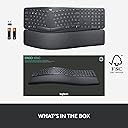
TLDR: Superb keyboard, 6*. Get the BT receiver out of the packaging! In the last year, I've bought five keyboards. In my 48 years of playing with computers, I must have had dozens of different keyboards. This Logitech K860 is easily the best. Beautifully comfortable to use, the palm rest is really comfortable to use. In the pictures, it looks as if the palm rest can be separated from the keys - in fact, they are all one unit, joined underneath. The ergonomic layout really is natural to use - my son, who hasn't used an ergonomic keyboard before, just sat down and typed on it (winning an online typing-speed competition!). Importantly, Logitech has kept the standard layout of the Insert/Home/PageUp/Delete/End/PageDown keys, and the inverted-T shape of the arrow keys. If you're used to using these keys as a touch-typist - which many programmers will be - then you'll still find the keys in the right location. On many split-keyboard ergonomic layouts, the widened layout of the main keyboard means that the middle-set keys are rearranged. The Logitech designers have done a great job here; the numeric keypad is the same size as on normal keyboards, yet the overall keyboard size is the same as normal keyboards (it's 18" wide, and 91/4" deep, including the wrist-rest). Again unusally for ergonomic keyboards, the keyboard angle can be raised at the front so that it slopes away from you. This is the most natural position for your hands, yet so many keyboards only have raiser-feet at the back. There are in fact two levels of raising you can use - there are two diffent length feet you can choose to extend. The markings on the keys are very clear, seemingly cast into the actual key, and show the Windows and Mac differences. I recently bought a Logitech K850 keyboard (a 3-computer Bluetooth switcher) but the markings on this look like transfers that have been pasted on, and therefore might rub-off in the long-term). The keys have a good feel and distance of travel and are quiet to use. Don't just throw the packaging box away! The keyboard is Bluetooth, and is easy to link to three computers (I have two Windows and one dirty Mac), with three dedicated keys (with a nice LED indicator) to switch machines. But inside the box, stuck separately and easily missed, is a Bluetooth receiver that you can use too. I don't need to use it; there is a neat slot inside the battery compartment where you can store it. Logitech provide a download - "Logitech Options" - that allows you to configure the keyboard, and gives a guided tour. It's worth downloading this, and clicking around to explore. You can program the actions of the back-row keys - for example, set up keys for Cut/Copy/Paste, and you can make these key definitions specific to individual apps. Areas for improvement? There is an LED on the Caps Lock key to show when it's on; however, there isn't one on NumLock, which is a shame. Also, you can't download a PDF manual - you have to click around in the Options program, or hunt around on the web. These are produced to a good standard, but for all technology I still prefer to have PDF that you can scan, bookmark and annotate. In summary: it's expensive - but really outstanding. Worth every penny.
S**C
Great - economical
I like everything about the keyboard-the only challenge is that with the numeric part it’s quite wide which makes the mouse management a bit less comfortable.
R**O
Top quality
Great business asset. Very helpful no more wristle pain
T**R
Always the greatest keyboard
It's my second Ergo Can't type it when your drunk as always but perfect when your sober
J**L
när kommer returpengarna
undrar när pengarna sätts in på mitt konto? Returnerade detta den 27 januari Nu är det den 5 februari och pengarna har inte kommit in på mitt konto
Trustpilot
5 days ago
1 week ago