


🎥 Elevate your remote meetings with crystal clarity and wide-angle confidence!
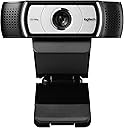
The Logitech C930e is a business-grade 1080p HD webcam featuring a 90-degree wide field of view with pan, tilt, and 4x digital zoom. Certified for Microsoft Lync 2013 and Skype, it supports plug-and-play USB connectivity and uses UVC H.264 encoding to optimize bandwidth and video smoothness. Designed for professional video conferencing, it offers flexible mounting options and advanced camera controls to keep you looking sharp in any remote work environment.


| ASIN | B00CRJWW2G |
| Antenna Location | Videoconferencing |
| Best Sellers Rank | #178 in Webcams |
| Brand | Logitech |
| Built-In Media | Webcams |
| Camcorder Type | Video Camera |
| Color | Black |
| Compatible Devices | Web Conferencing Applications |
| Connectivity Technology | USB |
| Customer Reviews | 4.6 out of 5 stars 5,264 Reviews |
| Digital Zoom | 4 x |
| Display Resolution Maximum | FHD |
| Effective Video Resolution | 8 mp |
| Exposure Control Type | Automatic |
| File Format | h.264 |
| Flash Memory Bus Interface Type | SD |
| Flash Memory Speed Class | C10 |
| Flash Memory Type | SD |
| Flash Memory Video Speed Class | V10 |
| Focus Type | Auto Focus |
| Form Factor | Desktop |
| Global Trade Identification Number | 00097855095985, 10097855095982 |
| Image Aspect Ratio | 16:9 |
| Image Capture Speed | 30 frames_per_second |
| Image stabilization | Digital |
| Item Dimensions D x W x H | 0.95"D x 3.7"W x 3.7"H |
| Item Weight | 5.6 ounces |
| Lens Type | Zoom |
| Manufacturer | Logitech |
| Maximum Aperture | 2 f_stop |
| Maximum Focal Length | 9.4 centimeters |
| Minimum Aperture | 16 millimeters |
| Minimum Focal Length | 2 |
| Model Name | C930-e |
| Model Number | 960-000971 |
| Number of Batteries | 1 Nonstandard Battery batteries required. |
| Operating System | [VARIOUS] |
| Optical Zoom | 100 x |
| Screen Size | 3 inches |
| Shooting Modes | Automatic, Continuous shooting recording, Sports |
| Special Feature | Lightweight |
| Style Name | Webcam |
| Supported Audio Format | AAC, MP3, oder PCM |
| Supported Image Format | JPEG |
| UPC | 097855095985 |
| Unit Count | 1 Count |
| Video Capture Format | ASF |
| Video Capture Resolution | 1080p |
| Video Resolution | 1080p |
| Viewing Angle | 90 degrees |
| Warranty Description | 1 year |
| Water Resistance Level | Not Water Resistant |
| White Balance Settings | Auto |
| Wireless Compability | Radio Frequency |
| Zoom | Digital |
B**I
Fantastic camera for both Mac and Windows
This is a really fantastic webcam. I have a mac laptop with both OSX 10.9 and Windows 7 installed, and this camera was literally plug-and-play with both operating systems; I didn't even have to install any other drivers. I was looking and looking for a HD webcam that offered Mac compatibility as well, so I was very pleased that I finally found one that works so seamlessly (even with FaceTime and Photo Booth). The picture and audio quality between this camera and my laptop's internals isn't even comparable. I switched between the two a couple times, and noticed that the internal camera was at least 50% blurrier, and the ceiling light behind me gave off quite a glare (my lens is clean, by the way). When switching back to the C930e, the picture was crystal clear and the glare, while not totally gone, was diminished to an acceptable level. I then did a couple of focus tests; it only took the C930e about 1.5 seconds to focus between my ring held about 1.5" away from the lens and the ring held 2' away from the lens. Very impressive, as my old internal wouldn't even come close to focusing on something that close. The audio is crystal clear on the other end of the connection; I even gave a go at recording a movie of myself playing guitar, and the audio came through amazingly clear for just a home webcam. I'm not sure if they mention that this comes with it in the description or not, but there is a little rubber "cap" that can fit over the lens when you're not using it, and then easily and quickly flip up when you want to use it. Great for both protecting the lens and if you're paranoid that someone can get access to your webcam without your knowing. There are lights on either side of the camera that light up when the camera is active. I had thought these would be rather distracting, but they are very unnoticeable; they give a clear indication when your camera is on, but they definitely wouldn't distract you from a conversation. The only other thing I'll mention is the software; there is a link to their site in the manual to download it. It's a regular download for Windows, and a link to the app store on Mac. It allows you to zoom, and then once you're zoomed in it will tilt, pan, scroll, etc. You can also adjust things like the white balance, brightness, contrast, and color intensity. You can download it without purchasing the camera if you'd like to take a look at it first, just google "Logitech Camera Settings download" and that should take you to the Logitech site. All in all, I am incredibly happy with this camera. True, it is quite expensive, but (at least right now) it is the top of the Logitech line; in this case, you really do get what you pay for.
T**M
Excellent video quality and connectivity.
D**Y
Great HD webcam!
The webcam built into my laptop works only intermittently, something which I can't rely on for business meetings since there's no rhyme or reason for when it will work or not. So I bought this Logitech C930e and am very happy with it. I've already not only used it in my home office but have used it for a couple of board meetings where most of us were present but there were a couple of people who could not be present but wanted to participate. Clear picture, very easy to set up, and I love that it has the privacy cap which snaps onto the camera and it flips up or down as we want. It connected to the computer just by plugging it in, but using the free Logitech software the zoom and other aspects of the camera can be changed, making it even more versatile. And it slips into a computer bag easily for transportation to a different location.
D**C
Good 1080p video, microphone input "pretty good"
This was the 3rd webcam I bought in a recent effort to get a 1080p video/mic webcam device for use on my new M1 Mac mini that does not have these built-in. This device just worked - what is described below is about two other devices. The first two other webcams I selected had great reviews from a large number of reviewers and cost about half of the price of this device. But when I attached them to my system they both suffered from relatively poor video performance and inconsistent sound performance. The video should have been 1080p but looked more like 720 with poor contrast. The sound input (microphone) was either not working or could not be consistently set between the Sound system settings panel and two major applications, FaceTime and Zoom, so that it was hit-or-miss to actually get things working when you needed them to be working. As a result, I sent both of the lower priced webcams back and bought the unit reviewed here. This device is not quite as good as a very similar unit from Logitech I bought about 3 years ago, but is clearly head and shoulders better than the two lower-priced webcams I tried, as described above. The Logitech webcam installed by plug-n-play on my Mac, was full 1080p resolution with a crisp contrasty image. The camera maintains focus on the user's face without excessive "hunting" and seems to behave well in mixed lighting conditions. Sound is "pretty good" with some hint of a "buzz" in mid-to-higher frequencies (my wife is a singer and does some Zoom recordings for a chorus, so there is a good sampling of frequency ranges and loudness - a test for any microphone). The only downside is that this webcam is 2x the price of the others - in this case, you seem to get what you pay for.
C**9
Outstanding!
Outstanding! A big improvement over the Logitech C920. I am a video engineer of 40+ years experience. The advanced settings of this camera give you a proc amp with control over Brightness, "Contrast", Saturation, Sharpness, White Balance, Backlight Comp and Gain. I put the camera on a Macbeth color-checker chart and monitored the output using a program of my own devisement. The auto white balance works well enough to leave in the "auto" setting. The brightness control acts like a real setup/pedestal control on a professional video camera. Unlike a professional video camera, the "contrast" control affects both black and white levels. Each proc amp setting has a numeric indicator showing the value of the associated control, from 0 to 255. This is a wonderful feature as the settings are repeatable -- simply dial in the desired value. A nice feature would be the ability to recall settings from a file. I got good pictures by overriding some of the default settings of 128. I have set the sharpness control to all the way to 255 and am getting nice, crisp pictures free of high-frequency artifacts. On Macbeth, the default contrast setting of 128 works just fine. I have run the brightness control up to 136 and the saturation down to 117 (my program measures these things). I have not checked out the audio from the built-in mics. If you're serious about audio quality you're best off using an external mic. If you know something about basic lighting you can get some decent pictures from this camera -- no light sources behind the subject, e.g. no light fixtures, open windows or lights on the ceiling/wall in the picture. By professional standards the video is a little noisy, but that is to be expected from a $100 webcam. The software works with Windows 7, and best of all the camera has a tripod socket!
K**R
Great webcam
My first order resulted in a medicine bottle being delivered by mistake. Amazon did an OK job of replacing the bogus delivery with a replacement webcam a few days later at no cost to me (except a trip to the UPS store) which was appreciated. I rarely have bad service from Amazon so its nice to know they do well enough to make things right. The actual webcam is as expected and has been fine. It was plug and play for me. I'm on Windows 8.1 and it worked fine in both a USB2 and 3 port and cable with no complaints. I downloaded the latest software from Logitech's website and after a quick reboot everything was fine. The only real thing the software adds is the ability to do digital zoom and focus (there is no manual analog zoom - the digital zoom basically wastes pixels and only shows a cropped portion of the total picture. PC World does a really good job of explaining this. It works just if high resolution is important to you and the ability to zoom in then this may be a concern). There is no disk in the package which was fine. Again it was plug and play for me on a relatively modern Windows 8.1 USB2. The user manual is very light on useful info and the warranty info in the box was all in Spanish which was odd but doesn't bother me. Those usually go into the trash after a few weeks once I know I won't return it. The fit and finish are great. I've owned four Logitech webcams over the years and this is one of the nicer ones. It feels heavy for its size (which is really much smaller than any of the photos do justice). I really like Logitech's solution for how to hang from a monitor. The lens cover is also nice and grips tightly. I suppose it could be more prone to be lost but only if you're a really forgetful person. One big thing to note is the wider lens is exactly as described by other reviewers and the marketing information. It takes some getting used to though having came from several other traditional lens webcams. Your audience seeing you on the webcam will have a very slight fish-eyed view of you which is a little odd. Most people place a webcam sitting say 2-3 feet away on or near a computer monitor for instance. If you place this cam in the same place as other traditional cams you will appear somewhat smaller. And obviously the background of your room around you will be much more visible. That may or may not be a concern just be aware it'll take some getting used to. I bought this cam because our family tends to have Skype webconfs with others in the family (holiday dinners with family overseas helps keep those distant feel closer) so there are always a few of us who want to be in the picture. And having a toddler running crazy is easier to keep in view with a wider lens. The microphone does a fine job of squelching out normal echo and reducing background noise. But I wouldn't set it next to a noisy computer fan or have a radio playing behind it and expect it to filter out all of the extra noise. All in all I'm very happy with the purchase and continue to appreciate Logitech's webcam solutions.
N**A
Great quality with great features
Great quality with great features. The image is very clear even under low light.
D**G
Great webcam! Much better exposure control than the Logitech C92X series for bright background!!
This is my 2nd webcam in 2 months. My first one was a Logitech C920/922/925 series webcam. While the picture quality and the sound capture of the C920/922/925 series was very good, the webcam had significant issues focusing on me during Zoom calls. I attributed that issue to my office layout that has large, bright windows behind my chair - this is a tricky situation to capture accurately even in normal photography. Even so, I expected the webcam to settle on an exposure setting after couple tries; unfortunately, that didn't happen. The webcam kept on going in and out of dark / light exposure constantly. Even switching to manual exposure mode didn't help and that became very annoying for me and my fellow Zoom attendees! I then returned that webcam and bought the C930e. This webcam has a wider optical lens and inbuilt image processing chip. While the Logitech website says this camera has the same exposure algorithm (RightLight2) as their C92X series, this darned thing nails the exposure after a single try! And yes, it has the same high quality picture and sound! For folks with bright backlit background like me, this is the webcam to buy, no question! I am really happy with this purchase and my fellow Zoom attendees thank me for not giving them a headache by blinding them with alternate light & dark Zoom image :)
P**S
Won't work with Smart TV
The Good.... Very swift shipping and good quality; Great field of view (via PC) The (very) bad, at least for my needs... Beware this will not work smart TV. Of course it would have been helpful to be advised of this before ordering from Logitech shop!! Found deep on Logitech site FAQ, after purchasing: "My Logitech webcam isn't working on my Smart TV" This article is relevant for the following webcams: Webcam C930e Webcam C925e B525 HD Webcam Business Webcam C920e Business Webcam C505 Your Logitech webcam won't work with your Smart TV, as it was designed to be used with personal computers only."
D**L
Sobrevalorada
Por un precio mucho menor puedes comprar algo similar. Si la iluminación no es adecuada mete ruido y aunque intenta corregir la iluminación y los colores, para mí no es lo suficiente. Si tienes un lugar bien iluminado debería verse bien. En cuanto al sonido bien, sobretodo si lo combinas con la eliminación de ruido de nvidia broadcast por ejemplo (eso suprimirá el ruido de las teclas y los clics) Adicionalmente, la compré en condiciones aceptables y en la descripción no decía que le faltaba la carcasa frontal. Y además el vídeo no funcionaba bien. Devuelta.
C**O
Boa?
Faz anos que tenho ela e a qualidade dela é muito boa, principalmente pra quem gosta de mostrar o cenario na live.
M**D
انصح بشراءها
انصح بشراءها
A**K
great especially for small offices or group calls
Great web cam. image quality is crisp and sound is a large improvement over my previous logitech camera. The wide angle is not for everyone, but it's perfect for what I use it for. Especially, if you are close to the cam, or want to have the ability to skype with several people in the same room, the wide angle is great! Otherwise, I use the skype setting to crop in on me, when I do not require the extended visual field. After months of use I have not experienced any problems with it. Audio seems fine too, though I never checked it specifically.
Trustpilot
4 days ago
1 month ago