


🖨️ Elevate your workspace with color, speed, and savings—because your productivity deserves the best!
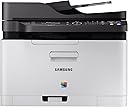
The Samsung Xpress SL-C480FW/XAA is a wireless color laser multifunction printer designed for cost-conscious professionals. It features mobile printing compatibility, an eco-friendly mode that reduces operating costs by 20%, and advanced ReCP technology for sharp, vibrant prints. With an 800 MHz CPU, it delivers fast, high-quality output while combining printing, scanning, copying, and faxing in one sleek device ideal for home offices and remote work setups.


| ASIN | B0196HHD7U |
| Additional Printer Functions | Scan |
| B&W Pages per Minute | 19 ppm |
| Best Sellers Rank | #326,028 in Office Products ( See Top 100 in Office Products ) #416 in Laser Computer Printers |
| Brand | Samsung |
| Built-In Media | Set / Toner Catridge / Imaging Unit / Power Cable / Line Cord / Quick setup guide / Wireless install Guide / Manual User's Guide / S/W CD ROM |
| Color | black |
| Color Depth | 24 bpp |
| Color Pages per Minute | 1 ppm |
| Compatible Devices | Laptops, PC |
| Connectivity Technology | USB |
| Control Method | App |
| Controller Type | Vera |
| Customer Reviews | 3.9 out of 5 stars 262 Reviews |
| Display Type | LCD |
| Dual-sided printing | Yes |
| Duplex | Automatic |
| Global Trade Identification Number | 00191628502929 |
| Hardware Interface | USB 2.0 |
| Ink Color | black, cyan, magenta, yellow |
| Item Type Name | Laser Printer |
| Item Weight | 24.98 Pounds |
| Manufacturer | HP |
| Maximum Copies Per Run | unlimited |
| Maximum Copy Resolution Black and White | 1200 x 1200 dpi |
| Maximum Copy Resolution Color | 1200 x 1200 dpi |
| Maximum Copy Speed Black and White | 19 ppm |
| Maximum Media Size | 8.5 x 14 inch |
| Maximum Print Resolution Black and White | 1200 x 1200 dpi |
| Maximum Sheet Capacity | 250 |
| Maximum print Resolution Color | 1200 x 1200 dpi |
| Model Name | Samsung Electronics Xpress SL-C480FW/XAA Wireless Color Printer |
| Model Number | SS256H#BGJ |
| Model Series | Xpress |
| Number of Trays | 1 |
| Other Special Features of the Product | Auto Document Feeder |
| Output sheet capacity | 250 |
| Paper Size | 8.5 x 14 |
| Print media | Paper (plain) |
| Printer Connectivity Type | USB |
| Printer Output Type | Color |
| Printer Type | Laser |
| Printing Technology | Laser |
| Processor Count | 1 |
| Resolution | 1200 x 1200 |
| Scanner Type | Sheetfed |
| Special Feature | Auto Document Feeder |
| Specific Uses For Product | Office |
| Total USB 2.0 Ports | 1 |
| Total Usb Ports | 1 |
| UPC | 887276110202 191628385126 779184239161 191628502929 |
| Unit Count | 1.0 Count |
| Warranty Description | Limited Warranty |
| Warranty Type | Limited Warranty |
T**E
Why Pay More? This One Does it All!
Wow! A laser printer that does it all (color, copy, scan, fax, wireless)! I also have a b/w Samsung I got for a low price and it's provided great service for years, so when our inkjet cashed it in, I naturally looked for a Samsung color laser. It has all the features your can shake a stick at and the price is amazing! (just look for those Amazon offers that come and go.) It works well as a wireless printer and is nice and quiet. My only quibble is the fact the pages don't automatically flip on 2-sided printing. I suspect that Samsung opted not to use it so that it won't cause mechanical problems over time. (You may get this feature on more expensive models, but at the price, this one's fine without it. All you need do is take the pages, reload them in the tray and push a button.) When you're faced with replacing that inkjet printer, why not go with laser? You'll love the quality printing and the length of time you'll go before replacing toner. Over time, the higher cost of toner will actually be less than the cost of the not-so-cheap inkjet cartridges.
W**D
Inexpensive color laser printer that does a lot of extras
I was originally looking for a new laser printer, but found this scanner, copier, fax, printer for only $20 more than the Samsung laser printer alone. It was easy to setup as a network printer. I haven't tried all the features and never plan to use the fax capability. My son commented that the pages he printed were "sharp" . I also downloaded the user guide pdf from the internet. So far it works well, and I have no regrets buying it.
A**N
Installation instructions were very poor (I'm an engineer
Ordered this for my home office because I was tired of an HP inkjet I had that never worked. This took me a few hours to set up including unboxing and connecting to my PC via the USB. When I finished it said it was connected wirelessly and I could unplug the USB, but once unplugged it was not connected to my network. It took me another hour to try to connect it via the WPS button on my router before finally entering the network key manually from the printer, which worked. Installation instructions were very poor (I'm an engineer, I'm good at following directions). Once connected it worked very well, good print quality and fast printing (compared to what I'm used to). However, when I tried using the scanner, it simply said "Not available." After an hour of googling I haven't found a solution that has worked, just vague mentions of a "Scan Manager" download that doesn't seem to exist on the Samsung support website. I'm now talking with Samsung customer service but honestly I've put 6 hours into this product and it's still not working, and I am a technical person. It seems like a good product but on the software/driver side it definitely does not work out of the box. Update 11/13: I've mostly struggled by with this thing for months now, despite frequent unexplained disconnects, paper jam errors when there is no paper jam. And now I'm trying to print cardstock for and event, and despite setting the paper type to cardstock (or thick, or anything else), it jams, every time. This printer is absolute garbage.
M**J
Good printer for the tech savvy user
After having used this printer for a few months, I can now say I like it. If I rated it during the first week I had it, I would have given it 1 star. Primary reason is that it is a complicated machine and figuring out all of its nuances is not for the faint of heart. Samsung doesn't have a very good user guide or on-line support, so I spent a lot of time playing around with settings before I could get it to do what I wanted. You can adjust settings via the printer's control panel, via its software, or via a web portal. This adds to the complication factor as the control panel on the printer only offers some of the options you need for tweaking, the software offers some more, and the web portal offers others. Samsung instructions are not very clear in terms of where you have to go to make your adjustments. The biggest problem I experienced was the fax set-up. I had Xfinity internet phone for my business line and while faxing with my previous Brother printer for years was fine, I could not get the Samsung fax to work. I eventually switched my business line from Xfinity to Ooma (to save money) and discovered that by using an Ooma Linx device and playing around with the Samsung settings, I was finally able to use the fax function. So, there is a happy ending to this story but it took a while to get here. The print quality is very good, so I'm happy with that. Time it takes to start printing is a bit delayed and the printer is noisy. If you don't mind that, it's a good laser printer. Just wish the replacement toner cartridges weren't so expensive! But I knew that before I bought it. It does seem to be very efficient in terms of the amount of ink it goes through, so that's a plus.
J**D
Print quality is so much better than any of the ink-jets I’ve purchased before
I have been replacing ink-jet printers about every year, so I decided to spend a little more this time and see if I can stop the cycle. I was worried about set up because there are a lot of reviews here that said set up was frustrating and time consuming. That’s not the case at all! I had this set up and test page printed within 10 minutes of opening the box. The tray does stick out about 4 inches (it is not flush as shown - it comes that way in the box, but as soon as you release the tray it stays out). Print quality is so much better than any of the ink-jets I’ve purchased before. The eco-friendly display (if you choose to use it) that shows on the computer print screen is wonderful, as it also shows you how much toner will be used and gives a preview of what the document will look like if you reduce the quality. Fingers crossed I don’t need a new printer for a while!
R**E
Works well on my old Toshiba and newer iphone 6s an 3 year old ipad.
Had problems trying to get it to work because it keeps going bad with auto updates. But I keep calling Samsung to fix it and they take over my computer and fix it. I like my previous laser color printer and needed a wireless printer for my Apple devices so I got this combination fax, copier, printer, and scanner. I don't use my fax any more since I got rid of landline phone service which morphed into internet phone service and fails when the power goes off anyway. Then there is no reason to have it with cell phone service. I had kept it for years because people said you need it for an emergency. If there is a bad earthquake there will be no power and therefore no internet and no phone service so that is humbug.
B**N
If you rarely print, and only want something to support sporatic use - this might be okay.
Not the best printer I've owned, but the most efficient if you're only going to be printing on plain paper and don't plan on doing anything extravagant. The print quality is poor even when force set on high resolution (definitely not on par with standard laser printers) and the paper handling is poorer than even similarly priced Brother printers, since it can't handle any special or thick paper - but it does come with a decent plain paper feeder/scanner so if you're looking for a cheap thing to scan, copy and print or just have general office use you could do worse. That said, I would NOT expect this to hold up to home office use - I'd say I'll probably get 2000-3000 prints out of it, probably not even enough to replace the toner two or three times. Not great, not bad. Just okay. Wouldn't buy again.
P**D
This one is the best one yet -- very easy to set up
This is my third Samsung laser printer which is NOT a complaint. The drums do wear out after use and it is less expensive to get a whole new printer than to get 3-4 year old replacement parts. This one is the best one yet -- very easy to set up, print is great and it appears Samsung did me a favor by NOT changing every little part so that the supplies I had will work with this one. It is a good value in my opinion and yes, when this one wears out, if the replacement part costs about the same as a new one, I'll get another one.
A**.
Una gran impresora a un gran precio
Tenía cierta desconfianza al adquirir esta impresora, pero cuando llegó cumplió con mis expectativas, tiene todas las funciones anunciadas y funciona al 100.
G**R
Five Stars
love the printer
Trustpilot
2 weeks ago
2 weeks ago