Buy anything from 5,000+ international stores. One checkout price. No surprise fees. Join 2M+ shoppers on Desertcart.
Desertcart purchases this item on your behalf and handles shipping, customs, and support to Poland.
🖌️ Elevate your art with precision and color that commands attention!
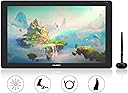
The HUION Kamvas 22 Plus is a 21.5-inch full-laminated drawing tablet featuring advanced Quantum-dot technology with 140% sRGB color gamut and 1200:1 contrast ratio. It offers a high-precision anti-glare screen with minimal parallax, an 8192-level pressure-sensitive PW517 pen with tilt support, and dual USB-C ports for versatile connectivity with Windows, macOS, and Android devices. Ideal for professional digital artists and designers seeking vibrant color accuracy and seamless workflow integration.


| ASIN | B0897KN196 |
| Active Surface Area | environ 495,32 centimètres carrés |
| Best Sellers Rank | 12,645 in Computers & Accessories ( See Top 100 in Computers & Accessories ) 36 in Graphic Tablets |
| Box Contents | Pen Display, Digital Pen, Adjustable Stand ST100A, 3-in-1 Cable, USB-C to USB-C cable, Power Adapter, AC Cable,Pen Holder PH05A, Pen Nib x 10, Pen Nib Clip, Glove, Cleaning Cloth, Quick Start Guide |
| Brand Name | HUION |
| Colour | Kamvas 22 Plus |
| Compatible Devices | Tablet |
| Country of Origin | China |
| Customer Reviews | 4.2 4.2 out of 5 stars (345) |
| Display Type | LCD |
| Item Dimensions L x W | 54.6L x 54.6W centimetres |
| Item Weight | 3440 Grams |
| Manufacturer | HUION |
| Model Name | Kamvas 22 Plus |
| Model Number | LPEU-GS2202-EU+UK |
| Native Resolution | 1920x1080 |
| Network Connectivity Technology | USB |
| Operating System | macOS, windows |
| Pressure Sensitivity | 8192 Levels |
| Product Features | Anti-Glare Glass;Full Lamination;140% sRGB Color Gamut |
| Screen Size | 21.5 Inches |
| Specific Uses For Product | Animation;Designing;Drawing;Editing;Gaming;Painting;Teaching;Writing |
| Target Audience | digital artists, illustrators, and designers |
G**L
Great for young enthusiasts
Excellent very impressive
M**N
Highly Recommend
I mostly work in Procreate on my iPad but since doing more commercial work I needed to be able to draw in Photoshop. This screen tablet has been a great purchase, and look forward to working on it. The screen space is really nice to work on and it was very easy to set up. There is no gap between the pen and the screen like other tablets I have tested. I took some time to calibrate the colour profile to match my mac, it is still not 100% but it's still really great. Be aware that it is only 1080p so the pixels can be noticeable but it's not really a big deal. I love my Huion Kamvas 22 Plus and would recommend it to anyone wanting to draw, from beginner to advanced.
M**W
Not 2K, but a nice comfortable size and tracks acurately
I went back and forth between buying a small tablet with a finer resolution and a large tablet with more 'room' for app panels etc. Went for this in the end. 'only' 1080p, so you will notice some visible pixels to begin with (especially if you are used to working on 2k/4k computer monitors), but honestly after a while you don't really notice and the trade off is you do have a more comfortable workspace with plenty of room for your brush and color panels etc inside your app of choice. Screen is bonded for more accurate pen tracking than the equivalently priced XPen display tablets (for instance) honestly it's hardly noticeable, it's so spot on to the tip of the pen. The screen also has a semi matt finish for a (slightly) less slippery, more papery feel. I still find the sensation of hard plastic pen nip againsts glass unnatural however, so i bought a set of Huion replacement felt nips for the pen which makes it so much better (in my opinion). The bundled power/display cables give plently of connection options, but I do wish it could either be powered and povide display through a single Thunderbolt connection with a single USBc lead or at least be able to use a standard USBc cable each for power and display, rather than the messy and awkward 'hydra' cable that comes with USBc at one end and all 3 of USBc/5mm Power/HDMI on the other. But... All said still a round great budget display tablet.
M**A
Great for the price
Pros: + It's a lovely screen with good pressure sensitivity for the price. + Even though screen is big, tablet is not bulky. + Great tablet stand. Lets you easily adjust angle. + Screen has a good resolution, lovely colours. Can be also used as a second monitor. Videos look fantastic on it. + Easy to set up. Cons: - Colours are too bright and saturated. I've been trying to calibrate the screen to make it look closer to the colours on my imac and laptop screen, but still a bit too bright. - No shortcut buttons on the tablet itself although I mostly use the keyboard anyway, so not an issue for me personally. Overall great for the price. Ideal for someone who has just started in the industry or as a secondary graphics tablet.
A**N
Multiple dead pixels, non existant and rude support from huion!!!
The tablet it's self worked well despite the pixels, a nice upgrade from the cintiq, unfortunately when we contacted huion about the dead pixels they told us that the entire team was on holiday for the dragon boat festival and to contract them in three days, three days later we try again and only get one response per day for each email!? day1 on holiday day2 on holiday day3 on holiday day 4 huion: send us your serial number we send a photo of the serial number on the back day 5 send us your serial number, but type it please we send an email with the number typed out day 6 send us a video of you pointing at the pixels we send the video (attached to this review) day 7 send us a drop box link to the video, we can't download them here we send them a drop box link to the video day 8 huion "dead pixels do not affect the performance of the tablet, therefore we can only offer a £30 refund" At this point we started the return process with amazon, because apparently a broken screen with more and more dead pixels each day doesn't affect an artist that needs a highly accurate screen quality?? Though THREE WEEKS later we are STILL waiting for a refund so we can get back to work drawing and buy anther tablet so long story short, huion does not care about its customers, clearly has no idea about the artists buying them and provides NO support at all! DO NOT buy from huion if you want any kind to long term support! Update: after waiting weeks for a refund we messaged Amazon, they said that they received our item just hadn't processed it, and issued us a refund as my wife hasn't been able to work this whole time. We immediately bought the same model again with hopes that it was just a one off. NOPE our second tablet also has dead pixels! I can't begin to explain my rage.
T**H
Amazing tablet!
So glad I bought this over the Wacom, when I first got it I thought it wasn’t working properly then I remembered you have to download the drivers from Huion - and within minutes it was working perfectly using Corel Painter. It comes with the USB C and drawing glove etc so everything you need is included. There is zero noticeable parallax it just works like a dream. I wish I didn’t struggle with the iPad for so long, this is so much nicer to draw on and a perfect size. I am confident my skills will improve now.
S**E
amazingg
colour is a bit off but its amazing
P**R
Issues with EXACT colour calibration
Well it worked fine - but I couldn't calibrate the colours to get a true rgb set up which for me is critical because I'm working as an illustrator - I tried and I tried but eventually I gave up - so I returned it and bought another Huion - the KANVAS pro 16 smaller but with better colour calibration - which is fine
P**O
Soy ilustrador profesional. Uso Mac M1. Trabajo más de 8 horas al día con tablets. Llevo 5 meses usando la Kamvas 22 Plus. Antes usaba una Cintiq 13 HD. Necesitaba una tablet más grande. La diferencia de precio tan grande entre Wacom y Huion me hacía pensarme las cosas. Al final tomé la decisión y no me arrepiento. De hecho, la Huion ha superado mis expectativas. Mis dudas antes de usar Huion era si la imagen en pantalla se vería nítida, porque al haber un cristal mate podría haber quizá una distorsión (como el efecto arcoíris). Antes usaba un protector de pantalla mate sobre mi Cintiq, y la distorsión de colores era bastante notable. Pero para mi sorpresa ese efecto no se da para nada en el cristal mate de la Kamvas Plus 22. Jamás tendrás un nitidez como si fuera un cristal brillante (glossy), pero estamos hablando de mate. Otra duda antes de comprarla era si la resolución de 1080 sería suficiente para un monitor de 22 pulgadas. Tenía miedo a que se viera todo pixeleado. Tras trabajar muchos años en una Cintiq a muy alta resolución, al principio sí noté esa "bajada" de resolución. Pero la verdad es que me acostumbré en asunto de una semana. Ahora mismo no noto ningún pixeleado. Creo que es un asunto de que el cerebro se adapte. La única manera de notar píxeles es acercando los ojos muchísimo (menos de 30 cm) a la tablet, pero yo nunca trabajo así de cerca. Honestamente creo que 1080 en 22 pulgadas es más que suficiente. Mayor resolución, al menos para mi trabajo, sería un exceso y quizá hasta un gasto innecesario en electricidad. El ojo humano no está acostumbrado a ver las cosas ultra enfocadas como nos lo dan estos monitores nuevos a ultra alta resolución, que en mi opinión dan una imagen artificial. Si estás pensando en monitores 2k o 4k, piénsatelo porque creo que es "overkill", y al final si usas esas altas resoluciones los iconos y menús de tus programas se verán en miniatura, y terminarás bajándole la resolución a 1080 para verlo todo normal. Así que, ¿para qué pagar por una resolución alta que no vas a usar y cuya diferencia es casi imperceptible? También me preocupaba que llegaran "píxeles muertos". La tablet llegó con un solo pixel muerto. Pensé en cambiarla, pero a la semana ya me había acostumbrado al grado que el pixel muerto "desapareció". Mi cerebro ya no lo veía a menos que lo buscara. Así que no la devolví porque no me molestaba para nada. Otra preocupación que tenía era si el cristal se rallaría. Como prevención compré un protector de pantalla para ponérselo en caso de notar el primer rallazo. Pero afortunadamente, hasta la fecha, no hay ningún rallazo en la pantalla. La he inspeccionado con cuidado, con mucha luz, y ni siquiera se ven micro ralladuras. Está como nueva. Solo por esta razón creo que vale la pena comprarse la 22 Plus en vez de la 22. El protector de pantalla que compré está ahí sin abrir. En cuanto a colores, son muy brillantes. Tiene mucha luz. Solo diría que los rojos están demasiado potentes, muy saturados, y aun no he encontrado la manera de equilibrarlos al 100%. No sé si se pueda. Pero cuando se trata de ilustración, siempre es bueno trabajar con más de un monitor para comparar. Es muy difícil que haya dos monitores que muestren una imagen igual. La tablet trae un guante que creo es muy necesario, porque cualquier sudor que tengas se pega a la superficie y hace que el lápiz no fluya igual sobre el cristal. Para evitar esto tengo que usar siempre el guante. El tamaño del guante, sobre todo en los dedos, era muy pequeño para mí. Para solucionar eso corté las puntas de las partes de los dedos, y ahora me queda muy bien. Recomiendo limpiar el cristal con un líquido sin alcohol al menos una vez al día para asegurar que no haya grasa pegada. No hay efecto parallax. La tablet no se sobrecalienta. No noto calor ni nada raro al trabajar. No emite ningún tipo de sonido. No he tenido problemas con temas de drivers. Instalación fácil. Por recomendación tuve que desinstalar los drivers de Wacom antes de instalar los de Huion. No he tenido que usar el servicio técnico de Huion, así que no puedo opinar al respecto. Después de estos 5 meses, sinceramente creo que me quedo con Huion frente a Wacom. Es cierto que Wacom es el Mercedes Benz de las tablets, pero siendo yo profesional, creo que no vale la pena gastar tanto dinero cuando tienes una alternativa de la calidad de Huion. La tablet se siente profesional, y también se ve profesional. Es la mejor inversión que he hecho en años. Y aun me resulta increíble que tenga esta herramienta por unos 500 € viendo los precios monstruosos que cuestan las Wacom de tamaño similar. Si en algún momento me da un problema editaré esta reseña para indicarlo.
A**Y
DE tablet werkt zo als behoren. de kleuren zijn wel warm. zoek zeker YouTube video's op hoe ze beoordeelt worde. Dit help teveel. als ook de speciale aan bieding was ik hele maal verkocht. voor mij is hij net te groot. maar beter plek over dan plek te weinig om te tekenen. ik mis wel de knopen voor mijn shot kuts. maar ik werk met toetsen bord. of ik kijk in de toekomst voor een kastje oom rapper te werken met knoppen op om te programmeren. ik raad het product aan. komen ook geen krassen op. soms staan ze er op maar kuis je er zo af met een doekje.
L**I
A quanto pare dopo l'uso per 3 anni per questa tavoletta c'è l'obsolescenza programmata. In pratica dopo un tot di tempo il pc non la riconosce più, ho cambiato i cavi pensando fossero quelli e ho buttato via i soldi, adesso è solo uno schermo costoso. Non ci sono soluzioni e l'unica cosa che la Huion fa è mandarti i link di altre tavolette da comprare. L'ho amata davvero, era fantastica. Adesso non è più niente. Non buttate via i soldi, so che può piacere ma non durerà.... Avevo una Huion kamvas gt191 e comprando questa il salto di qualità è stato ovviamente enorme. Il vetro opaco rende la sensazione del disegno più naturale, è come disegnare su carta. Il parallasse è veramente minimo, quasi impercettibile e la sensibilità della penna è ottima. Ovviamente devo ancora abituarmi al tilt della penna perchè non ho mai avuto tavolette con questa funzione, ma mi sto divertendo molto a sperimentare, Si può settare lo schermo con gli stessi colori del monitor principale, il menù ha molte opzioni tra cui scegliere. L'unica pecca è che c'è una sola penna, mentre per la gt191 me ne mandarono 2. Ottimo prezzo e qualità per un tablet di queste dimensioni. Ho avuto qualche problema con il software che mi dava sempre la tavoletta disconnessa, ho smanettato e trovato il mio metodo da sola. Ad ogni modo ho scritto al supporto della Huion spiegando il mio problema e hanno risposto quasi subito. Nell' immagine allegata è evidenziato il file che ha fatto partire il software. Magari per chi come me riscontra lo stesso problema può usarlo.
J**I
I'm impressed. It took me a few days to find the right adapter for my displayport because my laptop didn't have a HDMI-socket, but it works like a dream now. Make sure your pc or laptop has the right connections/requierments and let the fun begin.
C**N
la adoro es un tamaño ideal para trabajar, los colores me encantan y el tacto con el lapiz es de los mejores que he probado...
Trustpilot
2 days ago
3 weeks ago