🖨️ Print smart, save big, and stay effortlessly connected!
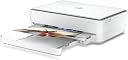
The HP ENVY 6020 All-in-One Printer is a versatile, eco-conscious device designed for home and small office use. Featuring fast wireless printing with self-healing Wi-Fi™, automatic duplexing, and borderless photo printing, it delivers professional-quality output at up to 10 ppm black and 7 ppm color. With a sleek design made from 20% recycled plastic and an included 3-month trial of HP Instant Ink, it ensures cost-effective, hassle-free ink management. Ideal for millennials balancing work, family, and sustainability.
| ASIN | B086LRTY7X |
| Additional Printer Functions | All In One |
| B&W Pages per Minute | 10 ppm |
| Best Sellers Rank | 75,524 in Computers & Accessories ( See Top 100 in Computers & Accessories ) 163 in All-In-One Printers |
| Box Contents | HP ENVY 6020 All-in-One Printer; HP 305 Setup Black Cartridge; HP 305 Setup Tri-Color Cartridge; Regulatory flyer; Setup guide; Reference guide; Power cord. |
| Brand | HP |
| Brand Name | HP |
| Color Depth | 24 bpp |
| Color Pages per Minute | 7 ppm |
| Colour | White/Dark Grey Heather |
| Compatible Cartridge | HP Original ink |
| Compatible Devices | Smartphones |
| Connectivity technology | USB, Wi-Fi |
| Control Method | App |
| Controller Type | Android |
| Customer Reviews | 4.3 out of 5 stars 11,500 Reviews |
| Display Type | LCD or LED |
| Dual-sided printing | Yes |
| Duplex | Automatic |
| EU Spare Part Availability Duration | 2 Years |
| Hardware Interface | USB 2.0 |
| Ink Colour | Cyan, Magenta, Yellow, Black |
| Item Dimensions D x W x H | 14.2D x 17W x 5.2H centimetres |
| Item Type Name | Multifunction Printer |
| Item Weight | 11.51 Pounds |
| Manufacturer | HP |
| Maximum Copies Per Run | 8 |
| Maximum Copy Resolution Black and White | 600 x 600 dpi |
| Maximum Copy Resolution Color | 4800 x 1200 dpi or less |
| Maximum Copy Speed Black and White | 10 ppm |
| Maximum Print Resolution Black and White | 1200 dpi |
| Maximum Sheet Capacity | 100 |
| Maximum Supported Paper Size | 216 x 297 mm (DIN-A4) |
| Maximum print Resolution Color | 4800 x 1200 optimised dpi color |
| Model Name | HP ENVY All-in-One Printer |
| Model Number | 6020 |
| Model Series | 5 |
| Model name | HP ENVY All-in-One Printer |
| Network Connectivity Technology | USB, Wi-Fi |
| Number of Drivers | 2 |
| Number of Trays | 1 |
| Other Special Features of the Product | Borderless Printing, Contains more than 20% recycled plastic, Double-sided printing, Print speed 10/7 ppm (black/colour), Print. Copy. Scan. |
| Output sheet capacity | 100 |
| Paper Size | 8.5 inches |
| Power Consumption Size | 4 Watts |
| Print media | Paper (plain) |
| Printer Output Type | Colour |
| Printer Type | Thermal |
| Printing technology | Thermal |
| Processor Count | 1 |
| Product Warranty | 1 year |
| Resolution | Up to 1200 x 1200 rendered dpi (when printing from a computer); Colour (best): Up to 4800 x 1200 optimised dpi colour (when printing from a computer on selected HP photo papers and 1200 input dpi); |
| Scanner Type | Flatbed |
| Series Number | 5 |
| Special feature | Borderless Printing, Contains more than 20% recycled plastic, Double-sided printing, Print speed 10/7 ppm (black/colour), Print. Copy. Scan. Special feature Borderless Printing, Contains more than 20% recycled plastic, Double-sided printing, Print speed 10/7 ppm (black/colour), Print. Copy. Scan. See more |
| Total USB Ports | 3 |
| UPC | 194721022028 |
| Warranty Type | Limited Warranty |
| Wattage | 6.4 watts |
M**E
Excellent printer
This is by far the best printer I have owned. It was easy to install and connect to my wi-fi and it prints really well from any part of the house, from my laptop and iPad with the HP smart app. A bonus for me is that it prints double sided, provided I remember to check that option in the print section. I did have problems with the printer being offline on occasions when I turned it on. I looked on the search engine to find out how to rectify this and was directed to the Hewlett Packard print and scan doctor. I downloaded this and ran the programme and it corrected the issue, so no more offline with the printer. There are two cartridges, one for black and the other for colour. These are usually a reasonable price but due to the pandemic have become difficult to obtain and the price has risen. Hopefully this will be a temporary issue. A great printer and good value which I definitely recommend.
A**R
straightforward, good looking and good job
I managed to install my new HP ENVY 6020 in a couple of minutes using my phone and subsequently my computer. I put the printer in the same room where the wireless hub was so there was no issue with connection. Start printing was extremely easy and even subscribing to the monthly ink service. The first three months are free so it's a good way to test it and see if it's worth it. When you link to the account it tells you how many prints you have done, when, and how much ink is left in the cartridges. Printing on normal paper is of very good quality both colour and black and white. Printing on special paper is of good quality. Finding the right Coulour Managment hasn't been easy but that's an issue also of the software you print from, not necessarily related to the printer. Scan is of very good quality and since it's a flat scan you are allowed to scan books. Copy is easy too I tried only one double side print so far and when the printer picked up the sheet to print it again it folded a corner a little bit, but besides that it worked perfectly fine. The printer is not so small, but it looks nice and has a pleasant light, which changes colour, coming out of it to show what's going on. It even plays a jingle when it has finished certain tasks. I think it's an ideal printer for the suggested 100-300 prints per month.
A**N
Perfectly good, except for setup
As others have said, this is a pig to set up. I tried installing the app on my Android phone, then on an iPad. Wouldn't install on either for ages. Managed to get it installed on my phone eventually, so carried on with that. There's no information about what to do, just 'follow the app' but if that fails there's no help anywhere in the app. The way it works is that for setup the printer can connect to a device by Bluetooth, which didn't work at all, or you can get the printer to be a WiFi host and connect your phone to that. From there you can add the printer to your home WiFi using your phone. I couldn't connect the printer and phone using the printer's WiFi. I could find the HP WiFi listed as an available connection, but it wouldn't connect. Gave up, switched to my iPad. Managed to install the app after several more tries. This again found the printer's WiFi but was asking for a password to connect to the printer. What password? Gave up. Took my dog for a walk. Sully calmed my nerves and I came back with fresh enthusiasm. Did a bit of Googling and found advice to switch off mobile data on the Android phone before trying to connect to the printer WiFi. Success!! So, I'm up and running and could continue setup. Putting in some paper and the supplied ink was straightforward, following the app guidance. You have to pretty determined and all but crash out of the app if you don't want to sign up to their ink supply scheme. Print quality is good. Not stunning, but this is not a high end printer. It's certainly good enough for ordinary uses. The app makes it easy to scan, copy, etc. So, once it's set up, I'd say it's a great printer for its price.
J**0
Quick setup, nice little printer for home use
From the point of opening the box it took me 15 mins to set up and print the test page. I’d been put off by some reviews saying setup had taken ages but I didn’t encounter any problems. The draw for me is that there’s no reliance on connecting with a PC. You download an app (scanned from a barcode) and within 5 mins the printer is online and connected. I’ve avoided having a home printer but after selling a house recently I gave in! The scanner is fairly slow but easy to use and has been a god send for the mountain of paperwork I’ve had to get through. I can now print postage labels too which has become a way of life in lockdown. I would recommend this printer, for the price I can’t knock it. If you need high volume documents quickly, it’s maybe not gonna be the one for you, but for casual home use it’s spot on.
A**H
Durable and Excellent Product
Excellent product. I have been using it since covid, when we couldn't really go out to the nearest library to get printing services. Print quality plus scan quality is quite good, professional. I changed jobs during this period, and all my documentation work was seamless. The price is also reasonable. It is Wifi linked, so no need to connect laptop separately with the device. Good ink quality, and lasts very long. I am still using my 1st cartridge after the trail cartridge.
S**E
Trash. Poor android software, poor windows software, poor documentation, buggy product.
You know those frustrating experiences where nothing works as intended? And you spend all day trying to do a 2 minute print. That's what you're in for The instruction leaflet has about 10 pictures, and attempts to be "smart" enough to set everything else up automatically. First up you need to use their app, because hey, no USB cable. We're doing this on wifi. It's not at all obvious when the printer is ready or on the wifi. It randomly prints status sheets The power cable is loose. So you install the app and finally get the printer identified. It prints out a calibration page which you're meant to scan... cool idea. Few smudges, but it's a start. Except you get "something went wrong". Not "something specific", but "something". That's it. On your own buddy. So let's skip this. Right next to the router btw, nothing else on the same channel, no issues getting an IP. But then the printer vanishes. Windows can't find it, the phone can't find it, the router doesn't think it's on the network. So, remove the printer from the app... go to add a new one. "Make sure it's on the wifi" How can I get it on the wifi if I need to set it up? Little wifi button... nada. Try adding a new one "My printer is not listed" (since it can't find it) So "select your printer type". It lists every HP model in the last 10 years but hey, not the 6000 series! Trash. HP's support doc "c06557114" in the URL suggests connecting directly to the printer, but the pin on the back doesn't work, the password is incorrect. Let's try setup mode from the HP app, after holding the wifi button again for 3 seconds... Nope, no printer. WiFi direct printers? Nope, not there. The HP virtual agent only has support info for Windows and Mac. Where's all the app stuff suddenly? The connectivity page doesnt run you through *re* connecting to the printer. Okay, let's try a USB cable and the PC software. 117mb... stuck at 5% for several minutes. "Unable to download the software package" Why? They've tried so hard to make it illiterate-proof, that it's a buggy, unintuitive mess. Absolutely pathetic attempt on HP's part, and it should be a point of shame. On top of that, the build quality is super questionable. -little levers to lock down the ink cartridges, they'll snap soon -power cable wiggles itsself out, even after ramming it in firmly -there's flimsy plastic adjustment controls underneath that are already bent Done with that... let's scan the doc... hah no, let's use the phone to take a pic. Eventually I hold the wifi button for the 5th time And the scanner finds the printer. Timing is key? It doesn't seem to *stay* in setup mode for more than a second or two. It finds the printer, guides me back through the setup... "ENJOY HP ACCOUNT BENEFITS" but... the status bar is still spinning on the app? Who wrote this trash? Am I waiting or not? I Skip it, because this thing's getting returned... "checking printer status" "skip alignment" since that doesn't work And now i'm being advertised to? Buy ink? Seriously? Finally I get to the scan page. There's no progress a such. It finishes, plays a jingle (yes it's musical, like a child's toy) I have to press "save" multiple times... And the quality is unacceptable. 300dpi max. Covered in bit rot. Not usable in any way. Worse than a picture from a 2010-era sony phone What would be nice: -Plug it in, USB, RJ45, etc -"tell the printer which network to use" -printer has an obvious wifi icon, that works. -unplug, done. And the icing on the cake. The print quality is terrible too.
M**.
Stupidly Easy
I am a regular non-techy middle-aged female. I'm not 'into' gadgets. I'm not tech savvy. I have no-one to help me set this stuff up. Just to be clear. But oh my word. How EASY was this. Took me 15 minutes from OPENING THE BOX to getting a print out of it. Seven minutes in total to do the actual set-up. The rest was recycling the packaging! My advice - download the HP App before your printer arrives. Then just plug it in, make sure you're within your wifi range and follow the instructions on the screen. It was SO STUPIDLY EASY I thought this has to be a joke. There HAS to be a catch. If I can do it - ANYONE can. Well done hp for such a fantastic and simple product. Honestly - I thought I'd be all night faffing with this. What a joy. AND....it's pretty! No huge black out of place devices in my home office thanks. All blends in with the decor! Perfect.
M**A
It's a great little printer and easy to use
Arrived quickly, looks great and easy to set up and i'm no tech wizard. Managed to easilu connect my phone and kids laptops too. The coloured light at the front is a nice touch, makes it look expensive. Only thing to add though is that to claim your free 3 months instant ink, when you set up the printer the code is on the sheet it prints out, it's the beginning of the printers email address and YOU MUST DO THIS WITHIN 7 DAYS of setting up your printer. I didn't know this and so missed out. I did get a free month by using a friends refer a friend code, they get a free months and so do you on top of your three months just enter it in the code bit when you add your other one. So if anyone is feeling nice please add mine and maybe I'll get my three months free after all and I have hopefully saved you on missing out on yours. My code is yx2t8p. Many thanks and happy printing Maria.
G**S
Dont buy
It gives 15 prints and ink is over
G**E
Softlocks - don't buy
Du kan inte "bara skriva ut" med den här. Det er ett mjukvaruprodukt som vill att du loggar inn och betalar varje månad. Ganska krångligt att skriva ut även med HP konto. Den vill också gerna ladda upp ala data till molnen. Efter ca. 6 månader kunne den inte äns skriva ut i svart. Hadde användt den 2-3 gånger. Mistänker felaktig mjukvaru lås.
A**O
Recibe la tinta a domicilio antes de que se agote!
Llevo unos días probando la HP Envy 6020 y el servicio Instant Ink y no puedo estar más contento y satisfecho. Por un lado la impresora me ha sorprendido en cuanto al diseño; sus lineas son sencillas es muy compacta, con el papel en un compartimento cerrado evitando la acumulación de polvo y le han incorporado luces leds que le dan un toque muy moderno y además iluminan los controles que están totalmente integrados sin botones. Con la nueva HP Envy 6020 podemos escanear o digitalizar documentos, hacer fotocopias en blanco y negro o color y por supuesto imprimir fotos con una buena calidad y documentos a una velocidad sorprendente y a doble cara de manera automática. Una de las cosas que más me ha gustado es su conectividad Wifi que nos permite imprimir desde cualquier dispositivo sin cables y de manera rápida y sencilla. Sin duda esta posibilidad que evita cables y hace que con un solo click puedas imprimir desde tu móvil o tablet se vuelve indispensable ya que se convierte en una manera muy cómoda y ágil de operar. Uno de los puntos fuertes que ofrecen esta y otras impresoras conectadas HP es el servicio Instant Ink, de hecho la impresora en este caso venía con 6 meses de este servicio totalmente gratis. Se trata de varias opciones o planes de impresión que te ofrecen 10,50,300, 500... páginas al mes por una cuota mensual muy ajustada, en este caso yo escogí 300 paginas impresas al mes durante los próximos 6 meses totalemente gratis! Durante ese tiempo cuando la impresora detecta que algún cartucho se va a acabar los solicita de manera automática y llegan a tu casa sin ningún coste más que la cuota mensual correspondiente al plan escogido( cuota que como comentaba estos 6 meses me regalan). Si algún mes no llego a las 300 copias se me acumulan las que no he gastado y tendría más copias disponibles para meses sucesivos.Además pasados los 6 meses, o en cualquier momento realmente, puedes sin ningún coste escoger otro plan o darte de baja en cualquier momento. La verdad es que me recuerda a alguna plataforma de series en streaming, con ellas nos olvidamos de alquilar pelis, comprar pelis,... simplemente ves lo que quieres cuando quieres por una pequeña cuota y sin compromiso, pues así me siento; imprimo lo que quiero cuando quiero no me preocupa el gasto de tinta ni su reposición por lo que le doy más uso a diario y de manera mas natural a mi impresora sin todas las molestias que supone la reposición de la tinta. SIN DUDA ME DECLARO FAN DE INSTANT INK!
K**E
Absolute Empfehlung.
Super leicht zu installieren. App ist übersichtlich und leicht zu bedienen. Wir sind von Epson auf HP umgestiegen und sind wirklich vom Gesamtpaket beeindruckt. Einsatz im Haushalt als Familiendrucker. Ergo: Absolute Empfehlung 👍
G**O
Piacevole sorpresa, ottimo acquisto!
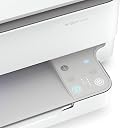
Inizio dicendo che mi sono trovato ad acquistare una stampante per via dello Smart working non avendone più una a casa da diversi anni. Ho fatto per questo diverse ricerche su tantissime stampanti ma spendere tanti soldi ora non era la soluzione giusta per me, soprattutto per il mio utilizzo. Mi imbatto in questa HP ENVY 6020 e dopo aver letto le varie recensioni ( ce ne sono davvero tantissimi e soprattutto positive) mi convinco ad ordinarla perché rispecchiava le caratteristiche da me ricercate: - Funzionalità - Dimensioni ridotte - Affidabilità - Estetica Appena arrivata ovviamente l'ho subito collegata per procedere nella configurazione. Il manuale di istruzioni è molto chiaro e dettagliato per quanto sia davvero semplice la configurazione. Tra l'altro il manuale di istruzioni vi aiuterà nella configurazione sia che essa avvenga tramite PC oppure tramite Smartphone. Ciò che dovrete fare riassumendo sarà solo scaricare applicazione "HP SMART" e l'unica cosa da fare sarà seguire tutta la procedura e creare il vostro account con il quale farete poi l'accesso sugli altri dispositivi. Veniamo ora ad alcuni dettagli: • APPLICAZIONE: L'applicazione è fatta molto bene, facile, veloce ed intuitiva da utilizzare. Nello screenshot che ho riportato potrete vedere le varie soluzioni che avrete per caricare, cercare o creare dei documenti da inviare poi alla stampante. Potrete per esempio prendere dei documenti PDF che già avete in archivio oppure fotografare un foglio che verrà trasformato in documenti per la stampa o invece stampare una foto ecc... Una volta scelto il documento vi si aprirà una sezione nella quale potrete andare a decidere quali pagine escludere dalla stampa e le varie opzioni ( a colori/bianco e nero oppure ( solo fronte/ fronte retro) . Ci tengo ad una precisazione: Se siete abituati a stampare fronte-retro, dovrete impostare la voce scelta tutte le volte perché non tiene memoria delle vostre preferenze. • QUALITA DI STAMPA E VELOCITÀ: Ottima qualità di stampa e anche molto veloce, da questa stampante non me lo aspettavo. Come potrete vedere nel video che ho caricato in pochi secondi mi stampa pagina fronte e retro. Non ho fatto una prova timer per confrontare ciò che il venditore riporta delle 10 ppm ma comunque va molto bene così per me ( Se cercate stampanti professionali per stampare migliaia di pagine al giorno non è sicuramente questa la stampante giusta per voi... È pur sempre una stampante da meno di 90euro! • SCANSIONE Anche il vassoio per la scansione è davvero fatto bene, sia per scansionare che per fotocopiare. • STAMPA DA REMOTO Questa è sicuramente una delle funzioni che più mi ha colpito, sia perché è prevista e sia perche funziona alla grande! L'altro giorno avevo bisogno di un documento per quando sarei rientrato a casa e con la stampa da remoto sono riusciti a stamparlo comunque così che quando sono rientrato a casa non ho perso tempo. • TASTI TOUCH In una delle foto che ho caricato vedrete anche i tasti touch. La spia in alto a sinistra è il wifi che vi conferma che la stampante sia regolarmente collegata alla rete mentre i due tasti sotto sono: - quello a destra serve per fotocopiare a colori - quello a sinistra per fotocopiare in bianco e nero Altro tasto presente, che non era acceso in quello momento è una ❌ che serve per annullare i documenti oppure fermare una stampa in corso. Penso che di informazione e dati sulla stampante ci sia ancora molto da dire ma non vorrei dilungarmi troppo . Per la mia esperienza con questa stampante senti davvero di consigliarvela se cercate una stampante: - Affidabile - Poco ingombrante - Di una marchio conosciuti - Con un applicazione top - Facile da utilizzare - Che costi poco ma avbia un alto rapporto qualità prezzo - Facile da installare Ad oggi fattori negativi non ne ho riscontrati, se cambiasse qualcosa nel tempo aggiornerò la mia recensione. P.s. nel pacco sono già presenti due cartucce ( 1 a colori ed 1 per il nero) Spero di esservi stato utile
Trustpilot
3 weeks ago
3 weeks ago