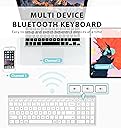
⌨️ Elevate your workspace, connect like a pro, and never miss a keystroke!
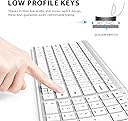
The iClever BK10 is a sleek, rechargeable Bluetooth 5.1 keyboard designed for professionals who demand seamless multi-device connectivity, ergonomic comfort, and extended battery life. Featuring a full numeric keypad, quiet scissor-switch keys, and durable aluminum construction with a protective silicone cover, it enhances productivity across Mac, Windows, iOS, and Android platforms.


| ASIN | B07ZJ6FX4P |
| Best Sellers Rank | #28 in Computer Keyboards |
| Customer Reviews | 4.1 4.1 out of 5 stars (14,711) |
| Date First Available | March 24, 2020 |
| Item Weight | 1.15 pounds |
| Item model number | BK10 |
| Manufacturer | iClever |
| Product Dimensions | 14.41 x 4.92 x 0.63 inches |
R**H
This is a great quality, sleek and sturdy non-slip design, made from aluminum.
The iClever Bluetooth keyboard is a high quality, well built sturdy keyboard made from aluminum. Its tapered design and non-slip base make it very stable, and the keys have a nice positive feel. It comes with a silicone cover that fits perfectly and will protect it from wear and spills. It does not have back-lit keys, but its build quality and sleek, low profile design will enhance any workstation.
K**M
Great keyboard, Great service!
I bought this keyboard almost a year ago to replace an apple keyboard that started going through a set of batteries every week. I love that this one is rechargeable and could connect to multiple devices, switching between them by simply pushing a button. It really improved my workflow between my iPad and computer. I also love the key spacing, how easily the keys press down and most importantly how quiet they are! No obnoxiously loud keys here! A couple weeks ago the keyboard started randomly disconnecting from devices and with computer I had to get a wired keyboard to sign into computer and reconnect it. The problem escalated in occurrence and then even started changing language I was typing in despite the computer and iPad still being set on English. Time to contact customer support! I contacted iClever with order number and a description of what was happening. They immediately asked for my address and sent me a new one. Now I am happily typing this on a keyboard that works! The new version included a silicon cover which I am actually liking. It does not affect the use of the keys and will help protect them from dust. Thanks iClever for a great product and better than expected service!
A**L
Budget Pricing With Apple Build Quality
The iClever keyboard looks and feels premium, but more importantly, it functions incredibly well. Recently, while working on a branding design for a client, I was given a late 2018 27” iMac as a gift. It didn’t come with accessories, and syncing my Magic Keyboard between both iMacs wasn’t working well at all. The Apple Magic Keyboard looks nice, but functionally, it isn’t an amazing experience given the price. The iClever Keyboard compares much more favorably to the original battery powered Apple Bluetooth Keyboard which uses traditional batteries, and tends to disconnect itself frequently. The iClever Keyboard not only stays connected to Bluetooth on startup, it can also pair to 3 different Bluetooth sources, then easily switch between the 3 of them. Not only that, it also has a built in battery, which came fully charged, and ran for a total of 9 hours without depleting the battery drastically. It also looks amazing, matching both the iMac, the original battery powered Bluetooth Apple Keyboard, and the Magic Keyboard. Where it also excels is the build quality. It feels sturdy, and it has more of a rubber, non sliding surface than the considerably higher price Magic Keyboard. The front rubber pads prevent my desk from getting scratched, unlike the Magic Keyboard, where the back has nice rubber padding, but the front lip essentially touches my desk, resulting in light scratches on my desk over time. The price is amazing, and the thing that impressed me the most was that none of the quality elements were expected. My initial expectation was tbat it would be a nice looking Apple style keyboard, for a very good price. The only thing I’m not really happy with is the slightly rough texture on the keys, where the Magic Keyboard, as well as the older battery powered Apple Bluetooth Keyboard, both have a much smoother key surface. In my case, that’s not something to dock points for because that’s subjective. With Graphic Design work, outside of frequently used hot keys, the keyboard isn’t really used very often. If someone uses a keyboard more often, I can see how the slightly rough textured keys may be initially offputting. With that being said, the iClever Keyboard is easy to pair. You simply hold down the 1 key with the Bluetooth symbol on it for 5 seconds. It will begin flashing, which allows you to pair it to your Mac or PC. Once you pair it, there’s a menu that opens up on the Mac asking you to hit the key to the right of the shift key on the left, and to the key to the left of the shift key on the right. You’ll then see 3 options, choosing the USA option essentially mimics the traditional Mac keyboard setup. On the keys you’ll clearly see the Windows equavanlant on the top, and the Apple one on the bottom. For example, the “Win” key has the Apple “Alt” key symbol underneath it so that it’s not confusing for Mac or PC users. The only exception to this is the Function key, which doesn’t have the Mac equivalent ‘Opt’ for the Option key underneath the ‘FN’ abbreviation. I’ve found myself pairing the keyboard to both of my iMacs, and just using it instead of the Magic Keyboard, or even the older Apple Bluetooth model at times. The iClever Keyboard is easily a 5 Star product all around. For the price, I didn’t think such a high level of quality would not only be achieved, but vastly exceeded, when all of its additional quality of life features are taken into account. I’m very OCD about presentation, aliviating clutter, and build quality, so that’s not common for me to say about most products. I build PCs as well, and the iClever Keyboard was great as a Windows Keyboard, though in that regard, I generally use the backlit Logitech K830 trackpad Keyboard instead. It’s nice to have the iClever Keyboard as an easy to pair option for when the Logitech is charging though.
S**S
Faulty after minimal use + no response from seller
UPDATED: Sent new keyboard after seeing review + emailing! Works great so far! 😊 Still some random keystrokes seldom BUTTT it's been hours and it's perfect! Great customer service definitely LOL. Exactly what I needed and wanted! 😋 I really loved this keyboard and was super excited to get it! BUT after literally three or four uses, the CTRL key didn't work anymore. I use it religiously when I'm doing my work or writing! 🙁 ALT doesn't work either. I have done everything in my power to fix it and I've contacted them a few times and got no response either. Super disappointed! Otherwise there have been no other issues (except a very few amt of times where it typed random characters. Like twice 💔) and pairing was very simple. I also have not necessarily had the time to really know how well it works since I decided to stop using it after it became defective LOL
C**A
I’ve been using the iClever Bluetooth Keyboard BK10 with my MacBook Air for nearly a month, and it has exceeded expectations in every way. Having previously used the Logitech K480, I constantly struggled with intermittent connectivity and frequent battery drain. Switching to the BK10 has been a game changer. The connectivity on the BK10 is fast, stable, and seamless—my MacBook Air picks it up instantly every time. The battery life is equally impressive; after almost a month of regular use, it still shows 50% remaining, which is a huge improvement over my previous keyboard. Typing is smooth and remarkably quiet, making it ideal for both work and late-night use. Overall, the iClever BK10 is a reliable, well-built, and high-performing keyboard that offers outstanding value. Highly recommended for anyone looking for a dependable Bluetooth keyboard for their MacBook.
B**Q
Perfect replacement for my original keyboard for my Mac. Comes with an insert with instructions to pair the item, no dongle needed. As well as a guide for finding the keys and where they are located. Sturdy and lightweight for carrying around to different items to connect to. There are three available. In my case, I have my Mac, iPad and headset. It feels great one my wrist while coding for long periods. Charges great and lasts long. So far on Day 3. The keyboard cover provided works well for me and it stays in place. I use my setup outside on my deck during great weather. The keys are silent. Great device. If I need another one, I will purchase again. Value for my money.
T**S
Excelente producto solo que que la configuración del teclado viene de usa y se complica si no esta pars México perp relación calidad precio le. Doy un 10
D**I
Fantastic! Soft ttouch keys and easy to use and charge. Battery life good (i do turn it on and off daily), compact with everything i need
M**W
This keyboard has the functionality, looks and quality of those double the price. It also comes with a fitted silicon cover, which will probably save your keyboard from certain death should you happen to spill your morning coffee onto it. The keyboard pairs with three separate Bluetooth devices - I have mine set up to use with my laptop, my iPhone and my smart TV.. A single charge of the unit with the provided USB-USB C cable will last several weeks. Overall, a fantastic product that offers excellent value for money.
Trustpilot
4 days ago
3 weeks ago