
Desertcart purchases this item on your behalf and handles shipping, customs, and support to Poland.
🔒 Stay ahead, stay secure — your home’s smartest guardian.
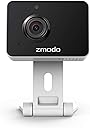
The Zmodo Mini Pro is a sleek indoor WiFi security camera delivering 1080p HD video with a 130° wide-angle lens, AI motion detection, and two-way audio. It features adjustable night vision up to 30 feet, secure cloud storage with bank-level encryption, and easy setup via the Smartz Eaze app. Compatible with Alexa and Google Assistant, it’s designed for millennial professionals seeking smart, reliable home monitoring with instant alerts and seamless remote access.
| ASIN | B00ZZ4HX1K |
| Alert Type | Motion Only |
| Antenna Location | Indoor,Pet |
| Best Sellers Rank | #265 in Dome Surveillance Cameras |
| Brand | Zmodo |
| Built-In Media | 1x Zmodo Wireless Camera 1x Power Adapter 1x Quick Guide Tools for Installation |
| Color | black/white |
| Compatible Devices | Alexa |
| Connectivity Protocol | Ethernet, Wi-Fi |
| Connectivity Technology | Wireless |
| Control Method | Voice |
| Controller Type | Amazon Alexa, Vera |
| Customer Reviews | 4.2 out of 5 stars 2,694 Reviews |
| Effective Video Resolution | 720 pixels |
| Field Of View | 135 degrees |
| Focus Type | Auto Focus |
| Form Factor | Cube |
| Global Trade Identification Number | 00889490001649 |
| Indoor Outdoor Usage | Indoor |
| Indoor/Outdoor Usage | Indoor |
| Item Dimensions | 6.5 x 4.8 x 2.5 inches |
| Item Type Name | Zmodo Mini WiFi Camera |
| Item Weight | 5.92 ounces |
| Light Source | LED |
| Manufacturer | Zmodo Technology Corporation |
| Manufacturer Warranty Description | 1 year manufacturer's limited warranty |
| Mfr Part Number | ZM-SH75D001-WA |
| Model Name | ZM-SH75D001-WA |
| Model Number | ZM-SH75D001-WA |
| Mount Type | Surface Mount |
| Night Vision | Yes |
| Night Vision Range | 30 feet |
| Number of Channels | 8 |
| Number of Items | 1 |
| Optical Zoom | 4 x |
| Other Special Features of the Product | Motion Sensor, Night Vision |
| Power Source | dc |
| Recommended Uses For Product | Indoor,Pet |
| Room Type | Living Room |
| Special Feature | Motion Sensor, Night Vision |
| UPC | 889490001649 |
| Unit Count | 1 Count |
| Video Capture Format | AVI |
| Video Capture Resolution | 1080p |
| Viewing Angle | 130 |
| Voltage | 5 volts |
| Waterproof Rating | IP65 |
| Wattage | 5 watts |
| Wireless Technology | Wi-Fi |
| Zoom Type | Digital Zoom, Optical Zoom |
D**C
You Don't Have to use the MeShare app!! This is a good camera.
Here is a list of things that I believe other reviews got wrong because people don't know they can use the Zmodo app. 1. The ZModo app's response is almost quicker than Nest/Dropcam app (seriously). It is definitely faster than the Arlo app. I own all three camera (http://smile.amazon.com/registry/wishlist/CKM50S56UDDB). 2. The instructions that come with the camera say to use the MeShare app but that is not true. 3. The night vision is pretty good. By far the best in this price range. 4. The Android app asks for a lot of permissions but if you are running Android 6 or better you can turn off the ones you don't need. 5. You can switch between low definition and high definition. 6. There is a 2-way talk feature. 7. You can update the cameras firmware from the app. 8. There aren't a lot of settings to turn on or off on a camera by camera basis. 9. The cloud service isn't ready yet but you can store a few videos locally on the camera. (as of 03/12/2016) 10. It is freaking $40!!! This is by far the best app/camera duo under a $50 and probably under a $100 (I hear mixed reviews about the Blink cams). I bought 2 more to replace some of the other cameras I bought in that price range.
G**E
Great pet camera
This is my first experience with a home camera; bought it to keep an eye on our pets while we were away. It was easy to set up, but not perfect. Had multiple error messages saying the wifi was poor, but what was really wrong was that the app needed to be re-started. After that, perfection. Some reviews complain of black and white videos. For me, that happens in low light: from dusk to dawn. It was great to check on our bunnies whenever we wanted with the live feed and to get notifications of when they were moving around (or when the sitter stopped by). You can talk to your pets, too, but be aware that you will be LOUD. Try speaking softly so you don’t scare the heck out of them. I absolutely recommend. Great peace of mind for such a low price, and the camera has good reviews online as well.
T**1
Possibly the best camera on amazon...
I have been using IP cameras for the past 5 years or so, and have to say that this is one of the best cameras I have ever used. Setup of the camera is quick and easy, using my Android phone. The quality of the video and audio is outstanding, and compares to my "higher" quality cameras. I think the best feature for me is the motion detect and sound detect. I have the camera placed in my house to keep an eye on my dogs, and if they start barking, I instantly receive 5 snap shots of what is occurring at that moment. Their app runs great on my phone, and allows me to easily switch between all of my Zmodo cameras. I dont believe that there is a better camera on the market for this price. I own 5 now!
A**R
"Wireless Device and Smart kit". The option that worked for me was ...
Just installed the Zmodo mini wifi IP camera (label on the box ZM-SH75D0011-WA) today (12/30/016). First of all, the included Quick Start Guide is misleading -- the installation instructions didn't match the Zmodo app. Below is the procedure I used to set up this camera. 1. Download/install "Zmodo" app from Google Play. 2. Launch the app, it will first ask you to sign up/register -- provide an email and a password. 3. Power on the camera. The front LED was solid green. 4. Go to phone's Settings (mine is Android phone), under wireless, look for a new SSID "ZMD_SAP", connect to it. It took a while to connect. Once connected, the front LED on the camera turned into blinking green. 5. Go back to the Zmodo app, click on + to add a device. The Zmodo app will show 3 options, "Zlink", "Automatic", "Wireless Device and Smart kit". The option that worked for me was "Zlink" (I first tried "Wireless" and it didn't work). Once "Zlink" was selected, it asked for the SSID of your home wifi router and password. Once confirmed, it took a while for the camera to connect to the home wifi router. The front LED was blinking blue for a while. Eventually, the front LED would become solid blue, indicating camera is connected to the home wifi router. My phone also automatically connected back to home wifi router. 6. Went back to Zmodo app, tried out all the features. Hope my review can help out a bit. Overall it's a good camera -- cheap and works great!
A**T
Long time owner..software updates rendered recording useless; no access to date/time feature; motion detection useless
While this inexpensive little camera has a decent picture, including low light quality, it completely fails in terms of another feature that is equally as important: video availability and storage. A series of glitchy "updates" has completely disabled my ability to keep track of video files. When I bought this camera last year the cloud service was not even working. It was a "coming soon" feature. However, the original software allowed me use full time recording and to store alert files on my phone, which I could then download and save. Each file was several minutes long, and I could actually go to any specific date/time and watch the recording by clicking a calendar icon and scrolling through the timeline. I would manually delete files that weren't needed. There is no sd slot in the camera itself so that is not an option. An update a few months ago opted me into a "free trial" for cloud service, which sounded great. I liked having that "option" as a way to hold on to video files I didn't want to store on the phone. Now that my free trial has run out, a new update has completely disabled my ability to click on date/time feature. It only shows me a handful of sound/video clips in increments of a few seconds. Full time recording has vanished. So now if there is a time I want to go back to view, too bad. How is a 10 second clip helpful if someone opens my front door? It doesn't even record long enough to identify the person. How is a security camera that doesn't record anything useful? I can't rewind or go forward. Instead I rely on the camera's motion detection feature to take a quick snapshot of an event. Unfortunately, the motion detection rarely works now. The last few days it does show some motion of my cat walking around but there are blanks left when I'm actually going in/out my front door. I will also mention that during my cloud free trial, it never really worked either. When I went to the login on the website it said "feature not available". Also the message alerts have stopped working. I have to manually pull up the app on my phone and click on alerts. Then I can randomly watch whatever useless 10 second clips happen to be there for the day. Another annoying problem is that these 10 second clips allow a download button to store them on your phone/tablet for later use, but will only allow local storage on device. I can not even move the clips to my micro sd card, nor is there a feature to change that feature. This camera only works with phones/tablets so it is useless with a computer and security software. So this camera has become utterly useless. I paid for a camera with certain features that the company decided to take away.
S**A
Surprisingly better than expected. Fast playback, quality video, charged with mico USB, totally portable and very easy setup.
My intent with this camera was for car video security. I have a 1958 VW Beetle and every time I take it out I have a hard time relaxing at the bar/restaurant/car show, or wherever I'm at, since I'm always worried someone is stealing or vandalizing it. I wanted something I could either wire to 12v or run off of portable power. This camera has a micro USB port and can be powered from any portable cell phone charger. Setup was extremely easy. I plugged it into my portable power supply, downloaded and opened up the MeShare app for Android and added the device. Connected first try. There was a moment of trepidation when all I could get was a blank screen. I simply rebooted camera and app and its been working excellent ever since. Video quality is as good or even better than some WeMo cameras I have. Another thing I find pretty amazing is the minimal delay there is with this camera. I have it connected to a portable WiFi hotspot (the one that will be present inside of my car) and the video is significantly more responsive than my WeMo cameras which are connected to my home WiFi at 50+Mbps. I also have some Arlo security cameras and this Zmodo also has slightly faster playback times. I guess I really wasn't expecting much and maybe thats why I am so happy with the camera (so far). I will report back with more feedback as my real world trials take place.
T**Y
Good camera
Do not buy. I own 23 of their cameras. Recently, the company changed their app. YOU ARE MADE TO WATCH ADS before being able to view your SECURITY CAMERA. The cameras have always been decent, but what good is it if you can't monitor your camera.
M**K
No Ads Please!!
Camera works great!! However, in the app I never had to worry about seeing ads. Now every time that open the app to see my cameras it wants to show me ads. This can be very frustrating when you are wanting to open you app and quickly check your camera's. Like I said in the past it wasn't an issue. I currently have 6 of these cameras.
A**E
Best product ever
Best product ever, good image no problems to connect internet, it will not work on 5G but work on the normal 2.4 wifi, if you wanna do someting for safe or share this is the most simple and the best product in the market, and the delivry was fast.
T**.
Tadellos !
Im Vergleich zu der zuvor bestellten ZMODO ZM-IXD1D-WAC ist diese Cam top. Bei beiden Geräten sollte die Einrichtung über die ZMODO-App funktionieren, tatsächlich schafft es aber nur diese (ZM-SH75D001-WA). Mittels der App mit dem WLAN verbinden, Gerät erscheint dann in der App, gleich auch die neueste Firmware geladen, fertig. Ich besitze schon ein anderes ZMODO-8-Kanal-System, hier war die Einrichtung ebenfalls sehr einfach und die Möglichkeit, mit der App auch per Handy von Überall auf die Cam's zuzugreifen war mir bisher nicht bekannt. Sicher, mit DSL-Anschluß und Portweiterleitung usw. auf's Heimnetz zuzugreifen ist natürlich auch möglich, aber ich habe seit einiger Zeit einen DS-Lite Glasfaseranschluss und damit ist das ganze ja nicht mehr so einfach bzw. gar nicht möglich. Daher ist diese Cloud-Variante sehr hilfreich und praktisch.
N**N
Fantastic little bargain camera
Bought as an alternative to a baby monitor and I'm not disappointed in the slightest. The image quality is great for the price paid, the video has next to no delay and with features like 2-way talkback you've got yourself a great quality video baby monitor at a fraction of the price. Obviously it's not as portable but these can also be run off power banks with a USB cable. The infrared is fantastic as well, no issue working in 0 light.
R**A
Buen precio y calidad.
Excelente tamaño, es muy discreto y lo utilizo abajo del motor de mi portón para ver quién llega a mi casa (y de ser necesario abrirle el portón). Ya le he instalado a mis familiares 3 en sus respectivos frentes de casa, para ver cuándo llegan sus hijos de la escuela o cuando alguien los visita.
A**C
Enchufe UK no de España
Me gustan mucho las cámaras de Zmodo, pero en este caso he recibido la cámara con enchufe UK en lugar del normal europeo sin que en ningún momento viniese especificado en la descripción. De hecho lo mandan de Inglaterra, por eso tarda varios días en llegar (además llegó un día más tarde de lo previsto)
Trustpilot
1 month ago
2 weeks ago