We remain fully operational. Our teams are working around the clock to ensure your deliveries continue safely.

DOWNLOAD THE APP


Customer Services
Copyright © 2025 Desertcart Holdings Limited
DOWNLOAD THE APP

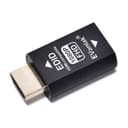

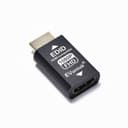
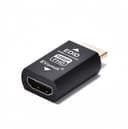
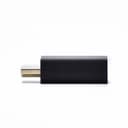


🔗 Lock your display, unlock your workflow.
The EVanlak HDMI EDID Emulator Passthrough is a premium aluminum adapter designed to maintain stable HDMI connections by locking EDID signals. Supporting native 1920x1080@60Hz resolution and 2.1 channel audio, it prevents display sync loss in multi-monitor setups and works seamlessly with Mac Thunderbolt to HDMI adapters, AV receivers, and video splitters. Ideal for professionals managing remote PCs or complex AV systems, it ensures consistent video output without desktop disruption.


| ASIN | B07YMS18T7 |
| Best Sellers Rank | #54 in Video Converters #1,592 in Home Cinema Cables |
| Brand | EVanlak |
| Color | E1080P-1PC |
| Compatible Devices | PC |
| Connector Type | HDMI |
| Current Rating | 1 Amps |
| Customer Reviews | 4.1 4.1 out of 5 stars (269) |
| Finish | Aluminum |
| Item Dimensions | 1.6 x 0.8 x 0.5 inches |
| Manufacturer | Evanlak |
| Model Number | E1080P-1PC |
| Nominal Power | 5 Watts |
| Number of Items | 1 |
| Number of Ports | 2 |
| Package Quantity | 1 |
| Power Plug Type | No Plug |
| Specific Uses For Product | TV |
| UPC | 752498099690 |
| Unit Count | 1.0 Count |
| Warranty Type | Limited |
R**E
Great for remotely managed PC for a senior.
Working great so far (a week) with a remotely managed Linux Mint PC I set up for my 80-year old mother. The M715q needs to be ON 24/7, so I can remotely manage it (VNC through ssh tunnel), and my mother uses it to watch streaming videos and what not. As part of remote management, I need to be able to reboot it remotely. Even without that, it simply will not behave correctly if an active display isn't connected to it. In my case, the display is just a basic 1080p 60Hz (59.94Hz) TV, so I chose the 1080p version. My mother simply turns the TV ON/OFF as needed. My M715q doesn't have HDMI output option, so I'm using a basic (passive) Benfei Displayport to HDMI adapter on top of this device, and it hasn't negatively affected its function. Even the audio through HDMI has been working perfectly, through multiple ON/OFF cycles each day.
I**N
Great for Mac laptops and HDMI switchers!
I have to use these on Apple MacBook Pro laptops going into a HDMI video switcher. The Mac's HDCP protection kicks in without them.
F**R
Potential issue with HDCP support
The quality of the device seemed good, but it didn't do what I needed. My Roku could see the device was attached and would not open apps due to HDCP error.
R**M
It does what it's supposed to
The item works just fine but I'd suggest getting this on sale since it's a bit pricey for what it does (there are plenty of cheaper alternatives). Overall no complaints on the product itself, it fulfills a simple task for problematic devices.
J**Y
1080p model got my mClassic working on my Samsung 4K TV
The mClassic will choose the highest available resolution between 1080p and 1440p when upscaling 480p content. Newer Samsung 4K TVs support 1440p, so that’s what the mClassic will push to these TVs. Unfortunately, Samsung TVs are much less forgiving of the 1440p output compared to 1080p. On some of my retro game devices, the signal would frequently cut out. Others wouldn’t display at all. By using the 1080p version of this device, I was able to force the mClassic to output 1080p, and I have yet to encounter display problems with any of my retro devices since I started using it.
B**N
Does not work to avoid auto input changes
My monitor automatically changes input whenever I unplug my laptop. It's frustrating that I need to change the input every time that I plug it back in. I've tried turning off the monitor before disconnecting my laptop, but that does not help. Unfortunately this device did not help at all. Even when plugged into my monitor, the monitor will still change inputs automatically when I disconnect my laptop. Waste of money.
D**7
Just what I needed.
I had an old TCL HDTV with HDMI inputs that wouldn't negotiate properly with certain devices... sometimes the color would be off, other times there might be no sound.I didn't want to get rid of it, because it works fine otherwise. After digging around awhile, I realized that EDID emulators were a thing. I ordered one that does 1080P- because that's what the TV is supposed to do, and as soon as I hooked it up the problems went away.
X**N
Says What It Does - Does What It Says. Very Easy!!
Not bad for the cost and very easy to use. Just plug it in and use it. I was looking for some kind of instructions. Plug it in line with the HDMI output of your computer and that's it. This fixed my desktop rearrangement when turning off my surround sound receiver. Computer stays on as it's running Windows 8.1 with Media Center. Worked great! I have been having an issue with watching NBC/Comcast content on my Sharp Aquos TV. This product did not resolve that issue. I think that's a video drivers or TV firmware issue. So for the price, definitely worth having my desktop look the same with icons where I want them every time. This can, I believe, also be used as a dummy plug. Just plug a monitor into it once and the remove that monitor. Should work fine for that.
V**N
Er liefert eine stabile EDID und verhindert nervige Hot-Plug-Ereignisse – mein Signal bleibt auch beim Umschalten am HDMI-Switch konstant. Full HD wird sauber erkannt (1920×1080 bzw. 1080×1920 @ 60 Hz), keine Flackerer, kein Neu-Anordnen der Fenster. Verarbeitung ist solide, der Stecker sitzt fest; wird handwarm, aber unkritisch. Besonders praktisch in Kombination mit Switches/Extendern oder AV-Receivern, wenn Geräte sonst „vergessen“, dass ein Monitor angeschlossen ist. Für den aufgerufenen Preis eine klare Empfehlung. **Plus:** stabile EDID, kein Hot-Plug, FHD @ 60 Hz, kompakt **Minus:** keine Status-LED (Geschmacksfrage) **Tipp:** Einmal einstecken, Port merken lassen, dann erst den Switch/Receiver einschalten – so ist die Erkennung am zuverlässigsten. Bei Verwendung einer Switch: der Emulator führt in die Switch, also PC -> HDMI-Kabel -> Emulator -> Switch.
A**H
It is not working as mentioned.
M**N
I was having issues with a Nokia Android box stuttering on playback through a receiver to a projector. This was happening intermittently on a number of different apps and occurred whether streaming or playing a file from my server. It did not happen using my Firestick. For a long time I assumed the Nokia box was suspect, however, with the help of ChatGPT I narrowed it down to an issue with my receiver. For some reason, the correct info was not being passed through from the Nokia box, and this caused the playback issue. ChatGPT suggested forcing the format using an EDID device. Considering the box only cost £50, spending nearly £20 made me think twice, but I thought I could send the EDID adaptor back if it didn't work. No need! It did work and all the videos that had previously stuttered now play perfectly. Assuming the device lasts, it was money well spent.
A**R
間に挟むだけで解像度を強制的に設定できる優れモノです。会場にある謎のプロジェクターを使ったプレゼンでHDMIがうまく映らない系のトラブルを回避するのに使えます。 使ったばかりなので耐久性は不明です。でも接触不良で壊れるみたいな話があるのでこれに変な負荷がかからないよう、直接機器に刺さずに延長ケーブルを挟んであいだに繋ぐような形で使っています。
M**T
This is the perfect companion to the Yolobox, as it makes it accept a lot more signals :) It does what it says on the tin, so if you need to force a source to send in 1080p, this is your guy
Trustpilot
3 weeks ago
3 weeks ago