We remain fully operational. Our teams are working around the clock to ensure your deliveries continue safely.

DOWNLOAD THE APP


Customer Services
Copyright © 2025 Desertcart Holdings Limited
DOWNLOAD THE APP
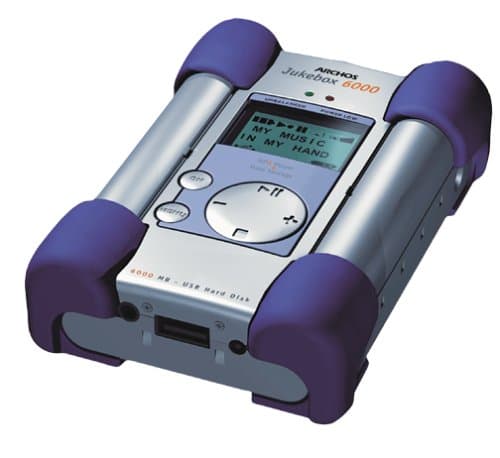
🎧 Own your soundtrack, anywhere, anytime—because your music deserves the ultimate stage.
The Archos Jukebox 6000 is a sleek, palm-sized MP3 player with a robust 6 GB dual storage capacity, enabling over 100 hours of CD-quality music playback. Featuring fast USB plug-and-play connectivity, a proprietary shock protection system, and a 2 MB memory buffer, it ensures smooth, interruption-free listening. Beyond music, it doubles as a portable hard drive, supporting easy drag-and-drop file management and customizable music organization. Compatible with Windows 98/2000 and USB-enabled Macs, it includes bundled RealJukebox software, stereo headphones, and a carrying pouch, making it a versatile device for music lovers and digital nomads alike.
| ASIN | B000050NPX |
| Customer Reviews | 3.2 3.2 out of 5 stars (23) |
| Date First Available | October 17, 2000 |
| Is Discontinued By Manufacturer | Yes |
| Item Weight | 10.2 ounces |
| Item model number | JUKEBOX6000 |
| Manufacturer | Archos |
| Product Dimensions | 1.3 x 3.2 x 4.5 inches |
P**Y
It makes me happy
It took me a few weeks to decide on an MP3 player, and it was a recommendation from a friend that landed me on the Jukebox. Pros: -Easy to load to and from. Rather than using a specialized program to manage files, it uses a regular drag-and-drop interface. -Clear filing system. When selecting tracks to play, you get to set up the heirarchy of files however you like. For example, Genre -> Artist -> Album -> Song. Makes the one-line display surprisingly easy to navigate. -File transport. I also use the player to carry larger files to share with friends (movie trailers, shared programs, etc.). Good for pals without broadband. -USB. USB is fast! It took me about 1/2 hour to upload all my MP3s. -Long battery life. I haven't had it die on me yet, and I usually only charge it every other day or so. -Great storage. I have about 1GB of MP3 files, so I still have quite a way to go before it's even nearly filled. Cons: -Only MP3. The current Firmware version still only supports MP3 format, so the few CDs I had stored as WMA I can't play (although WMA <-> MP3 converters are available). -Boot up. Since it's a hard drive, it takes a few moments (about 30 seconds) to boot up. The only true kicker is you have to hold the power button the entire time, which is annoying if you're about to go out jogging. -Moving parts. Since the unit is not solid-state (it's a hard drive), it's possible to make it skip, or severely damage it in a fall. So far I've only made it skip one time, and it was while leaping from a bus exit to the curb. -No one-touch volume. Probably the biggest downer is the lack of volume buttons or a wheel on the unit. To adjust volume, you have to access the control from the main menu. It's only two clicks away, but a simple wheel on the side would have been nice. Over all, I'm very, very happy with this unit. If you just want a player for short jogs or the ride to work, a smaller, lighter unit would probably be better. But since I transport large files and like having a large selection of music on hand, the Jukebox 6000 is perfect for me.
S**S
Great device...but a few glitches from Archos
I'm a techno-klutz and I got this thing working well in about a day...but without any help, at all, from Archos or its manual. PROS: size and technical features are great.(I looked at a Nomad--this is significantly smaller and more portable). It works extremely well through my e-machine. Once I figured out how to do it (with no help from Archos) I found it easy to transfer CDs (through MusicMatch) to the Jukebox drive. I now have the transfer process down to about 12-15 minutes per disc.[you just record the disc/selected tracks through MusicMatch's recorder. Label the artist and album on the recorder itself. Go to MyDocs/MyMusic folder on your C drive and simply click and drag (or copy) the recorded files to the "F" drive, corresponding to the jukebox. You can then reorganize the files directly on the F drive. Neat!) I've now got the music files organized by artist/composer, and they're easy to find on the device. I found the sound--despite what other reviewers have said--to be excellent...at least as good as a decent discman. I did substitute good, small headphones with an in-line volume control, since access to the volume on the machine itself is difficult. Sound is terrific when played through a Soundworks 88--and is quite good when played only through small, amplified speakers. CONS: Archos' instruction manual is almost worthless. It is hard to read, confusing, doesn't define terms etc. etc. Graphics are non-existent. Instructions for the MusicMatch software are not much better. Archos webpage is worthless. No instructions at all about the device. No FAQs of any value. No instructions. Nothing! Archos technical support "hotline" is absurd--I called many, many times the first day, and each time the call was sent directly to a voicemail box. Not once--with four messages--did anyone call back. When I finally reached someone--after several hours of trying--they were of virtually no help...didn't know the machine, couldn't communicate well in English, didn't get back to me when I called with followup. If you need help on this, don't look to Archos. Although I love the machine--and particularly the idea of having 100 to 150 of my favorite discs accessible anywhere--I think Archos should think twice about marketing this on a big scale until they can get product support. I'm serious--they've got the worst customer support/product support operation I've ever encountered! That being said, if you're not particularly computer proficient--like me--but are patient and motivated, you will be rewarded!
Trustpilot
1 month ago
2 months ago