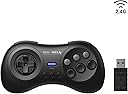

8Bitdo M30 2.4G Wireless Gamepad for Sega Genesis Mini and Mega Drive Mini and Switch with 6-Button Layout (Black)
Product ID: 156021245
🎮6-button classic layout
📡2.4G wireless tech
🔋built-in rechargeable battery
Desertcart purchases this item on your behalf and handles shipping, customs, and support to Poland.
🎮 Level up your nostalgia with wireless freedom!
The 8Bitdo M30 2.4G Wireless Gamepad delivers a premium retro gaming experience with a classic 6-button layout, wireless 2.4G connectivity, and a built-in rechargeable battery. Designed specifically for SEGA Genesis Mini, Mega Drive Mini, and Nintendo Switch, it offers turbo functionality (except on Switch) and comes complete with a receiver and USB cable for quick setup. Perfect for millennial gamers craving authentic gameplay with modern convenience.

| ASIN | B07XPHP57T |
| Additional Features | Wireless |
| Best Sellers Rank | #3,770 in Video Games ( See Top 100 in Video Games ) #8 in Sega Genesis Accessories |
| Brand Name | 8Bitdo |
| Button Quantity | 6 |
| Color | Black |
| Compatible Devices | Nintendo Switch |
| Compatible Video Game Console Models | SEGA Genesis Mini, SEGA Mega Drive Mini |
| Connectivity Technology | USB |
| Controller Type | Gamepad |
| Customer Reviews | 4.4 4.4 out of 5 stars (1,819) |
| Global Trade Identification Number | 06922621501015 |
| Hardware Platform | sega_genesis |
| Item Weight | 4.16 ounces |
| Manufacturer | 8Bitdo |
| Manufacturer Part Number | 6922621501015 |
| Model Name | 6922621501015 |
| Model Number | 6922621501015 |
| Package Quantity | 1 |
| Power Source | Battery Powered |
X**R
One of the best retro controllers released!
This is coming from someone that plays wired up to my Steam Deck on the dock, so any 2.4G talking points or battery life will not be discussed here. I mainly got this for playing retro SEGA games that used this controller layout, since playing with a modern controller feels wrong. As I got used to playing with this, I realized this may be my go-to controller for both retro and 2D games from now on. It works for nearly any genre, such as being one of the absolute best controllers to use for Shmups, or a fantastic alternative for fighting games. Platformers, RPGs, Racing, etc. They all play very well! I even tested it on Sonic Racing Crossworlds and beat a Time Trial record I had on Super Sonic Speed. This thing can handle nearly anything as long as you don't use a R stick for anything important and can move with the D-pad too. That's cool, but what about the controller itself? How's the feel of it all? Responsiveness? Quality? It's all fantastic. The buttons are nice and big while being easy to reach with my thumb. Travel distance is short for all 6 face buttons. The L/R buttons are also great. The star of the buttons is actually the D-pad. This thing is phenomenal! It moves in all 8 directions in anyway you want. The travel distance it short, so inputs come out easy. The texture is that of a rubbery hard plastic, where it feels like it grips your thumb without any accidental sliding happening, but it's still smooth enough to let you slide your thumb around if you actually wanted to. The controller itself feels nice on the hands. My fingers wrap around the sides while giving my thumbs enough space to reach every button. The texture of the plastic helps prevent slipping without it feeling rough on the hands. For what it's worth, I believe it to be a controller worth your money. For me, playing a lot of older games and some newer ones with this thing is pretty great. Only thing to keep in mind is that the dongle won't connect to your PC ootb, instead you'll likely use the cable that comes in the box. If you want wireless, get the Bluetooth version. This one will be detected as an Xbox 360 controller, which wasn't hard to properly set up. Inputs will need to be remaped, but once you find the proper inputs and set them up accordingly, it'll be smooth sailing.
L**X
Nearly Perfect Retro Pad
Wanted to play some retro (and retro-style) games with my 3 year old, and newer Xbox-style controllers are too complicated and too big for his hands. I've had good luck with the 8Bitdo Ultimate in the past, so I decided to give this a shot. I'm blown away! I was a Genesis kid, and while this isn't a 100% exact match for the Genesis or Saturn controllers, it just feels like home. The size works great for both me and the kid, and the d-pad is absolutely incredible. The 2.4G connection feels extremely responsive on Steam. There are only a couple negatives, the first being that not many games (aside from Sega) were designed for this layout. Haven't tried it on Windows, but at least in Bazzite it asked me to map the buttons myself, which I did by copying Xbox fighting pad layout. Also, there doesn't seem to be a home/Xbox/Steam button, so getting back into Steam needs to be done with another controller. (It's possible both of these issues may have a resolution, but I haven't messed around with it.) All in all, would definitely recommend, and I'll be picking up more of these in the future!
A**R
Great if you want a 6-button Genesis/Saturn controller; a bit weird on Windows.
First off, to get this mostly working wirelessly on Windows as mentioned in another review: Hold the Heart button (Home) + Up to put the controller in X-Input mode (you'll hear the disconnect/reconnect peripheral sound; Down puts it in D-Input mode and Left puts it in Switch Pro mode) Hold the Minus button (Mode/Select) + Up to make the dpad function as a dpad (the blue light by the USB-C port will flash; if you want it to show up as L or R stick instead, hold Left or Right) While in XInput mode, the ABXY and Start buttons map as expected; Z and C map to RB and RT respectively while the actual bumpers map to LB and LT. The Minus button is Select, the Heart button is Home and works just like the XBox button etc., and the Star button doesn't pass through to the PC instead toggling Turbo as described on the instruction slip. None of this is documented in the included instruction slip except the Turbo bit; the dpad mapping is mentioned on their support site but much of the rest information there doesn't seem to apply to the current revision of the M30 2.4 GHz (no red LED, USB-C vs micro USB, the button maps). Some of the information you'll find online and even in older reviews here also will not apply to the current revision (especially mode switching or button mapping). This contributed to subtracting a star in the end - even if you ignore the PC weirdness as it's declared unsupported, the rest of the documentation still hasn't been updated to match current devices (and really there's no good reason for a USB dongle to not officially support PC when all the work has been done already). All that said, this is a mostly nice pad for retro games up to the 16/early 32 bit era (before PS DualShock/Saturn 3D Pad) and games based on that era (Hi, Mina the Hollower!) - indeed, despite all the Genesis/Mega Drive ad copy the shape and layout of the pad itself is actually close to that of the original Sega Saturn control pad. The white M30 matches the colors of the white Japanese Saturn controller, while the black M30 matches the colors of the Japanese 6-button Genesis/Mega Drive controller (the bluish start button vs. grey in the US or red in the EU). Both look quite nice; I have the black one for maximum nostalgia myself. The shell itself is made entirely out of a nice-feeling textured plastic. It's a solid shell - no flexing or creaking when squeezed or twisted. It's light compared to my XBox controllers, but that's a good thing as much of its weight will be resting on your fingers since there are no grip wings like you'd find on more modern controllers. The buttons feel good and the dpad is great. All the buttons are rubber dome buttons just like the original Genesis controller; unfortunately, the plastic part of the buttons rattle a slight bit and there's no homing dot on the B or Y buttons. Controls feel precise and quite responsive with the 2.4 GHz connection both in Windows games and in RetroArch with runahead; I didn't use it wired much as the wireless felt good. It's supposed to be much better than the Bluetooth version (one site mentioned ~3.6 ms latency vs ~21 ms for BT!) which is why I dealt with the remapping. The other issues I ran into aren't really this controller's fault and just artifacts of having to show up as a standard controller to a PC. As mentioned, Z,C, and RB show up as RB, RT, and LT respectively once mapped to an XBox controller. This is unavoidable if wanting to use standard X-Input bindings and this allows the controller to be used for any PC game only requiring one directional input, but maybe they could have left LB/RB the same and did the face buttons as LT/RT? Also, if you're using this with an XBox controller etc. on the same PC, Windows doesn't seem to have a deterministic way to forcibly map a given controller to a given XInput port. Luckily I have a USB hub with individual power switches for each port, so I just put my XBox Wireless Adapter and 8Bitdo 2.4 Dongle on that and turn them on and off as needed. I should have bought one of these a long time ago. It's not without flaws but it's still great for those retro games that don't need an analog stick.
F**Z
Awesome Controller!
I bought this to use on the Evercade and it works Great. It feels nice and Dpad and buttons feel so responsive. Definitely worth buying.
V**R
Clean design, great comfort, effortless setup
Love this controller. Clean white design with a nice retro feel. Very comfortable and lightweight - great for long sessions. Buttons and D-pad are precise and responsive. Super easy to set up - just plug and play. Highly recommend.
H**N
Love it for my Sega Astro City Mini V
Bought it for my Sega Astro City Mini V and it works like a charm. It was easy to use. Plug and play. There is no button or switch to turn it off and it turns off by itself within 15 minutes of inactivity. I don't know if that wastes battery, but I would much prefer to physically turn it off when I can. Buttons feels great. D-Pad is pretty good too. Feel really good in the hand. I love the white color, but of course you can get a black one. Best thing about this is that it's wireless, unlike the official ones that you can buy for the cabinet. Now I can play the games on TV or on the cabinet without having to sit right next to it with my hands in the way because I have to use the built in small joystick and buttons on the cabinet itself. Totally recommend it and totally worth the moneyh.
R**Y
Much better then Bluetooth version
I'm using this with retropie. I've had some issues with my m30 Bluetooth version over the years. Latency issues, random disconnects, and also the shoulder buttons being registered as axis. This controller has none of the above. It connects instantly with no noticeable latency. I love it. Best retro gamepad that money can buy. They need to restock the black version.
K**N
WARNING: Warranty in name only
Take this warning from me. If anything happens to your 8bitdo product, such as the controller no longer taking charge well within the 1-year warranty period, unless you're in China, it's nearly impossible to actually get your product repaired or replaced since you're required to send it back to China. The warranty is there in name only but in actuality, cannot be used. Here's an email trail to give you an idea: Date: Tue, Sep 22, 2020 00:09 AM To: "[email protected]"<[email protected]>; Subject: M30 controller malfunction Hi 8bitdo, I purchased the 2.4ghz M30 controller for Sega Genesis Mini and it will not take a charge. The controller was purchased on Oct 3, 2019 from Amazon US. Attached is the invoice. The controller works wirelessly when plugged into a power source such as a USB charger but when it is not plugged in, there is no response and as soon as I plug the wire, the red light comes on to indicate that it's charging... yet the battery doesn't seem to take charge at all. The firmware is on latest 3.10. Can we discuss getting a fix/replacement please? Thank you. ---------- On Tuesday, September 22, 2020, 07:02:09 AM EDT, 8BitDo Support <[email protected]> wrote: Hello. So sorry you had this problem. We're manufacturers, far away in China. We can repair or exchange it for free. You only need to pay the freight/cost to send it back. Technician must detect and verify the issue of the product. And then figure out what the problem is. Please let us know your decision. We will never ignore our customers. Have a nice day. ---------- Date: Thu, Sep 24, 2020 01:45 AM To: "8BitDo Support"<[email protected]>; Subject: Re: Re:M30 controller malfunction Hello, Thanks for your response and offer for a free replacement. While I think it's reasonable for me to send the game pad to a service center in the same country (USA), I do not feel it is reasonable to have to send the controller all the way to China, especially considering the cost of freight and the time it would take for shipping, especially with delayed shipping due to Covid. Is there a service center in the USA I can send the controller to? Thank you. ---------- On Thursday, September 24, 2020, 08:44:13 AM EDT, 8BitDo Support <[email protected]> wrote: Hola. You can only send it back to us. We are terribly sorry. Sincere regards. ---------- On Thursday, September 24, 2020, 12:20:30 PM EDT, Hello again. This is very disappointing. It's essentially a warranty support that cannot be used in reality. I was looking at the new upcoming arcade stick but I will steer clear of it since the support process requires you to send the product back all the way to China. I will let other customers know of this situation. ---------- On Friday, September 25, 2020, 11:17:33 AM EDT, 8BitDo Support <[email protected]> wrote: Hola. We have sincerely and patiently serve you. We also offer free repair or exchange/replacement services. Returning and replacing are common procedures. This is how the warranty works. Even your warranty has expired, we are still serving you. In any other company, that's not going to happen. Sincere regards. ---------- Date: Sat, Sep 26, 2020 03:57 AM To: "8BitDo Support"<[email protected]>; Subject: Re: Re:M30 controller malfunction Hi - I understand that sending a product back to the company for warranty support is a common practice. Unless I'm mistaken, there is a 1 year warranty on the M30 gamepad I bought. I bought the M30 from Amazon on October 3, 2019, thus the gamepad is still under warranty. I appreciate your communication with me. But really, how realistic do you think it is for me to send a $25 (USD) gamepad all the way to China? It will cost at least that much just on the shipping costs. You have inventory for new products that gets sold via Amazon and ships out of warehouses in the United States, yet you require your customers to send the products back to China. What if it's a much bigger product like the arcade fight stick? Is the customer expected to ship it all the way to China as well? This is not a reasonable business practice and speaking honestly, makes me not want to take a chance buying 8bitdo products again until your warranty support practice is changed. I really like your products but you have to stand behind it in a reasonable manner. The current situation is not reasonable. Thank you. ---------- On Saturday, September 26, 2020, 07:11:55 AM EDT, 8BitDo Support <[email protected]> wrote: Hola. TIPS: You can look for cheaper shipping option. It's very cheap if you ask for no TRACKING NUMBER. It's cheaper to just send the controller back without the battery. Sincere regards.
L**A
Controle
Muito bom controle fiel ao original do Mega drive recomendo.
G**I
Controller sega mega drive/genesis
Buona qualità costruttiva e feeling vintage. Funziona con Batocera e raspberry pi4
C**O
¡Excelente producto!
Funciona como debe ser. Me resultó sumamente grato para usarlo con mi "Mini Sega".
J**S
Feels good
Nice controller. Light, solid. Works fine with my Nintendo Switch, I like it for games like Mario.
A**.
Retro gaming.
Works on the steam deck 👍
Trustpilot
1 month ago
1 week ago