Buy anything from 5,000+ international stores. One checkout price. No surprise fees. Join 2M+ shoppers on Desertcart.
Desertcart purchases this item on your behalf and handles shipping, customs, and support to Poland.
🖱️ Elevate your workspace with wireless precision and all-day comfort—because your productivity deserves the best.
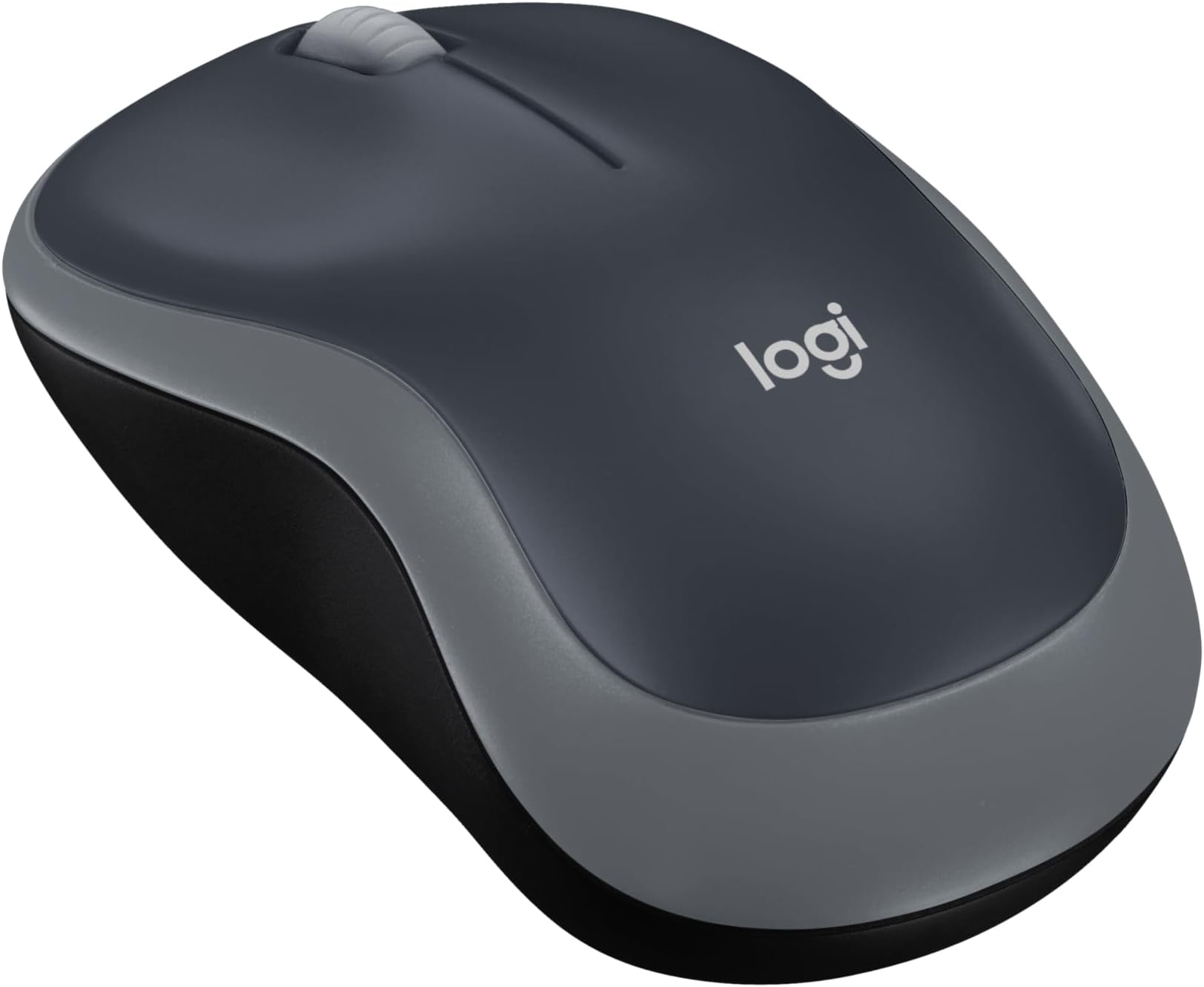
The Logitech M185 Wireless Mouse offers reliable 2.4GHz wireless connectivity via a compact USB nano receiver, delivering smooth 1000 DPI optical tracking. Its ambidextrous design ensures comfort for all users, while a 12-month battery life powered by a single AA battery keeps you unplugged longer. Compatible across major operating systems and built with recycled materials, it’s a sustainable, plug-and-play solution backed by Logitech’s 3-year warranty.


| ASIN | B004YAVF8I |
| Additional Features | Wireless |
| Antenna Location | Personal |
| Are Batteries Included | Yes |
| Are Batteries Required | Yes |
| Battery Average Life | 12 months |
| Best Sellers Rank | #1 in Computer Mice |
| Brand | Logitech |
| Built-In Media | Computer Peripherals^Mice^Computer Mice^ |
| Button Quantity | 1 |
| Color | Swift Grey |
| Compatible Devices | Personal Computer |
| Connectivity Technology | USB |
| Customer Reviews | 4.5 out of 5 stars 52,364 Reviews |
| Enclosure Material | Metal |
| Global Trade Identification Number | 00097855074126 |
| Hand Orientation | Ambidextrous |
| Hardware Platform | Mac, PC |
| Item Dimensions L x W | 1.54"L x 3.89"W |
| Item Type Name | Logitech Wireless Mouse M185 (910-002225) |
| Item Weight | 30 Grams |
| Manufacturer | Logitech, Inc |
| Mfr Part Number | 910-002225 |
| Minimum Required Operating System Version | ChromeOS 137, Mac OS 13 Ventura, Windows 11 |
| Model Name | 910-002225 |
| Model Number | 910-002225 |
| Mouse Maximum Sensitivity | 1000 Dots per Inch |
| Movement Detection | Optical |
| Movement Detection Technology | Optical |
| Number of Batteries | 1 AA batteries required. (included) |
| Number of Buttons | 1 |
| Operating System | mac os x |
| Power Source | Battery Powered |
| Range | feet |
| Special Feature | Wireless |
| Style Name | USB Receiver |
| UPC | 097855074126 |
| Unit Count | 1.0 Count |
| Warranty Description | 3 year limited |
M**E
Dependable, Reliable
As advertised. Logitech, best mouse for your hard-earned cheddar! It’s not that the (years) old Logitech mouse failed in any operational way, it just got that gummy, sticky surface texture that’s impossible to remove. While shopping for a replacement I noticed an off-brand mouse/keyboard combo and thought, “hey, 2 for 1”…mistake. All was well for about three weeks, long enough that when the gremlins arrived I didn’t immediately associate the new hardware. For the purposes of this discussion, gentle reader, know that I run legacy (what I affectionately refer to as, “Lazarus”) builds. Rigs that started life running Windows Vista/7, died, and that now, resurrected, run 10 and 11, and all that that implies. So, when a mouse started stuttering, of course I thought it was a gremlin in the machine, right? I spent more days than I am comfortable sharing with you pouring over processes and background apps, and registry trims…before Accam’s Razor suggested I eliminate the mouse as a variable. Changing the battery was ineffective, but when I swapped in the ooold Logitech…Yahtzee/Bingo/Booyah…smooth and precise…butter! All I needed was a new Logitech mouse. So, if you’re here you likely are having mouse issues of your own, or you just need one that works…this is it! 😉
P**J
Nice and a great value.
Hey, it works well. Just plug it in and you are ready to go. Only issue, minor, no light or color coding on back to indicate on or off.
N**E
Simple and efficient
This is a dandy little item. Easy to use straight out of the box, No fancy bells and whistles.but why should a mouse try to replicate commands that are on the laptop?
D**D
Very Fast
The Logitech M185 Wireless Mouse was exactly what I needed. This mouse works great and included a battery to get you started. No problems using it with my HP EliteBook laptop. I have to say, I was impressed with how fast I got the product. I don't think I could have driven to the store and back any faster. The service and price were worth it. Thanks again Amazon.
A**E
Great and convenient mouse! Good for anyone who wants something light.
I had lost a similar Logitech mouse a while ago, so I bought this one as a replacement. The Bluetooth feature saves me the hassle of physically connecting it to my computer, the mouse is quiet (aside from the scrolling), and the battery life lasts pretty long, and I haven't had to charge it yet. The smoothness is pretty neat, too. I'm still getting used to it because my other mouse didn't have that. Overall, the mouse is pretty nice, and I would definitely purchase it again.
H**K
Logitech M185 Wireless Mouse
Good mouse, works well. Nice small comfortable size. I always buy Logitech if I need to replace a mouse.
T**E
Great mouse
Works very well just what I neede at a fair price
R**L
Basic mouse that works - - for now.
I ordered this mouse (in blue) to replace the recently deceased exact same model that I've used for the past 2 or 3 years. I like the simplicity of the M185 mouse and mostly the best bang for your buck! I caught this one on sale for less than a ten-spot, so I thought, "why not." I'm hoping that this one will last a bit longer than my two previous M185 models, that averaged about 3 years each. This model seems plagued by a short life span and is predisposed to mysteriously and suddenly dying, without any obvious symptoms or warning of any kind - - you're working and clicking along, going about your day, when suddenly the cursor on the computer screen freezes and that's it. Nothing, zero, nada. Funny thing, I'm very careful not to abuse or drop the mouse, and keep a fresh battery installed and watch for leakage and all that stuff - - they just stop working, and I assume it is caused by some sort of inherent electronic fault in the circuitry of the previous M185's. Due to my loyalty to the brand and model (and since it was on sale) I decided to give it one more shot. They say that "third time's a charm". I like the fact that the M185 is simple and uncluttered with extra buttons that I would never use for my purpose, which is simple web-browsing and the occasional text document production. The feel is solid, not heavy, but not cheap feeling, either. I'm used to the shape of this mouse, which to me is quite comfortable for long sessions, another reason why I kind of wanted to stay with this model. The buttons have an audible "click", which doesn't bother me at all, and the wheel moves smoothly and also has a clicking operation (which I rarely ever use). The overall surface of the mouse has a matte finish, but like my previous models I'm sure it will eventually wear shiny spots where my fingers reside and will attain a more "well-used" look in time. Connecting it was a breeze, too. I just plugged the dongle into a spare rear usb port of my desktop, and the mouse connected instantly, no problem. The dongle can be stored safely inside the battery compartment, so you can take the whole thing out of the house if needed for use elsewhere. The speed of 1000 dpi seems just right for my purposes. The one I ordered even came with its own AA Duracell battery, which I wasn't really expecting. This mouse also enters "sleep mode" when you don't use it for a while, and I can't say how many times I've got up and left it on all night. And that's not hard to do, as I'll explain next. The only real negative to this mouse is the absence of any easily visible status indicator of it's on / off switch. The rear housing of this mouse is matte black, including the tiny switch where you turn it on and off with your fingernail, with only a very faint "on" lettering (also black), and very hard to see with my aging eyes. The laser is not lighted or visible when on, also adding to the confusion, especially in a darkened room. So, as a workaround, I took a tiny drop of green paint and placed it down inside the switch slider to visibly help indicate the "on" position, and likewise a dot of bright orange for the "off" position. Many of Logitech's more expensive models (and a few other manufacturers) include this color-coded switch indication. I guess for the $$, they had to cut corners somewhere - - a minor complaint. In summary, this is a good basic mouse that works - - let's hope that this one will last longer than its two predecessors.
A**L
Pequeño, funcional, económico y de buena calidad.
Lo compré para llevarlo a todos lados y usarlo con mi laptop, y como es pequeño, cumple a la perfección para eso. En cuestión de ruido al hacer clics, pues es lo normal. El transmisor que se conecta a la computadora es súper pequeño y cómodo, y se enlazó prácticamente desde que lo conecté. Algo que me preocupó fue no ver el típico láser rojo que la mayoría de los mouses tiene, pero estuve investigando y completamente normal en este, porque maneja lo que es el láser invisible.
O**.
ممتاز و منتج اصلي
ممتاز و منتج اصلي
C**L
LOVE! High quality, portable, silent!
I love this mouse. I told all of my close friends and family about this mouse. It is worth every penny. Bluetooth connectivity with my 2020 MacBook Pro is lightning fast. I was a bit worried about Bluetooth being slow to connect or finicky but the connection is instant each time I turn the mouse on. The “auto sleep” feature is great for when I forget to turn it off. Battery life has lived up to expectations too, I haven’t had to change it in over a month with some long gaming sessions! Also I LOVE THE SILENT CLICK. Size wise it’s a decently small mouse (see attached photo) but fits great in my hands and has been comfy for long periods. If you’re on the fence about it, just get it. 6 month update: battery still going, quality still the same as the day I got it!! I recommend it to everyone.
馬**あ
お買い得かも
サイズが小さいので手が大きい人には向かないかもしれませんが、使用感としては十分です。値段のわりに良い商品だと思います。
T**N
Works well
Nice mouse, works well
Trustpilot
2 weeks ago
1 week ago