Buy anything from 5,000+ international stores. One checkout price. No surprise fees. Join 2M+ shoppers on Desertcart.
Desertcart purchases this item on your behalf and handles shipping, customs, and support to Poland.
🚀 Elevate your WiFi game—coverage and speed that keep you ahead of the curve!
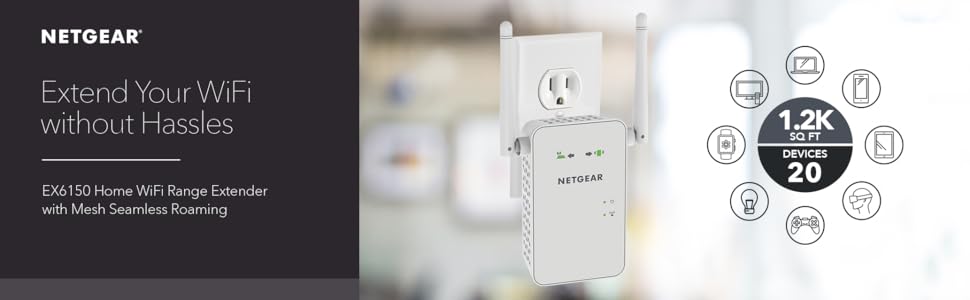
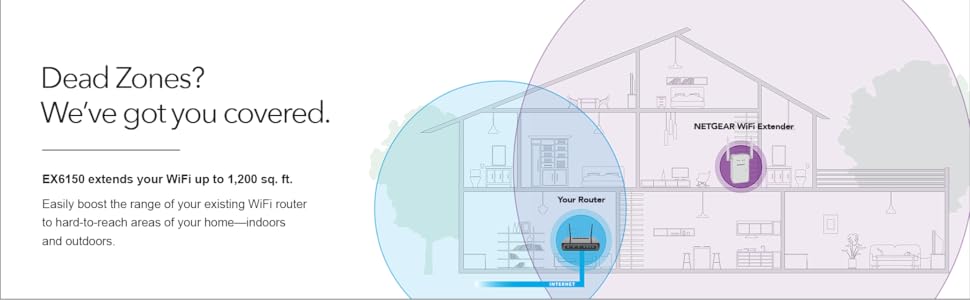
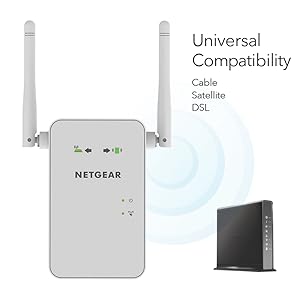
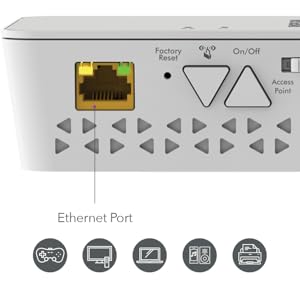
The NETGEAR EX6150 AC1200 WiFi Range Extender boosts your existing network by extending coverage up to 1200 sq ft and delivering dual-band speeds up to 1200 Mbps. Compatible with any router, it supports seamless roaming and connects up to 20 devices, featuring a gigabit Ethernet port for wired connections. Ideal for HD streaming, gaming, and smart home setups, it’s a reliable, easy-to-install solution to eliminate dead zones and keep your digital life uninterrupted.


| ASIN | B00R92CLCW |
| Best Sellers Rank | #658 in Repeaters |
| Brand | NETGEAR |
| Built-In Media | Quick start guide, WiFi Mesh Extender (EX6150-100NAS) |
| Color | White |
| Compatible Devices | PC; Mac |
| Connector Type | RJ45 |
| Customer Reviews | 3.9 out of 5 stars 6,271 Reviews |
| Data Transfer Rate | 1200 Megabits Per Second |
| Frequency Band Class | Dual-Band |
| Frequency Bands Supported | 2.4 GHz, 5 GHz |
| Global Trade Identification Number | 00606449105056 |
| Item Dimensions D x W x H | 1.5"D x 2.91"W x 4.8"H |
| Item Weight | 0.39 Kilograms |
| Manufacturer | Netgear |
| Mfr Part Number | EX6150-100NAS |
| Model Number | EX6150-100NAS |
| Range | 1.0 |
| Smart Home Compatibility | Smart Home Compatible |
| Special Feature | Mesh Network Technology |
| Special Features | Mesh Network Technology |
| UPC | 606449105056 |
| Unit Count | 1.0 Count |
| Warranty Description | 1 year warranty |
| Wireless Communication Standard | 802.11a/b/g/n |
| Wireless Compability | 802.11a/b/g/n |
K**G
Works as advertised so far
Before I leave my opinion about the product, I want to talk about Amazon, as I've brought it used from Amazon Warehouse deals. When I brought the item from Amazon, Amazon has it listed as Used - Like New, "Item is in original, pristine packaging." Now I'm not sure what Amazon consider to be pristine, but the item I've received can't be considered "clean and fresh as if new; spotless." The packaging for it was opened, the manual gone, the device has smudges on it and the box itself is beat up (box not a big deal, device itself is most important). Anyway, my point of leaving this message first if there are any potential customers that would prefer to buy it used, BUT "Like New" as Amazon would describe it, I wouldn't risk it, as this isn't my first time to be duped by Amazon's descriptions of their used products. All scores are subject to change as I use it more. Installation: 5 / 5, super easy to do and takes less than 3 minutes altogether. Now the thing was, I have brought my item used, so it was missing the manual to set it up. The box itself was old and didn't have any how to description on it. Luckily, it wasn't a big deal as NetGear themselves did a short guide on how to set it up themselves on their youtube channel. Search "NETGEAR WiFi Extender Setup: How To" on youtube if you happened to want to see how to set it up. It was simply plug it into a wall outlet, wait a minute for the red light on the device to turn green, click a button (WPS signal to router), go to router, click your router's WPS button, wait a minute for connect to set up... and you're good to go... for real... it is THAT simple. Wifi Extender: 5 / 5, Wow am I impressed (at the moment) since it works and works well. Now for those curious, how I am using it is having it connected in my basement. My router is on the second floor on my house. The NetGear itself is in the basement floor of my house. What was once my device struggling to receive one bar of wifi signal to absolutely no connection at all in the basement is now three bars of wifi. Of course, at the moment, I have only tested the 2.4Ghz band and haven't touched the 5Ghz connection. Will test it out when I decide I need that extra speed. Complaints: One thing I've noticed was that when I set up the connection with my router and the NetGear device was that I completely lost my internet connection for all my devices connected to the router for about 2 to 3 minutes. NOT SURE if it is NetGear related issue but I don't think it will be that coincidental. Either way, after that several minute of confusion, everything went back to normal. Also, when I plug the device into an outlet, it takes at least a minute, no more than 2 minutes for the device to connect to my router and become ready to extend the wifi range. Would I recommend: For the price of new, at of this review (~$90 + tax) but even then I've brought it used for around ($60 with tax) and I find it hard to justify that price (It should be more between the $30 - $40 range, but that is just my opinion). On hindsight, I should have gotten a cheaper device. All I really needed was the 2.4Ghz band wifi extension that supports up to 600 Mbps. The reason I brought it was to allow my grandparents and parents to get a strong enough signal on the ground level so that won't have to walk up two flight of stairs to get decent access to the wifi. So in the end, it isn't just about extending the wifi but how and why I am using it for. If you're using it to just extend the wifi, there are cheaper alternatives. Personally, I would wait til it dips into the $60 (new) range if I want to purchase another one, and yes, I would definitely buy this device (or newer versions) if I ever again come across a similar scenario.
C**R
I just got this yesterday and love that it works very well so far
I just got this yesterday and love that it works very well so far. I have a Linksys dual band router and am typing this off my Laptop in an area of my house that is tapping off the extender. On my laptop I can see that signal strength of either 2 or 3 bars out out five form the 2 bands off my router directly. From the extender I get 5 out 5 bars and can see my laptop operating significantly faster because of the improved signal strength. As others have said you will see the extender signals as the same SSID (network name) as always with an EXT on the end so you will need to enter your password to access them presuming you have a secured network as most people do. This is my experience in setting it up. * Took me about 15 minutes * The instructions ask you to set the switch on the extender to "Extender" but it came shipped that way so that was simple * Plugged into a nearby outlet to router to "sync" together and recognize each other. * Press the WPS button on the Extender (It's the one that has an antenna symbol * Press the WPS button on the Router (This was the only confusing part for me). The router does not label it, but it was the only button on the router other than the reset which requires a pin to access so I took a chance and was right) * Wait till they both stop blinking (about 1 -2 mins) * Repeat for second band * Move the extender somewhere further but still within range. (You can identify this by the green light indicators) I see that some had issue with their set up and maybe I got lucky, but seemed very simple to me. So far so good and hope it stays that way. Great product!!
F**H
Mesh update is a game changer
Range extenders as a group are a bit dodgy. I've had four different ones over the last few years including buying this EX6150 once before in 2017. All of the ones I've tried had great reviews and none worked for me until now. My problem is not one of range, but of masonry with a dash of interference from the neighbors. Specifically, our doorbell camera has had inconsistent connection to the network even though the router is only about 30 feet away from it. In that 30 feet are two masonry walls and a fireplace/chimney. I had all but given up on buying another range extender, but when I saw a review of the latest firmware update to the EX6150 that essentially changes it from a run of the mill extender to a universal mesh extender, I thought it worth another try. And, so far, it has worked brilliantly. I won't pretend know enough to explain why this extender works better than the other Netgear and TP Link extenders I've tried, but it simply does for me. And, to be clear, when I bought an EX6150 in 2017, it was the worst. Now, however, I get a reliable if not blazing fast 2.4ghz connection to my doorbell cam even through those three masonry walls. Additionally, the original SSID is used rather than having another network name (i.e. the SSID + "EXT" at the end). On the negative side, there is no documentation to cover this last update. The user manual is from before the last update and there is no mention of setup with the new firmware. This wasn't a big problem for me and the setup wasn't difficult. However, I still have a few minor questions that are not yet covered by Netgear's online info. I can't say that your experience would be as good as mine and if you are looking for speed, the EX6150 is only so-so. However, for my purposes, this is the first extender that did what I needed. Also, I bought a "used" one from Amazon for about half the price of a new one. At the current full price, even as much as I like it, I'd say it's over-priced. Good luck.
L**E
Underperforming and overpriced
I can't help but think that the people writing positive reviews don't actually understand how bad this thing really is. It is fairly easy to set up, and it's not too hard to get a signal from it. So, technically, it can extend your WiFi network. However, after even just a little bit of speed testing, it became readily apparent that the performance of this extender is quite poor. First of all, this extender is incapable of providing speeds higher than 30Mbps over 2.4GHz, even though 2.4GHz supports far higher speeds. This means that your devices that are not capable of 5GHz will not be able to benefit from the "AC1200" features, and it also means that you are constrained by the range of the 5GHz spectrum if you want the high speed features (5GHz typically has lower range than 2.4GHz). Secondly, the extender appears to be incapable of extending a 5GHz network that has the same SSID as a 2.4GHz network. This means that if you have a router that uses the same SSID for 2.4GHz and 5GHz, the network extender will add a 2.4GHz bottleneck, and will not give you the full benefit of 5GHz wireless unless you change your existing configuration. Third, the extender does not quickly handshake with devices. This means that if I'm moving from downstairs (where my router is) to upstairs (where the network extender is), there is about a 30-60 delay time where I don't have service, while the network extender hooks up to my device (tested this with a few different devices to Fourth, the extender frequently drops devices. This means that devices fall back to another WiFi router somewhere else, resulting in a weaker WiFi signal. The thing is, if you have no idea what you are doing, it's hard to notice any of the above. You may just think that crappy WiFi is the best you can do, and if it works "ok enough" then that's fine. If that's your standard, I implore you to purchase a much cheaper option. A $100 802.11ac WiFi extender SHOULD be a top of the line and robust piece of network equipment. Not a shoddy piece of consumer tech.
D**G
Works fine but incredibly difficult set up and management
Update: After writing the review below, I spent a couple hours with a very competent representative of Netgear who helped me correctly reset and then configure the extenders. First, a factory reset requires should be initiated AFTER the extender is fully booted, with the Client LED (upper right) green, and requires the reset button be pressed for a FULL MINUTE. Apparently, less than that does not fully complete the reset; the Netgear rep started a timer and made sure I held it pressed down until her timer expired. is pressed for a full minute; a flashing power LED doesn't necessarily indicate that the factory reset was complete. Secondly, we used the web interface to configure the extender. After connecting to the extender's WiFi network ("NETGEAR_EXT") browse to 192.168.1.250 to configure the interface. For me, this was much more robust and easier to use than the NigthHawk app. Tho my criticisms below remain valid, I did not encounter a failed extender and am not working on refunding a unit. ----------- Perhaps my problem is that I spent 40 years designing and implementing networking products and network protocols, but I found this range extender incredibly annoying to manage. The setup process is probably fine as long as one stays on the "happy path"; unfortunately that path is quite narrow and it is easy to get off into the weeds. In particular, its important to wait, Wait, WAIT because it takes a long time to boot and to change modes. One "off the happy path" task is changing the Wifi network (SSID) being extended. To do that requires resetting the device to factory settings and then going through the setup process again. However, it appears that the factory reset does not bring it back to the "fresh out of the box" state: in my case either the EX6150 or the NightHawk app retained enough context that I was asked for a password. In addition, the bootup process seemed to run the lights differently. I have had to change the SSID several times due to changes in my campus network. The first few times the changes were annoyingly difficult and time consuming - an hour each time, a lot of waiting for the EX6150 to settle into the new configurations. This last time, it would never allow a connection to the NightHawk app for the configuration process to start despite factory resets, power cycles and unplugging. This drove me to give up and use a new instance of the EX6150. Finally, I'm not certain about the reliability of the EX6150 firmware. There were instances where performance was terrible until a reboot - classic symptoms of memory leak - and other instances where the extender would not connect with the NightHawk app though it continued to extend the network. Though I generally have a good impression of NetGear, these lower end products are sketchy. I've given up on the first one, putting a second one into service. Will be contacting Netgear to get a refund on the first.
V**N
Excellent WIFI Extender where ease of configuration and speed makes up for the greater then $100.00 price tag
I wasn't getting signal in parts of my house and needed something to boost the wifi. I looked at all the options out there from getting a better router to getting another access point then to getting a network extender. I couldn't get the first one since I just upgraded my Verizon Fios Router and it would of just been a big waste of money. As for getting another access point.. I really didn't want to run an ethernet cable from my orginal router to another device. So I just ended up deciding on a network extender. Now the choices on this alone is HUGE. I did additional research and came down to a Netgear ex6200, Linksys re6500, and a Netgear Nighthawk ex 7000 and a Netgear ex 6100. Well after hours of research it come down to a few main things before I made my decision. 1. Speed most of the cheaper wifi extenders eat up more additional wifi to give you wifi and are just plain garbage I would certainly try to avoid those at all cost since your just tossing money away. 2. Ease of setup.. I mean i'm technically savvy but I know most of us aren't and just setting the god darn thing up is a challenge among itself. 3. Cost... well we all know this one. So with all that said and done I ended up getting the Netgear ex 6150. I wanted the more current version of the Netgear ex6100 and didn't mind paying a lil' bit more for it. I've had it for almost a week now. 1. The speed. It does exactly the same speed as my fios router and haven't been dropped yet. I've done the speed test and this thing rocks. Can't even noticed the difference between the extended network compared to the actual network. 2. Setup. This can't be more easier to setup folks. I did the following setup but there are other ways just to let you know. - Plug it into an outlet near your router. - Pick either Access Point for Extender from a switch on the side of the Netgear box. - Wait for light to turn from orange to green - Log in the WIFI_EXT network from your computer ( i did this wirelessly and from a Mac Computer) A Netgear_WIFI_EXT wifi network will show up. - Type in the web url listed in your direction pamphlet and WHAMMO the netgear web genie pops up. - Input what you want ( ex. setup extender; pick 2G/5G, Name the network, set password, ) - Done....easy peassey - Unplug and plug it where you need the wifi to extend to.( Oh if it's too far from the router the light in the front will let you know) 3. Cost. Well it was just over 100.00 bucks but with the ease of setup... It was well worth it.
A**N
Works great
I ordered this March 31, 2020 and received it April 3, 2020. Installed it within 10 minutes of unboxing. My reason for ordering this was because my Google Outdoor Nest Cam was having connectivity issues and constantly going off line. I was also getting a message on my Nest Cam app saying I was getting poor wifi connections between this camera and my wireless router. My Outdoor camera is in my driveway and not in direct sight of my router which is on the other side of my house. Once I set up and installed this Netgear wifi extender, which I ended putting in my garage, was receiving a signal that was 50% better and as of today April 6, 2020 I haven't had any drop outs. Installation was easy and although my router doesn't have WPS i was easily able to install using the browser interface connecting directly to the extender. I did however notice a drop in speed when connected to the extender but it's hard to tell if it's the extender or simply because there's way more people at home these days because of the country wide stay at home order from our president. Also this was a good buy because I was able to get a unit from Amazon Warehouse only because the packaging was slightly damaged but the unit itself was in perfect shape. Update- This wifi extender has worked so well that I I got another one.
A**R
Solid, efficient and reliable
I decided to switch to Netgear because my Linksys extenders were causing trouble in a couple of ways. I completely got rid of every problem with this extender. Right out of the box the extender looks pretty good. The design could very easily blend nicely in almost any wall. It doesn't really matter if you've used extenders before, you'll find this one extremely easy to set up. The manual is well explained and well illustrated. The web browser setup is so straightforward that you might not even need to look at the manual once in it. Now for the performance. The range is great; enough to cover an entire floor of an average house and a little bit more. I got this for the first floor of my house and now I have Wi-Fi in my garage and garden too. It deals great with concrete walls (I would imagine wooden walls shouldn't be any problem). The speed has been consistent no matter how many guests are connected from their cellphones or how many computers are streaming a movie; this router will extend your signal with no quality loss. No crashes so far. No need for re-configuration due to network errors. No problems with any kind of security protocol. I only have one complaint. The power plug is ideal for walls where the router can rest vertically. But all of my house sockets are placed horizontally. The design of the router is remarkably solid; however the router weighs on the sockets with a rotational force because I can connect it only horizontally. I can't help to feel the sockets may come a little loose as a result of this. However, you would have a very similar problem with the majority of routers out there because no manufacturer seems to address the issue. This router will meet the needs of most houses. I am very satisfied with the product so far and recommend it.
J**Z
Suficiente
Excelente extensor, lo use poco, tiene sus complicaciones para ponerle en funcionamiento pero competente contra otras marcas
D**G
Buen producto
Muy buen producto, puedes extender tu red de 2.4 o 5 ghz, al mismo tiempo, e incluso puedes extender una de 2.4 a 5 para obtener toda la potencia del dispositivo
M**E
Works perfectly BUT comes with travel adaptor
Works perfectly and does the jobs. Very easy to connect. Unfortunately it doesn't have an Australian plug so it arrived with a very flimsy travel adaptor. I didn't trust this adaptor (it was really unstable) so I went to Officeworks and purchased my own surge protected adaptor. It was unfortunate that I incurred another purchase for this product. Other than that, all was well.
G**O
Funciona perfecto
Funciona muy bien en una casa de terreno de 800 metros, fácil de instalar.
B**N
I cannot recommend
This product is the US version and comes with an AUS wall plug adaptor, wasnt happy about that seeing as the model number AC1200, EX6150-100AUS clearly should be an Australian version. The product itself does what its meant to do otherwise but save yourself some drama and buy the approved Australian version. I was offered a refund after a few back and forth exchanges but i would be out of pocket for the postage and have no wifi extender and then wait 8 weeks for a refund. I couldnt see the point to that, i think its pretty unsafe to use an adaptor like that so i cant leave it plugged in all the time its a nuisance.
Trustpilot
2 days ago
2 weeks ago