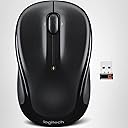
🖱️ Elevate your workflow with precision, comfort, and wireless freedom!
The Logitech M325 Wireless Mouse combines micro-precise optical tracking with an ergonomic design and up to 18 months of battery life. Its compact size and reliable Logitech Unifying receiver make it the perfect travel companion for professionals using Windows, Mac, or Linux systems, ensuring seamless web scrolling and all-day comfort.
| ASIN | B007T1CTDE |
| Additional Features | Ergonomic Design |
| Antenna Location | Office |
| Are Batteries Included | Yes |
| Are Batteries Required | Yes |
| Battery Average Life | 18 months |
| Best Sellers Rank | #606 in Computer Mice |
| Brand | Logitech |
| Built-In Media | … |
| Button Quantity | 3 |
| Color | Black |
| Compatible Devices | Laptop |
| Connectivity Technology | Wireless |
| Customer Reviews | 4.5 out of 5 stars 3,350 Reviews |
| Enclosure Material | Metal |
| Global Trade Identification Number | 00097855072818, 00097855086457 |
| Hand Orientation | Ambidextrous |
| Hardware Platform | Mac, PC |
| Item Dimensions L x W | 3.73"L x 1.54"W |
| Item Type Name | Logitech M325 Wireless Mouse Black (910-002974) |
| Item Weight | 3.28 Ounces |
| Manufacturer | Logitech |
| Model Name | FBA_910-002974 |
| Model Number | 910-002974 |
| Movement Detection | Optical |
| Movement Detection Technology | Optical |
| Number of Batteries | 2 A batteries required. (included) |
| Number of Buttons | 3 |
| Operating System | Linux, Windows 10 |
| Power Source | Battery Powered |
| Range | feet |
| Special Feature | Ergonomic Design |
| Style Name | Classic |
| Theme | computer accessories |
| UPC | 012303340288 097855072818 803982733511 097855087522 097855086457 |
| Unit Count | 1.0 Count |
W**Y
I love the mouse. It isn't as big as a regular mouse but it fits my hand well. No complaints at all!
Awesome mouse at decent price. There are cheaper wireless mice out there but they are not just cheaper, but cheap (in quality). I've gone through several of these and in this mouse I think I've found one I feel to be the all around best for a laptop that travels around. The mouse is smaller than the regular mouse, which I feel is a plus because of the traveling. I've been using it for a little while now and it works great. It hasn't been that long so I can't speak of the battery life but I have to say that I'm quite lazy in that I don't often turn off the mouse when not in use and it still works great, every time. The USB transceiver works with other Logitech devices and the best part in my opinion is its small size. It is tiny, so I just leave it plugged in all the time. It has rounded edges so it never snags on anything and to be honest, I forget it is even there. The mouse sensitivity is on par with any other mouse I've ever used. I don't use it to digitize anything so I can't say it is the best but in everyday use I can't tell the difference between this mouse and my expensive desktop mouse. I know sensitivity is important to many and I apologize for not being able to say more on the subject. All I can say is that it is sensitive enough that I haven't had reason to notice it wasn't sensitive enough. I hope that makes sense.
U**Y
Better than great
This mouse solved all my mouse problems. The problem I was having with my laptop mouse before was bad connections, the dongle stuck out too far and would accidentally get bent or broken, and the batteries kept running out. Also the laptop mouse I had before this one was too small in my hand. This mouse has a very small dongle so it does not stick out very far from your USB port. So it is not easy to accidentally break. You can leave it in all the time. The mouse has an off button so you can save battery life but even better than that is it will automatically turn itself off after not being used so even if you forget to turn it off you will still have a working mouse when you pull it out to use it. The connecting works great. Only one time did I have a connection problem and when i did i solved it by unplugging the mouse and plugging it back in. I had forgotten to turn if off that time. It may have been my laptops problem not the mouses. But it works great and have not had another problem. Also it is not too small so it feel good in my hand. My son who used to own a computer repair shop recommended this mouse to after I thru my last mouse away.
J**S
Great little mouse
This mouse has been working great so far! -I didn't realize how small it was until I finally got it, I wasn't expecting it to be as small as it is but it seems to still work great and is still comfortable. The size is like between a large normal mouse and a tiny laptop type mouse, but it is still comfortable to use. -The scroll knob is very nice. It has a very smooth action to it, it still has that clicking feedback that it gives when you scroll, but it's smooth and quiet. -One thing I didn't even realize about this mouse is that you are able to click the scroll knob to the left or right. For windows pc's it will go back and forth on internet pages I believe which is cool, but I'm using it on a mac and apparently Macs don't support this feature, apparently you are able to assign the knob a few features, but it's not a big deal for me and haven't really looked much into it. -The storage compartment is nice to have because I got a mouse and keyboard and am using the unifying receiver so I had one extra one so I stored it in the mouse which was nice. So far seems to be working great, will update if something negative about it comes up, other then that I highly recommend this mouse!
A**R
My favorite wireless mouse
I have purchased countless of these m325 wireless mice over the years, both for myself, family, friends, and for work. Note that the m325c model is slightly different, and I prefer the m325. Battery life on these mice is excellent - I've gotten well over a year with the included AA battery. I do tend to switch off the mouse when leaving my computer for a while (leaving work, leaving my home PC overnight, etc) but I don't always switch them off. I really like the feel of the scroll wheel on the m325. I turns easily and you can give it a good flick and it will spin on its own. I've even turned off the mouse and used the scroll wheel as a stress reliever (sort of like a fidget spinner). After using the m325, I can't stand the scroll wheels on any other mice. One thing to note is that the mouse can become unresponsive for finicky when the receiver is close to some RF signals. For example, if you plug the receiver into a USB 3 port and then plug a USB 3 hard drive into the adjacent port, it will most probably affect the way the mouse works. I usually try to plug the USB receiver into a USB port away from any other cables, and I have even used short USB extension cables to get the receiver away from other wires. If you are finding that this mouse is not working well for you (not moving, jumping, moving slowly or with a jitter) make sure there are no other cables near the USB receiver, and/or try a different USB port. The regular color options are all nice - my favorite are the purple and blue ones. The black is unobtrusive if that's what you need, and they grey/silver is just boring. There are many fancy designs but many of those are the inferior m325c so double check before purchasing. Years ago, Logitech had these mice packaged in a plastic package that was almost impossible to open without hurting yourself. They have since remedied that problem, and now there is a tab to pull to open the plastic package. The battery comes installed and you just need to pull a tab. Plug the receiver into your computer and you're good to go. You don't really need to install the software just to use the mouse in the regular way. However, if you want to use extra features, have an on-screen low battery warning, or add devices to your receiver, then you'll need to install it (a painless process and the software runs unobtrusively on your computer without any nagging). The mouse is physically a little small, but I have large hands and I don't mind it. It doesn't have a crazy amount of buttons like some of the complex ones, and it might be the highest accuracy mouse for gaming or design work. I have used it for Photoshop, video editing, and music workstation (DAW) software and I find it adequate, but these are not my lively hood. One last note: I've seen the price on these mice range from below $15.00 to over $30.00. Sometimes it depends upon the color, or the seller/store. If you shop around, you should be able to easily find them at the cheaper end of the price spectrum. Seriously, this is my favorite mouse. I've been tempted with some of the more "capable" models, but ultimately I stick with the m325. I've personally purchased, or been the decision maker to purchase over 200 of them. There are at least 8 of them in my house as I write this review.
J**N
Dead after 2 weeks of light use, 3 weeks for logitech to send a new adapter??
Just wanted an inexpensive and pretty simple mouse to use when I need to do things where my laptop touchpad becomes too much work to use. Plugged the tiny USB dongle into my laptop (Asus N53S Series running Ubuntu 12.04) and it worked immediately. The options for mouse settings are not extensive under Ubuntu, and the speed of this little mouse may take some getting used to as it zips all around and the scroll wheel speed is pretty darn fast. I'm not sure what clicking the mouse wheel does yet, as there is no setting for it within Ubuntu, it'll probably take a bit of research/experimentation to find out. The side to side wheel clicking works perfect though to go forward back within the browser as well as when navigating the file system. Wasn't a feature I went looking for, but I can see myself getting used to it. ----------------------- Edit 08/16/12 This mouse just dropped from 5 stars to 2 stars. 2 stars because it was great, while it lasted. Unfortunately after less than a month of ownership and pretty light use, the usb adapter stopped functioning. As much as the device "just worked" when I got it, now it "just doesn't work". The adapter had been plugged in the entire time, no constant unplugging/replugging, no travelling, nothing strenuous to cause its untimely demise. The "No-Fuss" of my title has now been negated by an hour or two of troubleshooting, following the various support instructions on logitech's site with no luck. No it just remains to see how Logitech handles the issue and how long it takes them to replace the failed adapter. ------------------------ Edit 09/01/12 Logitech Customer Support was pretty easy to deal with. An email sent with details of the problem and the various troubleshooting steps I'd taken was all that was required for them to accept that the USB adapter was toast and agree to send me a new one. Of course the process still took from 8/16-8/20. On 8/20 I received the email that I'd be getting a new adapter in 7-10 days. 9 Days later I received an email notifying me that it had shipped and giving me a tracking number that now shows estimated delivery for 09/06/12, which will be 17 days after I was told 7-10 days. ------------------------ Edit 12/27/12 3+ months since dongle was replaced and no problems since. This really is a great inexpensive mouse, just keep in mind there's always the chance you'll get a bad adapter that will be easily, but not quickly replaced by Logitech. Once you have a good adapter though, this mouse will serve you well.
T**L
Love a small mouse ... without the envy.
This great looking mouse is a bit small for my monster sausage fingers, but everyone else in my family loves the feel of the mouse. I don't "hate" the size, and it is comfortable in my monster meat paws, but I just prefer a bigger mouse. The USB transceiver is why I really love this mouse (barely 1/4" sticking out from the USB port). It also hides in the mouse for easy storage and it is not a 1 to 2 inches long like other receivers made by the four eyed geek in Washington. We had one, easily got caught on the first leg, arm or anything else in it's vicinity of the USB port it was plugged into. That prompted this purchase *AND* three others just like it for devices other then mine. Great value and performs top notch. You won't be sniping a punk from across the map in Call of Duty with this mouse , but you can lay down a mean game of Candy Crush in record time. General purpose duties this mouse handles very well, nice tactile wheel feel and great battery life. I recommend this device.
J**E
great quality
awesome mouse
W**?
Nice ergonomics, works well, until it doesn't
I've never had a mouse wear out before. I've had them get gunked up. I've had them wear down on the surface, taken them apart and cleaned them, etc. This basic mouse works very well, and a few months in you'll notice that the scroll wheel now slides freely without the built in precision resistance. Okay, not really a big deal, so I keep using it. I replace a battery in something like a year, and keep going. Then, it starts experiencing keyhop on the left mouse button after maybe 18 or 20 months. I wouldn't make a big deal about this, except exactly the same thing happened with two units. I'm a software guy and use it all day every day, so spending $10-$15 bucks on a mouse that feels right every couple years is no big deal, but maybe you want to keep a spare handy so it doesn't catch you by surprise. It absolutely would get five stars for value and ergonomics, if only two mice didn't have exactly the same problems, so early in their lives. It's a pity, because I didn't buy it for the price. I bought it for its simple features and excellent feel in my hand. I'm not quite sure if I'll buy another. I'm not used to buying replacement products after they break in a couple years, even if they are cheap. I wasn't raised that way.
Trustpilot
1 month ago
1 month ago