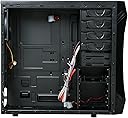
🎮 Elevate Your Game with the CHALLENGER!
The Rosewill CHALLENGER ATX Mid Tower Gaming Case combines sleek design with exceptional functionality, featuring pre-installed fans for optimal airflow, tool-less installation for hassle-free builds, and ample space for customization, making it the perfect choice for gamers looking to enhance their desktop experience.


| ASIN | B003YVJJ5Y |
| Antenna Location | Gaming |
| Best Sellers Rank | #3,314 in Computer Cases |
| Brand | Rosewill |
| Case Type | Mid Tower |
| Color | CHALLENGER |
| Compatible Devices | ATX, Micro-ATX motherboards, expansion cards |
| Cooling Method | Air |
| Customer Reviews | 4.6 out of 5 stars 1,691 Reviews |
| Enclosure Material | Alloy Steel |
| Fan Size | 140 Millimeters |
| Global Trade Identification Number | 00898745033199 |
| Hard Disk Form Factor | 3.5 Inches |
| Internal Bays Quantity | 5 |
| Item Weight | 12.76 Pounds |
| Light Color | Blue |
| Manufacturer | Rosewill Direct |
| Material | Alloy Steel |
| Model Name | CHALLENGER |
| Motherboard Compatability | Micro ATX |
| Number of Fans | 3 |
| Power Supply Mounting Type | Bottom Mount |
| Recommended Uses For Product | Gaming |
| Supported Motherboard | Micro ATX |
| Total Expansion Slots Quantity | 7 |
| Total USB 2.0 Ports | 2 |
| Total Usb Ports | 2 |
| UPC | 808111664049 132018028032 872182657972 806293511076 132017864228 809185327038 172302662870 163121138165 804067395853 898745033199 809385176221 |
| Warranty Description | warranty |
C**Z
-Ryzen 5 -GTX 1080 -ATX mobo -1 SSD - PCI Network Card - 750 EVGA PSU In general this is a great case with excellent optimization for pretty much any utility ...
I bought this case for a new rig from scratch. So far I have put this stuff in it. -Ryzen 5 -GTX 1080 -ATX mobo -1 SSD - PCI Network Card - 750 EVGA PSU In general this is a great case with excellent optimization for pretty much any utility needs of a computer. And it is beautiful. Pros: -It is pretty. The glass looks great, no bubbles or anything, it is tinted which is good or bad based on preference. -The airflow is immense. For both CPU and graphics cards. I have yet to get above 72 degrees C for both cpu and gpu under full load with stock coolers while OVERCLOCKED, with fans running at 8 volts, awesome. The fan on the bottom pushes air through the empty PCI areas well if it isn't full of stuff. Even with the PCI Network card it is great. - Fans, It comes with 4 stock. I haven't switched them out, they are quiet and have a pretty blue color. It comes with a fan controller (I think can run 6 fans) for the front three fans with a switch on the top of the case to adjust for low speed no LED, and high speed with LED, and off. The rear fan LED's run off of how much voltage gets put through it, since I haven't hit 80 degrees with my CPU yet, I haven't seen it full brightness, but that is changeable in the MOBO settings, so it's no problem. -The Cable management is great. It is all hidden behind in the back pane area, there is efficient clearance to run flat cables anywhere you want, and enough ways to run cable anywhere you need for any MOBO. -You can put 6 2.5 inch SSD's along with 4-5 3.5 inch HDD's, keeping all hidden. so you can even put some more in PCI slots. At this point you are limited by your MOBO and PSU. I highly doubt you will run into a storage problem. -The magnetic air screen filter out any major dust or pet hair etc. effectively and without reducing airflow noticeably so this is good. -It run's pretty quiet, The nosiest thing I can hear is the stock cooler running at 1900 RPMs. Even so I can't hear a thing with headphones, and can still hear the tv out in the living room with my door shut. It is sufficiently quiet. My last decibel test read 26 decibels at like 10 inches from front. -If you want to put LED strips to light stuff up, there is plenty of spot to do so, as well as clean cable management (actually, you only really see the gpu power and 24 pin cables). You can show your rig off in style. -If you were to put a water cooler in, it can fit any radiator up to 360mm on the top, as well as a 280 if you want. The only problem would be with your MOBO set up. - There are many many mounting options for MOBO's you shouldn't have any trouble. - Comes with a lot of utility stuff like mounting screws and etc. Cons: Only individual preference things really, or things to be expected with this type of case. Really not much of a problem. - No SD slot if you want one. -The power button is easily pushable on accident if you are messing with the headphone jacks, fan controller, or usbs on the front panel. - The shroud for the psu eliminates the possibility of putting PSU upside down with the fan up if you want to. - If you like to put stickers on your case bigger than 1" inch square, unless you put it on the glass there isn't much space to put them. - It is heavy, but that is to be expected with a bunch of glass that is a 1/4 inch thick. Smudges are expected to happen with glass as well.
W**E
No-frills case with everything I need
I'll start off with what others may consider is the biggest negative: this case is basically just a box. No intricate design or LEDs provided via strips or the fans - but that is more than fine with me. I don't need a case that looks like it's a transformer in disguise. This case looks sleek and monolithic and with a side-window and plenty openings, it allows your parts to steal the attention instead. A case like this for ~$50 isn't that noteworthy, but this thing has a few features on it that makes it a 5 star product for me: 1) Optical drive bay (note, optical drive not included. That should be obvious though) 2) PLENTY of space for long boi GPUs (it supports max length allowance of about 400mm IRCC, mine clocks in just shy of 350mm) 3) Ample front-facing openings for air intake, most cases at this price have side vents or meager openings that constrict air flow 4) Excellent cable management options and supplies 5) Two fans being included was a nice touch 6) Solid build and material used Yes, this review is my opinion, but let's set that aside for now. It is a FACT that a case in this price range that has the first 3 things above is hard to find. I should know - I looked at almost 50 cases before settling on this one. I'd recommend this case to everyone, unless you are specifically the person that doesn't need an optical drive and wants a flashier case. The only thing I really wish it had was a "dock" the optical drive bay cover could clip into for easy storage (maybe there is one and I missed it).
L**6
A beautiful, well-constructed case with some interesting design choices
For reference, my previous case was the NZXT Phantom White case available here NZXT Crafted Series ATX Full Tower Steel Chassis - Phantom White with Red Trim Computer Case CS-NT-PHAN-WNR White/Red . TL;DR: The Rosewill Cullinan case is a beautiful, modular, modern case that challenges computer builders to think a little outside the box. Five years after purchasing my second gaming rig, the performance had degraded to the point where I knew that I couldn't put off an upgrade for much longer. After extensive research on all of the core components, I decided to pull the trigger and purchase the Rosewill Cullinan case. My requirements were high: the case would contain thousands of dollars worth of computer components, so solid build and design was essential; the case would need to support superior cooling solutions and provide adequate ventilation; and it should have a sleek, minimalist visual appeal. The Cullinan appeared to check all of these boxes, and after assembly and several weeks of usage I'm confident that it has. Cullinan is a fairly heavy case for its mid-sized footprint: the tempered glass on the top, front and side panels significantly add to the overall weight, though it did not feel flimsly when these panels were removed. The tempered glass gives the case a beautiful appearence when the computer is turned on, dimming the blue fan lights enough to prevent them from being distracting. As a fair warning to future purchasers, the front glass panel has NO slot for any optical drives; if you require this component, it must be external. The side panels are easy to remove with a flathead screw driver and can be screwed back in by hand. The top panel also features a neat plastic dust guard to keep the inside of the computer clean, though it obviously will need to be cleaned out from time to time to retain optimal air flow. The case provides *barely* enough room for an ATX form-factor motherboard (though plenty of space for a GTX 1080 ti, so PCI cards will never be a problem). The side of the motherboard rests millimeters away from the PSU compartment, which is accessed through the other side panel. Once the PSU is installed, the wires (along with the front panel connectors) are fed through a small hole in the compartment to the rest of the case. This hole is surrounded by cheap rubber, which easily breaks off from the case if any real force is applied. The PSU compartment also contains the slots for any storage, so be sure to install all HDD or SSD drives before flipping the case over and reinstalling the back side panel. The HDD and SSD slots contain trays that can be easily removed with pressure, although I found that they don't fit into the slot as snugly as I'd like. Any backplates that need to be installed (liquid coolers) should also be done here as well (there is a small gap in the metal the the motherboard rests on directly under the CPU for easy access). Spacers for the motherboard are preassembled into the case metal, which I found very convenient. The motherboard installation is relatively smooth, although the spacing between the board and PSU compartment can be difficult to work with using a normal screw driver. The top panel provides enough space for a 360mm radiator to be installed, although it will not support a 240mm + 120mm configuration. Also, the PCI card slots on the back panel of the case are secured with flimsy metal shields which are easy enough to remove with a philip's head screw driver, and the holes themselves are partially obscured with some flap that is secured with a hand screw, which I guess is common in modern cases, though I don't particularly see the value. I'll update this review more once I've had more time to measure the performance (particularly cooling), but for now I am satisfied with the case. I think that some of the design choices make assembly overly complicated, but I was willing to experiment with a new approach if it would improve long-term maintenance. We'll see whether or not the additional headache up front will be worth it in the end.
D**Q
Does everything right - detailed feature/guide here.
This was an absolutey phenomenal product. I was iffy on getting it, but after a quick skim of all the positive reviews with high ratings, I grabbed it. Now for the rundown, as well as a detailed look at what it features and tips on building in it. Update 2023-04-26 Guess what? I'm STILL using this case. It has gone through four builds and EVERYTHING is still running with no issue. If that doesn't tell you to buy this case, I don't know what will. There is plenty of room to work where you need to. Both right and left temepered glass panels come off, and utilize large, thick screws with grips on them making it a cakewalk to do. The entire front plastic cover pops off, exposing the air filter. The air filters are 1. Metal-like material, 2. Magnetic. This means that removing them to clean them is amazingly easy. The four fans you see featured are preinstalled, and large in size (120mm). This means you don't have to buy any fans to go with it (I made that mistake, but at least I have extras now) The right side of the tower is designed incredibly well - here you will find the slot for your power supply, the 3 thin slots for your solid state drives, and the 2 pullout trays for your hard disc drives. On the bottom of the unit, there is a fan cutout for your power supply, and a rubber guard separating the PSU housing from where the motherboard will be, making wire management easy as any excess wires can simply be stored underneath in the PSU cubby. Speaking of fans, they are so silent you can't hear them. No I'm serious, the fans make zero noise. The only noise you hear is air moving, but the fans themselves just seem like they aren't there at all. It also helps that the tempered glass covers have rubber seals where you screw them in, meaning it also blocks out a lot of the internal noise. The three fans in front pull air in from the sides, and the rear fan at the top of the back blows it out - it's a very well designed air flow system. The air flows in and is guided up and to the top allowing the cooler air to remain in the tower longer to soak up the heat before being funneled to the back top, meaning the air flows where it needs to and stays long enough to actually collect heat in the first place. The top filter area of the tower is nice and long, 360mm to be exact - with the various mounting locations you can put screws in (it also comes with screws for every hole you see) it's easy to mount a water cooling loop, or more fans. The top also has premade holes, so mounting fans or a radiator + fans for your water cooling loop is incredibly easy. The kit comes with spare screws, for us less agile folk - losing a scew or two isn't nearly as bad. In the back, there's a little slide you can lift up - unscrew the screens and put in your graphics card. Then, you can slide it back down - it covers the bright metal piece that you screw in and makes it look much nicer and cleaner. That's all I can think of to cover the great functionality of the product, let's move on to notes of interest. Make sure your power supply has SATA connectors for future projects. The power, reset, and button lights respectfully are already Velcro'd and nicely together so you don't have to fool with organizing them. I don't know if you'll have this issue, but if you build everything and power the PC but your fans aren't working - don't fret! There is a switch on top with the letters L S H or something similar (can't remember ATM) , I had to switch it to the right to get the fans + their lights to work. If you switch all the way to the left the fans will run but won't be lit up. The 4 pre-installed fans aren't connected to anything - what you actually want to do is connect them to a little black board on the right side of the tower, these have 3 prongs in them to fit the fans on to, and the black board is what will connect to your motherboard - so the only motherboard fan slot you use is the CPU one, the others aren't needed - if you have a three pin connector. This is actually what makes the fans run so keep in mind the motherboard won't recognize them (with the exception of the CPU fan, if you are not water cooling.) Well, that's all I can think of to mention. Overall this is a fantastic product, and with its fantastic price tag (I got mine for just 70 - 80 USD) it really can't be bested. This case I'd absolutely recommend to anyone, and will be using it in all future builds.
B**.
Awesome...just awesome
I was looking for a case that had the full window on the side. This one has a window on both sides and the front is almost complete glass as well! This product is amazing looking and has really good functionality as well. The only downfall (like other reviews state as well) the fan controller has off, low, and high. The fan's have to be on and it turns the lights on as well. It's not a big deal for me though. I have a 360 aio in the top and a gtx 1070ti installed, I keep the front fans (the one's connected to the fan controller) on low just to have some air coming in and to have the lights on. It keeps everything in my case as cool as can be. I have no heating issues and it looks cool as well! I will be replacing the fans soon with green led fans to change up my color scheme but the fans that it came with seem to work just fine for me. If you want an all glass case and don't want to spend a ton of money on one then I highly recommend this case. The cable management on it is awesome as well. I don't have any wires that are hanging around making it look tacky or anything. When I build my next computer I will certainly be looking at Rosewill cases, this is the second one that I have purchased and I haven't been let down. The first one was on the cheaper side, the metal was sharp and would cut you, given the chance. This one seems to be manufactured better than any Rosewill case I have seen. Great compared to, basically, the same thing that others have put out and pretty much cheaper than any all glass cases that I have seen.
P**K
Made the right decision
I have been searching a new case for a while and when I came across this case I was hesitant as I saw reviews saying the tints was too dark, fans too loud, etc. When I received it and I finished my build, I loved the case. This may be one of the best cases out there for this price range, especially considering it comes with 4 pre-installed led fans, which are quieter than I was expecting them to be. I will admit that the cable management was a bit tough considering the little room you have behind the PSU, but I got through it fine. Everything else fit perfectly; motherboard, psu, cooling, and lights. The best part is that I still have room to do a water cooling upgrade which will keep my system even cooler though the air flow through the case is spectacular. The case itself does have a fan speed switch for the pre-installed fans, but I found it a bit weird that the fans had to be on maximum speed for the lights to be on. (If your case fan in the back is spinning, but is not lighting up, check the motherboard settings as that fan needs to be on maximum speed for the lights to be on as well.) THOUGH they have to be on maximum fan speed, they're still extremely quiet. The case also came with screws for psu, motherboard, etc. which was nice. Just in case you were wondering what my build is: i5-7600k GIGABYTE AORUS GA-Z270X-Gaming 5 Samsung 960 EVO Series - 250GB PCIe NVMe Cooler Master Hyper 212 EVO Corsair Vengeance LPX 16GB (2x8GB) DDR4 3000Mhz EVGA GeForce GTX 1060 3GB GAMING, ACX 2.0 (yeah yeah due for an upgrade) EVGA SuperNOVA 750 G1, 80+ GOLD 750W, Fully Modular Kingwin 204" RGB Multi-Color LED Flexible Strip Kit TP-Link AC1300 Wireless Dual Band PCI-Express Adapter
P**S
Nice case!
While a little pricey, it's really not bad compared to some of the high-end cases. As for the layout, it fit my needs perfectly. I especially like the PSU at the bottom of the case so it can draw fresh air in, instead of the pre-heated air inside the case. Heat causes you PSU to be less efficient, and shortens it's lifespan. As far as heat inside the case, there should be very little due to the presence of three large fans (front, top, and rear). The option to install a couple more on the side is nice, but I don't think that will be necessary... even with my crossfired HD3850's. There's 11" of space where my PCI-E slots are located (my vid cards are 9 1/8"), so long video cards have plenty of room to breathe. I could easily fit my pair of HD3870 X2's (10 1/2" x 1 5/8" each) in this case. Cable management is pretty nice when it comes to keeping things neat and tidy, too. The front fan cools the HDD(s), while the top and rear fans exhaust the heat that my video cards dump into the case. RAM sits directly below the outer edge of the top fan, so air will be drawn the length of the modules, instead of across them. I wasn't sure I'd like the tool-less design for the HDD(s), but these things are very tight and secure. Someone complained about plastic screws holding the side panels on... this isn't the case. The screws are metal Phillips screws with large plastic, knurled heads. There's even a slot across the top of the heads so in case you overtighten them and can't unscrew them by hand, and you don't have a Phillips screwdriver, but you DO have a dime in your pocket... you're good. All in all, I am extremely happy with this case. If you're looking for a well-built case that's got plenty of space for your components and good airflow to keep things cool, this is the case for you. PS: I ordered it on 9/19/11, and it was delivered by noon on 9/20/11! That's AWESOME!!!
A**X
Good Value for the cost, but MADE IN CHINA
I just got the case out and started my build so I have not fully tested it yet. The Good! - I am generally impressed at the quality of the case for the price. - It comes with three large fans already installed. - Plenty of room for expansion inside (well designed). - All Metal construction. The Bad! - MADE IN CHINA (PRC), and the Amazon ad does not tell you that, so you can make an informed buying decision! - Online shopping DEPENDS on the accuracy of the photos that accompany the ad because a builder makes decisions based on those photos. I made choices that cost more money because these photos did not show the connections from the front control panel accurately AND did not show the power connections for the fans properly. The back fan is a 4-lead connector as it should be, but the other two showed a power-only connector to the power supply but actually has 3-lead connectors so the motherboard can control them. - The Amazon ad says that it is compatible with a Micro ATX motherboard, which it is, but it is also compatible with a full ATX motherboard. - One of the side panels does not fit quite properly and thereby stripped the screws used to secure it. In spite of these things, the case is still a good value.
Trustpilot
2 weeks ago
3 days ago