🖥️ Forge your fortress of performance with ASUS TUF SABERTOOTH 990FX R2.0 – where durability meets precision power!
The ASUS TUF SABERTOOTH 990FX R2.0 is a premium ATX motherboard designed for AMD Socket AM3+ processors, supporting up to 8-core AMD FX CPUs and 32GB DDR3 RAM. It features advanced thermal solutions like CeraM!X ceramic coating and TUF Thermal Radar for superior heat management, military-grade components for exceptional durability, and DIGI+ digital power control for precise voltage regulation. With extensive connectivity options including USB 3.0, SATA 6Gb/s, and multi-GPU support, it delivers a stable, high-performance platform ideal for demanding gaming and professional workloads.
| ASIN | B008YDJHWM |
| Best Sellers Rank | #771 in Computer Motherboards |
| Brand | ASUS |
| CPU Model | AMD FX |
| CPU Socket | Socket AM3+ |
| Chipset Family | AMD |
| Chipset Type | AMD 990FX |
| Compatible Devices | Personal Computer, Desktop, Server |
| Compatible Processors | AMD Athlon, AMD Sempron |
| Customer Reviews | 4.5 out of 5 stars 679 Reviews |
| Global Trade Identification Number | 00610839187706 |
| Graphics Card Interface | PCI Express |
| Item Weight | 4.45 Pounds |
| Main Power Connector Type | ATX |
| Manufacturer | ASUS Computer International Direct |
| Memory Clock Speed | 2666 MHz |
| Memory Slots Available | 4 |
| Memory Storage Capacity | 32 GB |
| Mfr Part Number | SABERTOOTH 990FX R2.0 |
| Model Name | SABERTOOTH 990FX R2.0 |
| Model Number | SABERTOOTH 990FX R2.0 |
| Number of Ethernet Ports | 1 |
| Number of Ports | 14 |
| Platform | Not Machine Specific |
| Processor Socket | Socket AM3+ |
| RAM Memory Technology | DDR3 |
| Ram Memory Maximum Size | 32 GB |
| S/PDIF Connector Type | Optical |
| System Bus Standard Supported | SATA 3 |
| Total PCIe Ports | 1 |
| Total SATA Ports | 8 |
| Total Usb Ports | 14 |
| UPC | 041114950577 112840025140 807320176596 610839187706 |
| USB 2.0 | 2 |
| Unit Count | 1.0 Count |
P**D
This really SUCKS .... Amazon has been accomodating however in my major disappointment as to refunding me for the purchase.
I bought this MB recently. Shipping time & packaging was great but the MB is a nightmare. After insalling it it recognized most of my componenets with no problem except 1 of my graphics cards. I am running 2 identicle graphics cards but the system was only showing 1 of them. Turns out 1 of the PCIE slots is not working. Both my cards are good as they both work ok in the working PCIE slot that is funtional. The bad one has a red light light on it on the MB by that slot.Also after running a few minutes or after any attempts to update windows on a clean install or most any other system drivers I kept getting the wonderful BSOD. I have contacted Amazon to return it & they are fully refunding me for the board because they don't have any more. So I now have to reorder from someone else at a higher price. I am not a happy camper on either case at hand. I have another board on order & will update after I recieve that board if its shipped & recieved with no problems. Was really looking forward to runing my new system with this board & my new AMD 8350 CPU. I just hope this board hasn't messed up or damamged any of my other components. Amazon has been accomodating however in my major disappointment as to refunding me for the purchase. Kudos for that. ***************************************************** Update to my previous review above. 3/1/14 I have received my new board I ordered not a replacement from Amazon or Asus since Amazon accepted my defective board back with a full refund. My new board had me sweating bullets after the installation as the system at first booted up fine. Then after running a short time started running unstable. Periodic crashes, freezes, etc. All the components seemed to be fine at the time. As all are brand new with the exception of my Graphics cards. They are not even a yr old yet but still the only thing not brand new to my build. The more I ran the system the more unstable it seemed to get & I was ripping my hair out trying to figure out what was wrong. Started running system tests on everything I could think of & as it turned out it was bad Ram sticks I had purchased causing the problems. I had just bought brand new GSKILL ram for my new system build so had no idea the ram was or would be defective but it was. After running windows memory tests on full test sequence not just the basic test it determined the ram was defective. I removed the new ram & installed some older slower Corsair Ram I had in my previous build & my system issues stopped completely. I have returned my GSKILL ram to the manufacturer & have gotten replacement sticks to put in my system. With the good ram my system is completely stable atm running flawlessly. Here is my new system build info: MSI Computer Corp. ATX Mid Tower Chassis with USB3.0 x1 Front/USB2.0 x2 Front/3.5-Inch Drive Bay x6/5.25-Inch Drive Bay x3, Black (Raptor); PC Power and Cooling Silencer Mk II 950W High Performance 80PLUS Silver SLI CrossFire ready Power Supply compatible with Intel Sandy Bridge Core i3 i5; Dual ASUS GeForce GTX 550 Ti 1GB 192-bit GDDR5 PCI Express 2.0 x16 HDCP Ready SLI Support Video Card ENGTX550 TI DC TOP/DI/1GD5 run in SLI, The CPU AMD FX-8350 FX-Series Eight-Core Processor Edition, Black AM3+ FD8350FRHKBOX with a Cooler Master Seidon 120M Liquid CPU Water Cooling System with Copper Heatsink and 120mm Radiator - 1 Fan, all installed on this ASUS SABERTOOTH 990FX R2.0 AM3+ AMD 990FX SATA 6Gb/s USB 3.0 ATX AMD Motherboard run with G.SKILL Sniper Gaming Series 16GB (2 x 8GB) 240-Pin SDRAM DDR3 1866 PC3 14900 Desktop Memory F3-1866C10D-16GSR, a Samsung Electronics 840 Pro Series 2.5-Inch 256 GB SATA 6GB/s Solid State Drive MZ-7PD256BW as my main drive; & for storage a WD- Black 1.5 TB HDD; & a Segate 500GB HDD; LG DVD burner, & LG Blu-Ray Burner on a 27" HD Sansung monitor & Bose Companion II speaker system. I have not had a chance to install my new replacement G-Skill ram yet but hopefully I have a good working set of ram now. So far I am happy with the new Motherboard & its performance. At this time due to RL situations I haven't had much time to work with my new system since the MB replacement but I'm looking forward to many yrs of great performance, gaming & computing. If any issues arise with this motherboard I will update my post to inform everyone interested. This seems to be a great board when you can find & get a good woring one. As we all know with all electronics there are going to be some bad ones that get out with the good product line so there are going to be defects in the stores from time to time. That is inevitable. Its just a matter of the companies QC practices & how stringent they are with the practices they have implimented. Reviews are hard to base a judgement on too as you never know the knowledge lvl of the user / reviewer but I will say even though I'm not a professional certified technitian I have been building & working on computers for over 20 yrs & feel I am pretty knowledgable & proficient. I do build, & repair my own systems & have done so for family & friends for the same amount of time. I try to be honest & bias in my reviews & base them on actual product descriptions & quality not on my frustration with a instance or emotional dealings with a person or company unless it pertains to the product & issue resolutions if an issue of problems or defects arise.
T**P
Excellent Board, minor design flaw, still worth it and five star worthy.
So far, the board has been great for everything except for overclocking. Not that you can't overclock, because you can, but you need to have more than a basic understanding of overclocking to do it on this board (it doesn't have the usual ASUS Auto OC that all prior ASUS boards have had/have). It does however have some AUTO sections to help with overclocking needs and the board hasn't melted under some of the conditions I've placed on it, so that's a plus. The UEFI is weird to work with, but you get used to it. There's plenty of "guides" out there on the net to help someone with overclocking this board though, so don't let the complexity of options blow you away. This board has a lot of everything on it like USB ports 3.0, 2.0, and all USB's on this board are backwards compatible which is a plus. There's a couple of e-SATA ports on the board. It also has the newer USB Flashback BIOS button which has a designated USB port to use for quick BIOS updates from a thumb drive (very nifty to use). Inside the board is aesthetically pleasing on the eyes and quite easy to color match if you wanted to, to your other components. There are a total of 8 SATA ports on the board. Max RAM is 32GB @ 1866. I currently use 32GB @ 1600 with 9-9-9-27 (had to set it manually for this) and everything is fine (Corsair Vengeance RAM used). The RAM slots are not like typical ones, so don't freak out if you get this board. The slots only have one set of click-ins on one side and the other side is just a hook post for the other side of the stick. I thought I had a defunct board when I saw that, like as if the other posts got broken off. But, nope, it's designed that way and it does work like that without issue. The only real downside to this board, and it's really just a design flaw, is that you need to hook up your SATA's before you put a video card on this board. Most GFX are quite long in length and as an example, I use a XFX R9 290X and it literally covers the entire mobo from the left to right. This created a slight issue as the card is so long that it literally "covers" my SATA ports (4 of them, what would be your "first four" for HD/Optical). So just be aware of that so that you at least hook your lines to the mobo first before placement of your massive GFX. I use a red theme, and the mobo colors don't detract from the rest of my setup. An image below will show the GFX blockage of the SATA ports.
M**K
Excellent
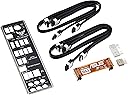
So I purchased motherboard as a replacement for my asrock 980de3/us3. I went really cheap and assumed the 980 ment the chipset (it's a 960 chipset or something). The power phases on my board were garbage and I could overclock my FX 6300 but it took a lot of power, and produced a lot of heat. So I spent the extra and picked this up. As soon as I got the box I noticed it was very large, and heavy. Packaging was pretty sweet and secure though the static shield bag was not sealed. Nice clear sturdy plastic protector on the top of the board. Pulling the board out I notice how heavy this board was. It's a full size pcb, and with the added heat sinks, bells and whistles and the "Tuff" components it's a very sturdy board with little flex. I like the colour of the board and components. In daylight and at home it's not as vibrant as the photos make it seem. Doesn't reflect a lot of light. Aside from the board. In the box was a manual, 5 year warranty booklet, Test card, I\O shield, 4 SATA cables (2 with a right angle on one side and two straight) Driver CD with "Powered by Asus" aluminum sticker, and a ASUS vinyl "TUFF INSIDE" sticker. The only thing I really wish to comment on is the I\O shield was really quality. It's aluminum with a black plastic face, and a foam insulated back with aluminum shield. Very quality. I swapped all my parts to the board and did a test boot. It posted fine and everything worked and didn't need to install or repair windows ,lucky me! Running stock clocks and amd turbo core on my voltage to the cpu was 1.21V. With the old motherboard I was getting (stock with Turbo Core OFF) a whopping 1.48V!!!! I learned my lesson and should have just spent the extra money on this as I love to overclock things and the DIGI power really does wonders getting low voltages and stable clocks. My only complaint is the EUFI. I'm not a big fan of it and I'm really stuck in my old ways of BIOS. Having the EZ Flash BIOS should prove to be a nice feature so I can try out different versions pretty easily! If you plan to overclock I would suggest this board and have no regrets spend the 160+ on the board.
A**R
Fantastic Board and Can Handle Many Components
I heard a lot of negative things about this motherboard, but so far for me it has been a fantastic board. WILL NOT work with older PSUs, so be prepared to buy a PSU with the appropriate ATX connectors (24-pin, 8-pin, 6-pin, etc.). I have an older Antec 550w PSU and it barely does the job (read on further about this). CHECK SDRAM compatibility before purchasing this board and plan your RAM purchase accordingly. Unless you get a monstrously huge CPU cooling system, there should be plenty of room around the CPU socket for a large heat sink/cooling fan and it won't be too difficult to place RAM in. The stock heat sink/cooling fan that came with my processor was NOISY, so I got an Arctic Alpine 64 Pro Rev. 2 heat sink/cooling fan combo that fit just fine and it did not get in the way of the RAM slots. Plenty of USB ports. Plenty of SATA ports, even though the side-facing connections may make it difficult for some installations, especially if you have HDD cages or trays that take up a lot of space in your tower computer case. Need to remember to plug a 4-pin or 8-pin 12v ATX into the mobo for the CPU: 4-pin for 95W or under processors and 8-pin for any processor over 95W. If you don't do that, your comp will power up, but not POST and a red LED for the CPU will light up on the mobo. Thankfully my PSU had at least a 4-pin connector, which worked for the type of processor I have (AMD FX6300). Plenty of USB 3.0 and USB 2.0 ports. I've got a USB keyboard, USB mouse, external HDD, USB headphones, a UPS, a USB wireless adapter, a LaserJet printer, and an Inkjet printer connected so far and have had no problems. Onboard HD sound is great and will work with surround 7.1 system. Nice and clear audio. No onboard video, you MUST buy video graphics card. I got an ASUS Radeon R7 360 2GB vid "card" (the thing is huge and heavy) and it works great with no issues. I heard nVidia video graphics cards work very well on the board and an SLI bridge comes included for nVidia vid card lovers. Adapters for USB 2.0 connectors and PWR SW, Reset SW, HDD LED, etc. connectors come included (very handy). BIOS settings for OCing the CPU can be difficult to understand for those who don't frequently OC, so do your research ahead of time and have a superior CPU cooling system. Easy to update the BIOS. Can flash BIOS with USB stick and install updates from there or do an online update (would not recommend). The included manual is useful, but don't rely on it for serious troubleshooting, should something go awry. Management utilities on the included DVD are pretty useful, the the other software is either crapware or a newer version you can download online and install. Like I said, after two weeks of having the board installed and powered on 24/7, it seems to be stable and working very well.
J**K
SOLVED!: Nice board but WILL NOT play Blu-Ray disks, at all.
UPDATE: The Blu-Ray Problem is solved. It was NOT the SaberTooth. It was the 13.9 Catalyst display driver that caused the problem. I ended up having to uninstall all the amd drivers to get rid of the file causing the problem. I reinstalled the latest chip drivers and used Catalyst 13.4. I used Nero 2014's Blu-Ray Player and put a Blu-Ray Disc in the Lite-on drive(Avatar) and was happy to see it played with no glitches at all. I tried several more BD's and all played ok. I am so happy because I really like this board with the 8350 in it. So I've raised the score to 5 stars. It was never the Sabertooth's problem, just a driver issue. I upgraded to this MB in Sept'13. When I did I had to get a new product key for Windows 8 Pro because Microsoft considers a new MB a new machine. I got the new product key and upgraded from an Asus M4A89TD PRO board to the Sabertooth 990FX r2.0. I moved the 12 gigs of DRAM to the new board, the Lite-On iHBS112 2 Blu-Ray burner/player. and WD 1 TB HD. Keep in mind everything worked fine on the old board with Win 8. After installing the new board and putting in the new key things seemed to be going fine. Microsoft Office 2010 worked as did everything else but this. Neither PowerDVD 12 or Nero 2014 will play Any Blu-Ray disc. Even unprotected home movie disks. Nero and PowerDVD both said it wouldn't play or couldn't connect to the media. The video cards are Sapphire 7850 x2 in X-Fire. Regular dvd disks will play with no problem. All of this equipment plays on my other M489TD Pro series board. The display device is a 2013 LG HD 3D TV with HDCP/HDMI inputs. Also, I can open the Blu-Ray disk with File Explorer and browse the files with no problem. So, the OS has no problem with the Blu-Ray disks. Everything is HDCP ready but the system will not play any Blu-Ray, even, as I mentioned, the unprotected ones of home movies. All will play on the previous M4A89TD with no issues. I have the latest Bios 1903 and the latest chipset drivers on this site. Graphics driver is Catalyst 13.9. I've tried several versions of Catalyst and none made any difference. I also disabled the firewall which didn't help. So, now I have built a home media center that can't play Blu-Ray at all into our new LG HD3D tv. Everything else seems to work ok, so far. But this is a real deal killer if it won't play Blu-Ray. Very disappointed with this board. Any help out there? update: I put win 7 on the sabertooth r2 and was able to play Blu-ray disks. I upgraded to win 8, again to see if It would now play Blu-ray, but it will not with any combo of drivers play a blu-disc, protected or not. Interestingly, Nero will allow me to send the movie to a folder or other device, so it can read the disk. Nero, or any other player, still won't play the Blu-ray disc. HELP!! UPDATE
S**.
The name is funny, but the board is sound
I've been a longtime fan of ASUS motherboards - finding them to be reliable, feature rich, and well-made. The Sabertooth 990FX R2.0 is no different. This board packs in all the major features needed in today's market without a heavy price tag. While some of the "next gen" technology may be missing - that same technology is still being tweaked, so there is really no need to pay for it at this point. A point to make right now - this is the R2.0 board. Do not confuse this with the older 990FX board or the recently released Gen3 board. Each of these three options share the "Sabertooth 990FX" moniker, but end w/the aforementioned R2.0, Gen3, or blank -- and each has different technology, BIOSes, etc. As for the ease of use on this board - it was a snap to configure. This board features the new UEFI (vs BIOS) configuration screen, which allows many new enhancements when configuring motherboards. First, the mouse works while in the UEFI and second - there are actually graphical representations to help guide your decisions. ASUS programmed in "boost" settings into their UEFI, which allow you to pick Eco, Standard, or Performance settings. Want to reduce power, as you only surf the web? Select Eco. Want to get the best settings you can from the board, ensuring you get maximum performance from all the parts? Select Performance. That easy. No longer are you required to go through meaningless menu options and hope you select the right option to boost your board's performance, while not accidently making things worse. Of course, for the power user who wants that level of control - you can still go to "Advanced Mode" and make adjustments, line by line, on just about every option you can imagine. Want to overclock - this board has the settings. Want to squeeze out a bit more power from your aging memory, graphics card, etc? Yep, you can do that too. The only drawback I've found thus far on this board, is the software suite that ASUS includes to make BIOS (or UEFI) updates easy. The suite is "broken" and displays error messages when the computer first loads - as it cannot access a certain part of the board for some reason - which returns a null value. A bit annoying, but it does not hurt the performance of the board. I've been unable to update the UEFI from within Windows and need to do it via a USB drive formatted to Fat32 (cannot be exFat or NTFS). Are these annoyances a deal breaker? No - ASUS normally does a great job finding and eliminating these little glitches, but they are worth noting for people looking to get this board. Overall, everything else about this board works great. SATA ports were easy to connect and configure. The cables that came in the package are high quality. The "extras", such as the case-plate, are actually well-made. And there appeared to be extra care and attention put into the construction of this board - no weak parts here that will fry/break-off/stop working anytime soon. The layout of the board is great - making it easy to install all my equipment without playing "tetris" to get everything to plug in and work.
A**E
ASUS delivers again.
Long story short, this board rocks. I'm sure you've done your research and know all the specs but let me add a few little details that prob aren't on the specs sheet. This this is heavy. Gives a real sense of quality when handling it. It comes with 4 SATA cables, two of which are 90 degree cables. It includes little dust covers to go over ports on the board you are not using. The ASUS Q connector kit is nice for ease of front panel connecting, but could easily be made into a custom header for your front panel connector for a super clean install. The rear motherboard knockout panel is a different two-layer system that eliminates those annoying springy grounding tabs making the install that much more painless. It also looks much nicer and has the TUF logo on it. Cons. With two double slot video cards installed, The rest of the expansion slots are pretty much useless. I can still use the old PCI slot at the bottom. I wish they would put a PCI-E 1x slot above the top 16x slot like most manufactures are doing these days. The realtech audio is newer, yet seems a bit lacking over my previous ASUS board. It also seems a bit under driven, but may just be a setting I haven't found yet. If you are mildly OCD, good luck finding parts to match this color scheme. Bought to upgrade my ASUS M5A97 motherboard because it started running hot and didn't have 2 full PCI-E 16x capabilities for crossfire (only 16x,8x). Reading all the poor reviews on Amazon and Newegg was a bit misleading, and alot of the problems seemed self-induced and/ or lack of knowledge. If you are on your 3rd RMA board and are still having POST issues, you really need step back and re-assess the situation. ASUS has always been a trusted brand to me and my past 5 builds in the last 2 years have all been AM3+ ASUS boards with no errors. Lastly, Props to Amazon. This thing was on my doorstep withing 16hrs of ordering with Amazon Prime.
J**N
BIOS not working
I bought this motherboard for one reason only, durability. It's an awesome motherboard but I have run into a problem. I cannot access the bios in the motherboard. This is a fresh installation because I purchased a new WD hard drive. This is my set up; not a gaming rig. Cosair 500 W power supply Asus ATI Radeon HD5450 Silence 1GIG Patriot Memory 'Sector 5 G Series 4GB; 2gx2 Western Digital 500 GB HD AMD Phenom II X2 555 Black Edition Callisto 3.2 GHz Lite-On LightScribe 24X SATA DVD+/-RW At first, I thought, maybe it was the power supply. But, it works with my older MOBO, MSI G45. Steps I did to try resolve the problem, removed all drives, hardrive, sata cables, and ram. Except for graphic card, processor, and power supply. I let it boot, tells me i need to press f1 to run bios, nothing..it froze. Maybe it was the other components that were damage? I called my friend, he brought his gaming rig over to my apartment. This is what we did. MOBO: ROG Formula V We tested the HD and the CD/DVD drive on his rig and both worked perfectly because we went ahead and installed windows 8 with the 4g of ram. We even tried the power supply, worked fine too. We thought the processor could of been damage during the cleaning process, he had long cables, so all we did is insert the cables in to the sabertooth, insert the ram sticks, and used my power supply. The mobo booted up, windows installed the necessary files. It worked, but still could not boot into Bios or the boot menu. It froze every time we tried. We tried the direct button located on the motherboard. The same thing happened. The MOBO works fine..its the BIOS!!! lol..its very frustrating I searched online. I found a few people with the similar problem. Something about dead battery, CMOS being corrupted. Will call support before i send it over. Maybe i am missing something. I will update if anything changes.
O**R
Excelente Tarjeta Madre
Me encantó esta tarjeta madre. La calidad es excelente, la tuve que reemplazar dado que ya era momento de actualizar. La utilicé 5 años junto con un procesador FX8350 y podía correr juegos actuales sin problema.
に**6
良かったです
良かった
R**O
Great board, stable
Great board, stable, incredibly simple to set up. I replaced a dead board and transferred all of the existing components to this one, including CPU and memory. What a difference! The system became more stable, and everything is even faster. I used to have issues with configuring the board to start up and be stable, this one is bullet proof. No issues. Highly recommended
J**V
AMD Asus Motherboard
I have always had Asus AMD motherboard, processors and graphic cards. This time around wasn't any different. It has military grade cooling substances high quality components. I am not a gamer but I prefer powerful components for my personaly built system and this motherboard meets my needs amply. Thanks Follow the web link for further Information ASUS SABERTOOTH 990FX R2.0 - AMD AM3+ 990FX SABERTOOTH 990FX R2.0 4*DDR3 6*USB3.0 12*USB2.0 GBE LAN
S**H
For higher amd processors like the fx 9590 you will face problems till updating ...
For higher amd processors like the fx 9590 you will face problems till updating bios and change some bios setting. if any one facing same problems contact me by the reply option
Trustpilot
1 week ago
2 months ago