

Buy anything from 5,000+ international stores. One checkout price. No surprise fees. Join 2M+ shoppers on Desertcart.
Desertcart purchases this item on your behalf and handles shipping, customs, and support to Poland.
🚀 Unlock next-level storage speed and cool reliability — don’t get left behind!
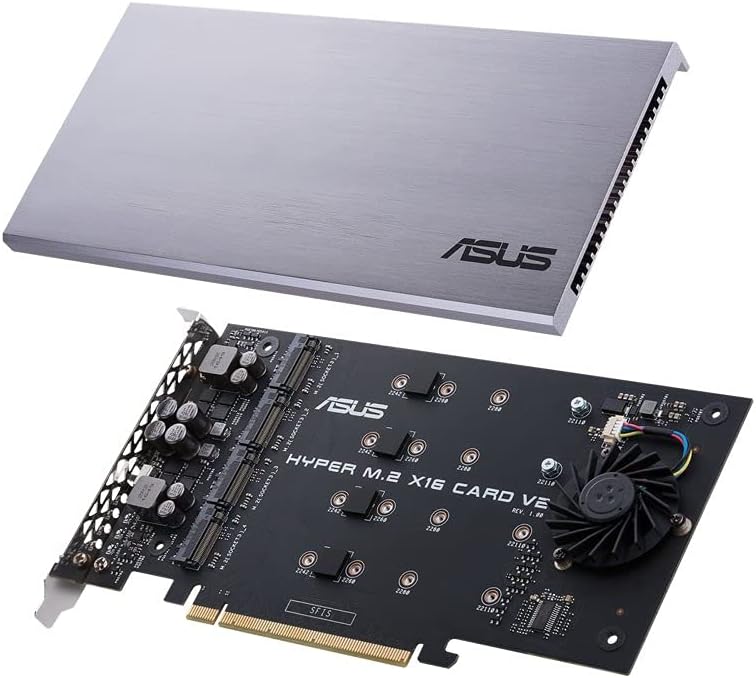
The ASUS Hyper M.2 x16 Card v2 is a high-performance expansion card that supports up to four PCIe 3.0 M.2 NVMe SSDs with a combined bandwidth of 128Gbps. Featuring Intel VROC technology, it enables bootable RAID arrays using CPU PCIe lanes. Its integrated blower-style fan and large heatsink ensure optimal cooling to prevent throttling during intense workloads. Ideal for advanced desktop builds, especially on AMD Threadripper and compatible platforms, this card delivers powerful, scalable storage expansion with stable power delivery.


| ASIN | B07PCKTL1J |
| Best Sellers Rank | 38,174 in Computers & Accessories ( See Top 100 in Computers & Accessories ) 103 in Network Cards |
| Box Contents | ASUS HYPER M.2 X16 CARD V2 - Interface adapter - M.2 - Expansion Slot to M.2 - M.2 Card - 128 Gbit/s - PCIe 3.0 x16 |
| Brand | ASUS |
| Brand Name | ASUS |
| Compatible Devices | Desktop |
| Compatible devices | Desktop |
| Customer Reviews | 4.2 out of 5 stars 700 Reviews |
| EU Spare Part Availability Duration | 2 Years |
| Global Trade Identification Number | 04718017104791 |
| Hardware Interface | PCI Express x16 |
| Hardware interface | PCI Express x16 |
| Item Dimensions L x W x H | 24.8L x 5.2W x 22.8H centimetres |
| Item Type Name | ASUS Hyper M.2 x16 Card v2 4 x M.2 Socket 3 |
| Item Weight | 400 Grams |
| Item weight | 400 Grams |
| Manufacturer | ASUS |
| Manufacturer Part Number | 90MC06P0-M0EAY0 |
| Model Number | 90MC06P0-M0EAY0 |
| Operating System | Android |
| Product Warranty | 1 Year |
| Product dimensions | 24.8L x 5.2W x 22.8H centimetres |
| Style | Modern |
| Style Name | Modern |
A**N
Great for bifurcation
Works well in my X399 Threadripper system plugged into a x16 slot, bifurcated into 2 * x4 u.2 adapters, a x4Chinese 10g SFP+ NIC, and a consumer nvme SSD for the final x4 lanes. Great use of a single slot. There is plenty of room on the card for bulky m.2 to u.2 adapters, just be careful with routing cables; given the cable twists required to reach around your case, you're better off routing cables first, then plugging them into the adapters.
N**S
Get an extra 2 NVMe drives on a x570 mobo
Works great in my Asus x570 motherboard. Got it in pcie slot 2 which is them working at 8x as the 16x is split from the first slot. Only problem is you cannot use all 4 slots on the card as there aren't enough lanes left. There is only 8 lanes left which can be split into two 4x lanes which you need to do in the BIOS settings. You need to set PCIe slot 2 to PCI RAID and then you need to go into the NVME express bios setting and turn on RAID in there. You will then be able to see both the 1st two slots on the card. If you don't set NVME to RAID you will ONLY see 1 of the drives. Was racking my brain for ages as to why I could only see 1 card after splitting the PCIe 2 slot. NVME RAID solves this. Not sure why this is as the card doesn't do any RAID anyways, but just allows the PCIe slot to be split between the drives. To use this card to its full potential it would have to be used with a threadripper CPU/mobo but that is way out of my price range currently. I'm very happy with 2 drives in the mobo and another 2 in the Asus card. Thats more than enough storage.
S**E
Great product but awful fan
It is important to check your motherboard compatibility before buying this. In my case, it is an ideal companion card for an X399 Threadripper build for VROC. The card is PCIE 3.0 (newer motherboards have PCIE 4.0 so this is not relevant to you) and goes into x16 or x8 slots. Note that x16 is needed if you intend to use all four M.2 sockets on the card, otherwise x8 is okay for two sockets on the card (each M.2 SSD uses x4 PCI lanes). This will make or break it for you depending what free PCIE slots you have. I have installed 2x M.2 NVMe SSD with M-key 2280 length in RAID 0 (stripe). Pros: 1) Single slot height 2) Amazing Asus build quality e.g. solid aluminium heatsink, strong board, high power delivery to M.2 SSDs 3) Attention to detail with all screws included, pre-applied thermal heat pads, switch to disable fan 4) Speed, oh the speed Cons: 1) Not a simple task to configure this and instructions are inadequate for setting up JBOD or RAID (0, 1, 5 and 6) 2) Fan is awfully noisy and grates on you very quickly (it has to be off except for benchmarking making it redundant) 3) LEDs are a nice idea but who can see them out of the back of your case? 4) Card is not far off a small GPU in size so space considerations could be an issue for some Overall, I am happy with the speed gains but why such a cheap, whining and annoying fan?
T**N
Did what I needed it to do.
Using on an X570 motherboard with Ryzen 3900X. Used to add two more NVME SSDs to my system....no RAID. On X570 you can only use two SSDs in this product...this is a limitation of the platform.....specifically a lack of PCIE lanes. I put it in the second x16 slot....so my GPU runs at x8 and the SSDs get x4 each. Remember to set the second slot to x4/x4 or PCIE RAID mode (bifurcation). Easy to install, looks good and has a fan which can be turned on and off via a switch on the back of the unit. Although not specced as such, runs my PCIE 4.0 SSDs at PCIE 4.0.....which is a bonus. If you see negative reviews of this or similar cards, it's generally because the user has no clue what the requirements are to actually use it.
B**S
Only works with intel
Tried this with my 5800X, surprisingly it didn’t work straight away, messed around in the BIOS, couple of google searches later found out it needed intel based RAID software, moral of the story do research before you buy haha
M**T
It has brought a new lease of life to a seven year old PC!
Got this to attach a single Samsung NVME drive to an old but still very good Intel Haswell based Z87 motherboard primarily for use with Adobe suite. Installed Adobe software directly on the NVME drive rather than the C (SSD) drive and the performance gains were instantly noticeable e.g loading up Premiere Pro, timelines etc. The slick aesthetics gives it a premium feel and look compared to other adapters on the market. What more since the casing is used as a heat spreader along with an active fan, the drive remains cool and isn't throttled under full load. Haven't noticed the fan noise that another reviewer mentioned since all the other fans in the PC completely drown it out. I haven't been able to push temps beyond 46° under full load which is incredible because I was hitting near 70° using a generic adapter and heatsink before. Next step is to figure out how to mod the Z87 bios so I can use it as a bootable OS drive and add a second drive. Overall very happy for now with great potential for when/if I decide to upgrade my system further down the line.
L**T
Don't buy from Scan. But the card is brilliant
First off - the 1 star is SOLELY for the seller which is Scan. If you choose a different seller I imagine your experience will be remarkably better. The item itself is a solid 4 stars! I've used these before on system builds and if you have a new AMD system it will take 2 NVMe drives. If you go for a motherboard that takes a Threadripper processor you can use 4 NVMe drives. Intel builders need Intel brand NVMe drives. So check your motherboard and processor first for compatibility. I give the product 4 stars as it opens up a lot of expansion and the chance for doing a decent RAID set-up. I drop one star only because it takes up a x16 slot regardless of your system's ability to run all four drives. If you have an older system this device may only run 1 drive. If this is you then there are cheaper single-NVMe PCIE cards available. Build quality is top notch, the card is an ASUS brand with an attractive heavyweight heatsink with a quiet built in fan (which you can turn off or on with a physical switch). Due to the weight which is comparable to a medium to high-end graphics card its reassuring to use an ASUS mobo with their reinforced sockets! The one thing I can't comment on is benchmarking which I haven't done as I find this not useful in the real world with people having different hardware and setups. My experience with these cards is that they are extraordinarily fast even in comparison to SSDs.
C**E
Amazing build quality
Perfect add-on card for m.2s ,amazingly built ,easy to install the drives too compared to others that iv used , also theres a small fan inside that works quite well and is not noisy .i would definitely recomend
Y**Y
ممتاز
ممتاز وجوده ممتازه
T**E
Funktioniert perfekt
Vorteile/Nachteile: + Unterstützt bis zu 4 M.2 SSDs + Großer Kühlkörper + Einfache Installation + Lüfter leise Ich habe die Asus Hyper M.2 X16 Card V2 in meinem Gaming-PC verbaut und bin sehr zufrieden. Die Installation war kinderleicht - einfach in einen freien PCIe-Slot stecken und los geht's. Der große Kühlkörper hält die Temperaturen im Zaum. Insgesamt eine tolle Lösung, um den Speicherplatz zu erweitern. Klare Kaufempfehlung.
J**O
todo correcto
todo correcto funciona perfectamente de momento
F**F
Doesn't work if you don't have an Asus Motherboard
I have an AsRock motherboard from five years ago with a supported chipset but it will only recognize one drive when connected. Therefore, it's not usable, sadly. I had to go back to the individual adaptors I already had. When I saw it advertised as a RAID device I thought it had its own controller built in so I could connect it normally on a PCIEX slot and have it share the 8x bandwidth I have available between two drives, maybe even 4 if not being used simultaneously. Sadly, it's not the case. It seems that it just does some sort of basic circuit connection (I am not an expert) and if your motherboard isn't specially designed to use it via some proprietary ASUS technology, it will only recognize one device. I guess that's why the price went down considerably and the item was a second chance one.
J**N
Funkar nästan som jag tänkte.
Ett tips är att kolla på asus hemsida. Det beror på vilket cipset du har på ditt moderbord hur du kan använda kortet. Mitt x470 klarade bara av två diskar. Hastigheten är full fart och datorn hittade diskarna direkt.
Trustpilot
2 weeks ago
2 weeks ago