Buy anything from 5,000+ international stores. One checkout price. No surprise fees. Join 2M+ shoppers on Desertcart.
Desertcart purchases this item on your behalf and handles shipping, customs, and support to Poland.
๐ Elevate your office game with speed, style, and smart printing.
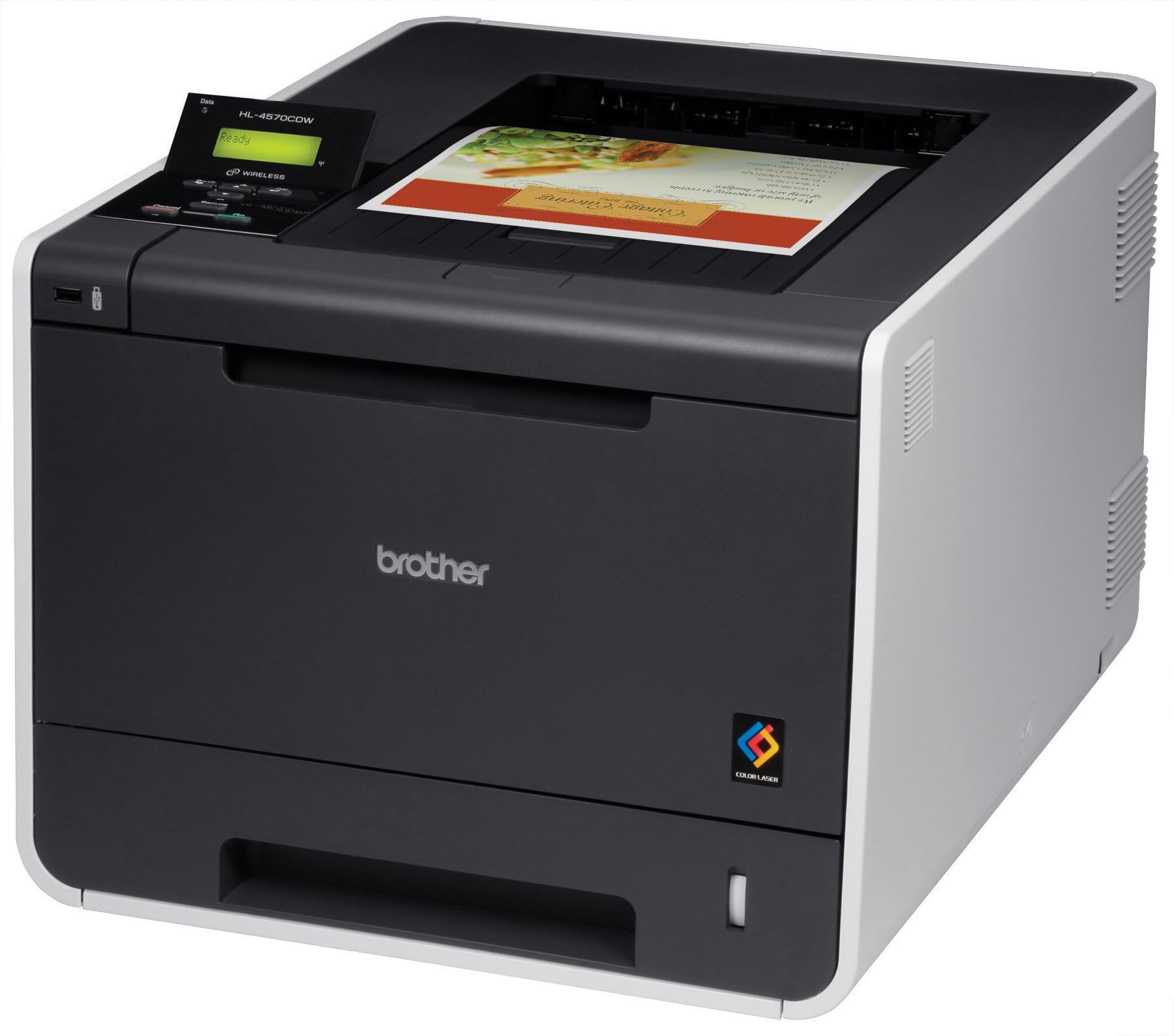
The Brother HL4570CDW is a wireless color laser printer designed for small offices and workgroups, delivering fast print speeds up to 30 ppm with sharp 2400 x 600 dpi resolution. It features automatic duplex printing, versatile connectivity options including Wi-Fi and Ethernet, and supports high-yield toner cartridges for cost-effective, professional-quality output.
| ASIN | B00439GOKY |
| Additional Printer Functions | Scan |
| B&W Pages per Minute | 40 ppm |
| Best Sellers Rank | #753,795 in Office Products ( See Top 100 in Office Products ) #1,103 in Laser Computer Printers |
| Brand | Brother |
| Color | Black |
| Color Depth | 24 bpp |
| Color Pages per Minute | 30 ppm |
| Compatible Devices | Laptops |
| Control Method | Remote |
| Controller Type | Android |
| Customer Reviews | 3.3 3.3 out of 5 stars (241) |
| Dual-sided printing | Yes |
| Duplex | Yes |
| Global Trade Identification Number | 00012502625001 |
| Hardware Interface | USB 2.0 |
| Ink Color | Black, Cyan, Magenta, Yellow |
| Item Weight | 46.3 Pounds |
| Manufacturer | Brother Printer |
| Maximum Copy Resolution Black and White | 2400 x 600 dpi |
| Maximum Copy Resolution Color | 2400 x 600 dpi |
| Maximum Copy Speed Black and White | 30 ppm |
| Maximum Media Size | 8.5 x 14 inch |
| Maximum Print Resolution Black and White | 2400 dpi |
| Maximum Sheet Capacity | 500 |
| Maximum print Resolution Color | 2400 x 600 dpi |
| Model Name | HL4570CDW |
| Model Number | HL4570CDW |
| Model Series | HL4570 |
| Number of Trays | 1 |
| Other Special Features of the Product | Copying, Fax, scanning, wireless |
| Paper Size | 8.5 x 14 inches |
| Power Consumption | 560 Watts |
| Print media | Paper (plain) |
| Printer Connectivity Type | Wi-Fi |
| Printer Output Type | Color |
| Printer Type | Laser |
| Processor Count | 1 |
| Resolution | 2400 x 600 |
| Scanner Type | ADF |
| Series Number | 4570 |
| Total USB 2.0 Ports | 1 |
| Total Usb Ports | 1 |
| UPC | 012502625001 |
| Warranty Description | 1 year on-site limited warranty |
| Warranty Type | Full warranty for 1 year |
| Wattage | 560 watts |
F**N
A rather decent color Laser, affordable in price and operation, is durable, with convenient WEB print engine / administration
This printer so far has performed well and we are still on the factory toners after 1171 color prints and 258 monochrome prints. I have not had one bit of trouble with this printer. Print quality is somewhere between medium and medium-high but not definitely not glossy brochure high quality like some solid ink printers or other toner lasers that run $4000-8000. This is a great SOHO / home printer for me and family and the toner isn't a bad price. I've pursued the option to refill my own toners with high-quality toner and the pay-off rivals savings that many inkjet printers offer. Taking into consideration I do not have to worry about failed print heads, messy waste ink tanks, CISS ink systems. Other added enjoyments, this printer came with 128MB or ram on-board, has a web print engine inside the printer with administrative functions. Another nice thing is the printer sit and not worry about having to flush your ink nozzles every so often or ink drying up or causing issues, really even the toner in this laser printer has not made a single mess or smudge yet. It is a little on the heavy side and is what I call medium on the foot print but it doesn't get moved much, has Ethernet and Wifi for connectivity so it has found its place and is a good match for my needs and price point. Only cons I have noticed is that the paper drawer feels a bit on the flimsy side and the printer seems to have an annoying green mode that puts the printer to sleep after extended periods of no use. All-in-all I consider the two cons very minor and still like the printer very much, though I may have a different opinion later if the paper tray should ever break...
S**N
Awful Graphics Print Quality. Can't Print a Solid Color Square Adequately.
This printer doesn't seem to be capable of printing solid regions of color consistently. When I printed a solid color square, there would be a regular jagged pattern of unprinted paper within the perimeter of the square. I wasn't expecting it to be able to print photos adequately, but I did expect it to be able to handle solid geometric shapes. Consumer Reports even said that this printer is very good at printing graphics, but I found this to be far from the case. It also seemed to be incapable of printing two bordering regions of color, like a red square inside a black square, without leaving a gap between the color regions. I ran the printer's self calibration, but it didn't seem to impact the quality of the output at all. Honestly, I'm confused at what niche this printer is meant to fill. It does great with text, but doesn't seem capable of anything else. You can't really punch up your company printouts with your logo, because printing graphics makes the output look much worse overall. I'm sure it would be fine as a normal office printer, but Brother itself has better solutions for that, with much cheaper toner to boot. So, I guess if you want to print color text, and only text, then this would work, but I can't imagine who would want to do this. Finally, I couldn't figure out how to get this printer to print without adding a 1/4" border of padding to the paper. I read the manual, and looked online for hints, but never found a solution. I think that this is a very important feature for a color printer, since you're more likely to be printing to a template or precise size specifications if you're printing graphics. It's actually easy to do on a much cheaper black and white Brother printer that I own, so it seems very weird that this printer doesn't seem to offer this feature. In the end, I returned it to Amazon in perfect working order (absorbing the $40 restocking fee because really there's no way to pin this printers problems on Amazon), because it didn't do the basic tasks that I needed it for, and couldn't think of a situation in which I would prefer to use this over my black and white brother printer that I got for less than 1/3 of the price. Very disappointing purchase.
R**N
Best mid-range laser printer with curling paper problem
I hope the one message I can get out to everyone is that printers are one of the most undependable machines that anyone can look to purchase. I run a home business and I made the mistake of spending well over $1k a few years back for a Konica Minolta 5430DL. It was a beauty of a printer, but shortly after spending nearly $600 in replacement cartridges the printer started falling apart. What I learned is that even the priciest printers break. This is more of a disposable technology than something you can hand down to your kids. When all the printer companies play the game of selling printers with limited ink cartridges and then charging you more than the printer itself for refills, you know that the only way to come out ahead is to buy the best bang-for-the-buck printer with the expectation that it's only going to last a few short years. I believe the Brother HL4570 is that kind of printer. For $400 I knew I was buying something mid-range. It would certainly be a step down from the $1k Konica Minolta but at least the value of the printer is close to the value of replacing cartridges. This means when I finally deplete the cartridges I have the choice of buying more cartridges or another printer -- whichever costs less. I chose Brother because I wanted a wireless printer that played well with Mac. If read on counteless discussion forums that more than any other brand, the Brother is the easiest to install with a Macintosh computer. Those discussion forums were correct. The wireless setup with my iMac took less than 10 minutes to complete. ...but I am getting ahead of myself. Bought this printer when it dropped in price to $399 from $450. Had it shipped Amazon Prime 2-day and Fedex delivered it overnight. It's rather heavy, weighing in at about 65 lbs. The unit is well packaged. Be sure to read the quick-start manual for important unpacking instructions. There are a lot of doors and drawers that you need to access and remove small pieces of packaging. Once unpacked and plugged in, the first step was to pair the printer to my WiFi. A small LCD display lets you navigate through a setup wizard that automatically detects your WiFi network. The next step is simply inputint the password which is a bit of a cumbersome process as you have to wade through rows of characters till you get to the numbers and letters you need. Frankly, that part of the setup seems very old-school. Brother could have really improved upon this process. Be aware that as you enter each number and letter of your password that character quickly turns to an asterick to hide it. Don't be confused by what the printer is doing.] Once the password was entered the printer immediately paired to my network. No hiccups whatsoever. The next step was even simpler. I put the install disc in my iMac, run it, and it automatically installs the drivers and detects my printer. Never have I ever been able to pair a printer to my Mac or PC this easily. It really is true -- this printer is Mac's best friend. I decided to do a test page which is done simply by pressing the GO button on the printer. It didn't take long for the printer to whiz into motion and produce a page. Two immediate problems: First, my room stunk of toner. This thing put out a stench that I could not believe. I had read another review from someone complaining about the smell this priter produces. Fortunately, it seems, the stench was only present at the initial print. I am hoping that the printer is just breaking itself in. I will keep you posted on future prints. The second problem is page curling. Pages come out curled. I am using 30 weight paper which should be less prone to curling. I understand there are adjustments you can make in the computer to lessen the curl. I will certainly look into this and keep you posted. Print speed and quality is very good. Black text looks very crisp but colors are not true to original. I had read in another review that this Brother printer produces darker versions of the original color. This is true. Oranges were deeper, light blues became dark blues. Potentially, I don't see this as a major problem -- but some who are more finicky about their printer producing true colors will not be happy. I won't even talk about photos. Haven't tested photo printing because I already know it will look like garbage. You don't use these printers for photos and anyone buying it for that use is foolish. Is the printer loud? Somewhat, yes. But realize that I am coming from a monstrous Konica Minolta machine that was even louder than this Brother. So, for me, the printer is quieter than the more industrial sized machines I have been used to. Thus far, I am very impressed with the ease of setup and immediate pairing to my WiFi network and iMac. I mean, I had this running in less than 15 minutes after full unpack. As for overall quality? It is what I expect from a $400 laser printer. It's speedy with highly acceptable print quality. However, it's not on par with business class machines. It suffers from subdued color reproduction, colors are slightly darker than they should be and pages curl. The machine awakens from sleep and produces a page in less than 10 seconds. This is great. My Konica Minolta would wake from sleep and go through a minute of two of machine "whirring" until it decided to spit out a page. For $400 this doesn't seem to be a significant step down from my $1k Konica Minolta business class computer and that's why I am not complaining. You can read through countless reviews on Amazon hoping to get the right printer. Every single one of them has a handful of bad reviews and complaints about breakage and toner cost. I found the Brother, particularly this model, to be the better rated printer in its price range. Certainly toner replacement will be a little cheaper than going with HP. UPDATE The stench I was experiencing with print jobs has lessened, though there is still the slightest odor of print toner whenever I run the printer. I am hoping this subsides with age. Went into PRINT SETTINGS on my Mac and selected REDUCE PAGE CURLING. It did very little to curb the problem. This printer still produces curled prints and that's the only annoying issue I still have with this printer. In all, the Brother 4570 is probably the best color laser printer in the $400 range. Certainly a better option than purchasing an HP which comes with limited-filled toner cartridges and (from reviews I have read on Amazon) its own set of headaches.
J**C
I have one at home and just purchased a second one for my office. Of the dozen or so printers I've owned over the years, this one has been the most reliable and carefree. Setup is easy, the wi-fi is terrific (in the office setting, I just connect it using my 'shared internet' on my mac so no hassles or worry about others using it), easy to replace the toners and good mileage from them. I like the ability to change settings through my web browser (once its connected to the network). We might print 20 - 30 pages in any week which I'm guessing is average for home user. It weighs about 45 pounds / 20 kg and it would be a good idea to check the specs regarding its footprint if you have limited space.
G**M
We have had a couple of these installed for more than a year now. Work great! Fantastic quality!
S**C
Black cartridge randomly started spewing black toner in the printer. Rendered the machine useless as it made all my printed documents appears as if they were printed on newspaper.
J**C
Very good product but the set up for wireless is complicated for a non computer expert! Printing is very good and colours are precise.
J**P
Purchased this printer for my daughters University papers. It replaced an old reliable HP5000 laserjet. Received the Brother printer replacement on time. Setup was easy. Print quality is great I should have ordered the scanner c/w ADF since I threw out my old scanner.
Trustpilot
5 days ago
2 weeks ago