Buy anything from 5,000+ international stores. One checkout price. No surprise fees. Join 2M+ shoppers on Desertcart.
Desertcart purchases this item on your behalf and handles shipping, customs, and support to Poland.
โก Upgrade your laptopโs brainpower โ because speed waits for no one!
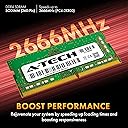
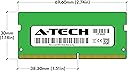
The A-Tech 8GB DDR4 2666MHz SO-DIMM RAM module is a high-performance, energy-efficient memory upgrade designed for laptops and notebooks. Featuring a 260-pin form factor and operating at a low 1.2V, it delivers fast 2666MHz speeds and reliable, non-ECC performance. Easy to install and backed by a limited lifetime warranty, itโs the perfect choice for professionals seeking smooth multitasking and enhanced system responsiveness.


| ASIN | B07KGMBL93 |
| Additional Features | Lightweight |
| Best Sellers Rank | #18 in Computer Memory |
| Brand | A-Tech |
| Column Address Strobe Latency | 19 |
| Compatible Devices | Desktop, Laptop |
| Computer Memory Size | 8 GB |
| Customer Reviews | 4.7 out of 5 stars 1,920 Reviews |
| Data Transfer Rate | 21300 Megabytes Per Second |
| Form Factor | SO-DIMM |
| Item Type Name | DDR4 RAM Memory |
| Manufacturer | A-Tech Components |
| Memory Form Factor | SODIMM |
| Memory Generation | DDR4 |
| Memory Speed | 2666 MHz |
| Mfr Part Number | AT8G1D4S2666NA0N12V |
| Model Number | AT8G1D4S2666NA0N12V |
| Number of Pins | 260 |
| RAM Memory Technology | DDR4 |
| RAM Size | 8 GB |
| Special Feature | Lightweight |
| Unit Count | 1.0 Count |
| Voltage | 1.2 Volts |
| Warranty Description | Limited Lifetime Warranty covering defects in materials and workmanship |
C**T
Good Upgrade or Replacement
Great replacement for a bad SODIMM or a memory upgrade for your laptop. These installed easily and memory tests proved they were reliable. These were used in an HP 15dw laptop and hav proven to work well. A great buy.
T**D
New life for my NAS.
I needed more memory for my QNAP TS-673 NAS. I took a chance purchasing this. I installed two modules (without removing the existing 2x2Gb modules) and it booted up without any issues and it shows all 20Gb. Gave new life to my server. Packaging was fine.
R**E
Fit my Dell Desktop micro tower
Fit my Dell desktop micro tower, the dram installed easily. Great product and the maximum capacity that the computer will handle. the company offers great Tech support. Great price at the time.
D**E
Big jump in performance
Replaced a set of G Skill DIMMs that failed after 7 with these A-Tech DIMMs. Noticed a big increase in performance.
M**O
Decent RAM for the price, not necessarily a "scam" (read on....)
note: This is in response to the other review titled "Scam Stick Sent" that was posted on August 20, 2021. I also bought the same RAM from Amazon and installed it in my laptop, only to see 5.9GB free/available for the system to use ...so why is the advertised/printed 8GB not being shown? Whatโs going on!?! If you look at one of the pictures that the other reviewer posted, specifically the one that shows the BIOS (i.e. shows that they have an Acer Aspire A515-43), you'll notice near the top that this laptop has an AMD Ryzen 3 in it. I don't have the same exact laptop as this other reviewer, but mine has an AMD Ryzen 3 in it as well. This is important to note because these AMD Ryzen 3 chips are actually APUs (Accelerated Processing Units) which in very basic terms combines the functions of the CPU and GPU on a single die. In other words, this APU also serves as the iGPU (integrated Graphics Processing Unit) for the system. The reason why we're seeing 5.9GB of available RAM is because a portion of the installed 8GB system memory has been allocated for the APU/iGPU to use since it doesn't have its own dedicated memory, a design called "shared graphics memory" (go ahead and Google it for more info). If youโre lucky, you might have a setting in your BIOS that allows you to adjust how much memory to allocate to the iGPU (though you wonโt get the full 8GB back since the iGPU still needs some memory allocated/shared to it so it can function in the first place). Unfortunately, I did not have that setting in my BIOS so I ended up buying a 16GB RAM stick off Amazon from a different manufacturer (Team Group for the curious out there). To no surprise, the system reports only 13.9GB of memory being available! (This is plenty sufficient for my use case, though.) Whatโs more important after installing any new RAM in your system is to boot MemTest86 off of USB or CD and test your newly-installed memory for any errors. As of this writing, the current version of MemTest86 (from Passmark Software) runs 4 โpassesโ of tests on the RAM. If you can get through all passes with no errors, then it is safe to say that your RAM is stable. If not, then return/replace it right away with Amazonโs hassle-free return process. Even if you passed the return window, most manufacturers offer a โlifetime warrantyโ on their RAM so youโll have to deal with them instead (and your mileage may vary in that regard). Oh yeah, there's a similar test program called MemTest86+ which is a fork of the one from Passmark. It's also great, but I don't use it because it's not being actively updated (the latest version is a beta from 12/4/2020). My motivation for writing this review is to clear up some confusion and dispel any worries because that other review may mislead others into thinking theyโve been โscammedโ when that might not necessarily be the case. Iโm not saying the other person didnโt get scammed, but it seems highly unlikely given the fact that A-Tech is a reputable company, Amazon is handling/fulfilling the order, and the white label on the package (as shown on the first image) acts as a tamper-proof seal so youโll know right away if the package has been opened already. tl;dr If you have an AMD APU in your laptop, you won't get the full advertised 8GB available for your system because some of it is being shared/allocated to the APU. (If your BIOS has that particular setting available, then you can adjust that allocation amount). Also, run MemTest86 immediately to check your RAM for errors!
R**L
works
memory worked on me HP 15-bs212wm I tried to use 32gb and 16gb memories and they didn't work because my laptop is only compatible up to 8gb, previously I had a 4GB one and the performance was very low, with this new 8GB memory the speed improved considerably, I was thinking of throwing away the laptop but now with the new 8GB memory I am giving it a new opportunity
C**A
Great ram ddr
Works great hooked it up right away my laptop is running a lot faster now
G**E
Easy to install and a big improvement in performance
My HP laptop came with 8GB of RAM, which was never enough from day one. With Windows 11, you need nearly 8GB to run the operating system. I finally got to the point where the computer was sluggish and had to be shut down frequently. When opening Task Manager, it often showed that my memory usage was near 100%. It took me a few hours to figure out the exact type of RAM I needed (there are so many variations out there and it's not so easy to determine). What wasn't too tricky was determining the maximum amount of RAM my laptop takes. Anyway, I upgraded to 32GB (two 16 GB modules) and was pleasantly surprised with how little time it took me (30 minutes from start to finish). The hardest part is taking the bottom off the laptop. The increase in performance has been tremendous; it's certainly not sluggish anymore. From monitoring Task Manager, I noticed that my computer instantly began utilizing 16GB of the 32GB that was now available. It just goes to show how badly the upgrade was needed. The sad thing is that even today, HP still sells new laptops with 8GB of RAM installed. Seriously? You'd think they'd take more pride in their products than that. Otherwise, it has been a great laptop.
A**H
ูุนู ู ุจุดูู ู ู ุชุงุฒ
ูุนู ู ุจุดูู ู ู ุชุงุฒ .
A**L
Funciona correctamente
Trustpilot
5 days ago
1 month ago