
Buy anything from 5,000+ international stores. One checkout price. No surprise fees. Join 2M+ shoppers on Desertcart.
Desertcart purchases this item on your behalf and handles shipping, customs, and support to Poland.
๐ Secure Your Connection, Elevate Your Business!
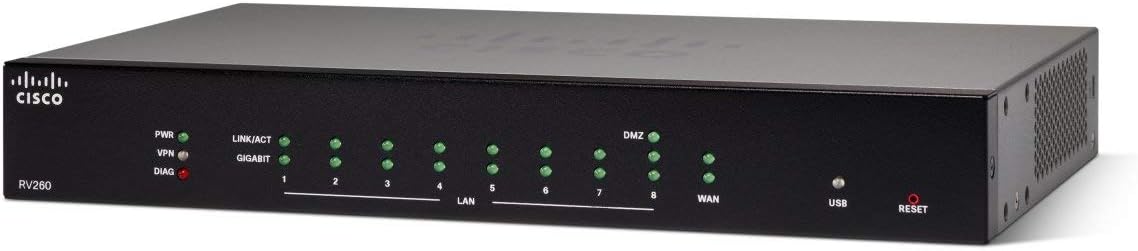
The Cisco RV260 VPN Router is a powerful networking solution featuring 8 Gigabit Ethernet ports, IPsec VPN support for secure remote access, and guest Wi-Fi capabilities through VLANs. With a focus on security and productivity, it includes a year of web filtering and comes with a limited lifetime warranty for peace of mind.


| ASIN | B07KB3BX61 |
| Antenna Location | Security |
| Antenna Type | Internal |
| Best Sellers Rank | #306,188 in Computers & Accessories ( See Top 100 in Computers & Accessories ) #5,297 in Computer Routers |
| Brand | Cisco |
| Built-In Media | Router |
| Compatible Devices | Personal Computer, Printer |
| Connectivity Protocol | Ethernet, Wi-Fi |
| Connectivity Technology | Ethernet |
| Control Method | Remote |
| Controller Type | Switch |
| Coverage | Limited lifetime warranty, one year of technical support |
| Customer Reviews | 4.2 4.2 out of 5 stars (218) |
| Data Transfer Rate | 75 Megabits Per Second |
| Frequency Band Class | Dual-Band |
| Global Trade Identification Number | 00882658985935 |
| Is Modem Compatible | No |
| Item Type Name | VPN Router - 8 GbE Ports |
| Item Weight | 3.7 Pounds |
| LAN Port Bandwidth | 1000 Mbps |
| Manufacturer | CISCO |
| Maximum Upstream Data Transfer Rate | 75 Megabits Per Second |
| Mfr Part Number | RV260-K9-NA |
| Model Name | RV260 |
| Model Number | RV260-K9-NA |
| Number of Ports | 8 |
| Operating System | Cisco IOS |
| Other Special Features of the Product | WPS |
| Security Protocol | IPsec |
| UPC | 882658985935 |
| Voltage | 120 Volts (AC) |
| Warranty Description | Limited Lifetime |
| Wireless Compability | 802.11ac |
D**R
Easy setup, connectability
Router works great in home environment. Looking for an upgrade to the normal netgear products on the shelf. Tried a quad band 6100 nighthawk with software/hardware issues on first update. Family tried connections with multiple tablets dropping signals with each kindle. Decided to upgrade to the cisco unit and have not had any issues since. The interface is easy to coordinate as also the run through for operation. Have the ability to serial in which is nice to when needing to setup interface options. The main feature I enjoy is the MU-MIMO operation as multiple wireless devices, security, and network identifications in the local area works exceedingly well. I read multiple issues in several business environments with hassles and connection droppage. While I had thought this would be another problem to tackle, this was not so with this unit. GBit throughput to fiber network has exceeded previous routers encounter with latency, throttling, and bandwidth. While our service is capped by 100 mb we can obtain and maintain 120-127 on a single connection. Haven't used tech support but have been in contact with cisco on other matters relating to products. Unless you are savvy, schooled, and on level with reps its a bit jarring to communicate. No problems with the product, its usage, and system requirements. All meet the needs of the family; not to mention subnetting is great for control the youngin's afterhours usage. Happy user.
J**E
Solid
I have had this new Cisco router running for a day now, and my wired and wireless speed and my home network response have improved drastically. Finally getting what I pay for in terms of my ISP. No more random wifi drops. No "hanging" web pages either. Excellent hardware so far. Feels solid. Upgraded from a NETGEAR R8500 Nighthawk X8 Tri-Band AC5300. NETGEAR abandoned this very expensive product and it became slow and would drop signal. Lots of complaints about this product on forums, look for yourself. Never will waste money on NETGEAR again.
Z**E
works fine so far
This is a review of model RV260 K9 NA VO1, with 8 Gb ports and no wireless capability or PoE. I decided to buy this router when I realized the variant of Tomato firmware I was using on my asus router hadn't been updated in about five and a half years. I don't know that it needed to be upgraded, but I thought I should probably install something more current, and I didn't want to go to the trouble of doing that on my aging router. I was attracted to this router by the somewhat reasonable price and by the limited lifetime warranty. In my very brief experience with it, I am reasonably happy. Initial configuration was pretty straightforward. While setting it up, I was notified that a firmware update was available, and the process to update was easy and painless. I believe there is an option to revert to previous firmware versions. The web-based interface is a bit awkward in my opinion. For example in order to save changes you make to the permanent start-up configuration, you have to click a button to apply the changes to the running configuration, click a save button, which takes you to another screen, where you have to click another button to save the changes to the permanent startup configuration. Overall however, the configuration process is reasonable, and the help documentation is useful. The hardest part about configuring the unit was setting up DHCP for the devices on my network. There are separate tables for connected devices, DHCP leases, and static DHCP entries. There is a button to add a connected device to static DHCP, but it didn't seem to work consistently. I might have just not understood how to get that to work, but I ended up manually entering all my devices into the static DHCP table. For me this wasn't bad, with 20-some devices. Another thing that seems like a quirk or bug is that the tables of connected devices and DHCP leases are confusing, with some entries showing a host, some with dashes. Not all devices appear on the list of connected devices either, even ones that I know are connected, including ones that I'm actually looking at the web management interface. Getting name resolution working on my local subnet was also kind of a puzzle to me. At the suggestion of someone in the very useful community forums, I found out I had to specify the router as the first DNS server, followed by my chosen external DNS server. This used up one of the two available entries for DNS servers, so I was not able to specify a backup server. Update: It turns out the proper way to do this is to use "Use DNS Proxy" in the VLAN settings. The bottom line is, despite the somewhat quirky firmware, this router is adequately configurable and has the features I would expect, even beyond my relatively simple needs, and so far is working well enough. I still prefer Tomato.
C**R
Good Working Small Buisness Router with 8 LAN ports.
I am a 70-YO home user, who installed and serviced VOIP Telephone and Intercom systems before I retired. I guess that makes me about an entry-level IT person. LOL I had a Cisco RV4000 Ver-2 Four Port router which had exceeded it's life expectancy (2008-2018), daisy chained to an 8 Port Switch. It was time for an upgrade to something that is still supported by the manufacturer. As always with anything new, it took awhile to figure out how to program this unit, but it wasn't too bad. Biggest trick for me was that the DHCP Server Settings are now hiding inside the VLAN settings. I have 26 devices on my home network. My Cameras and NAS have to have Static IP Addresses to function properly. (see pic of DHCP table) I have static addresses for every device on my network, which should help to keep the bad guys out. I don't use any of the super advanced features like VLAN and the Web Filtering Service, so I can't speak to those settings. Upgrading to an 8 Port Router allowed me to get rid of the additional switch and still have one free port, so that makes one less wall wort in use. I was able to creatively use the rack mount ears turned 90 degrees, with one inverted, to make them wall mount ears. I did need two slightly longer screws since the holes in the ears are countersunk. (see pic) My old stuff just sat on the shelf and required two hands to plug LAN cables in and out. They just loved to slip off the shelf when messing with them and all the LAN cables were a big rats nest. All in all, I am happy with the new RV260 router. It is a bit faster then my old one. Now if it will run for twelve years like the old one, I will be real happy.
K**Y
Very good router, bought it as an upgrade to my 15 year old Juniper SSG5, have had this one running for 8days now, no issues after firmware update, works like a charm
S**Y
Hi, I had the dling and Cisco did not make cover better but now itโs very fast and does not stuck. Also I reserved it very quickly. I am recommending it. Thanks
M**.
Tried configuring a PPTP VPN connection but the client couldn't connect. Researching the error revealed that this is a bug that's been know to Cisco for well over a year, and still no resolution.
Trustpilot
3 weeks ago
1 week ago