⌨️ Elevate your typing game with the keyboard that works as hard as you do.
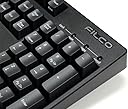
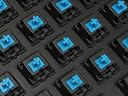
The FILCO Majestouch 2 Mechanical Keyboard with Cherry MX Brown switches is a premium, durable keyboard designed for professionals who demand precision and comfort. Featuring dual USB and PS/2 connectivity with NKRO support, a heavy-duty ABS case, sculpted keycaps, and a minimalist design, it offers a stable, quiet, and responsive typing experience built to last for years.
| ASIN | B004VKYHP4 |
| Additional Features | ABS case |
| Antenna Location | Business, Education, Everyday Use, Gaming |
| Best Sellers Rank | #12,348 in Computer Keyboards |
| Brand | FILCO |
| Built-In Media | USB Cable |
| Button Quantity | 104 |
| Color | Cherry MX Blue |
| Compatible Devices | PC |
| Compatible Operating System Family | Windows |
| Connectivity Technology | USB or PS/2 |
| Customer Reviews | 4.0 out of 5 stars 68 Reviews |
| Enclosure Material | Acrylonitrile Butadiene Styrene |
| Hand Orientation | Ambidextrous |
| Item Weight | 1.2 kg |
| Keyboard Backlighting Color Support | Single Color |
| Keyboard Description | Mechanical |
| Keyboard Layout | QWERTY |
| Manufacturer | Filco |
| Mfr Part Number | FKBN104MC/EB2 |
| Model Name | FKBN104MC/EB2 |
| Model Number | FKBN104MC/EB2 |
| Number of Items | 1 |
| Number of Keys | 104 |
| Number of Sections | 1 |
| Recommended Uses For Product | Business, Education, Everyday Use, Gaming |
| Special Feature | ABS case |
| Style Name | Contemporary |
| Switch Type | Cherry MX Blue |
| Theme | Computer Keyboards |
| Warranty Description | One year limited repair |
| Water Resistance Level | Not Water Resistant |
A**X
A different experience.
I already have previous experience with mechanical keyboards. In particular, I own a Filco Majestouch (the predecessor to this keyboard) with Cherry MX brown switches. So I had a pretty good idea what I would be getting with this Majestouch-2 with Cherry MX blues; at least, I had expectations of what I would get. My particular reason for choosing the Cherry MX blue version was to become familiar with the hype around the blue switch. Around the internet, they're known to be the typist's switch and create for a pleasurable typing experience. Coming from Cherry MX brown's, I can say with time, that I agree with the sentiment. The blue switches have a noticeable click that the brown switches do not have which aids in more feedback of a confirmed key press. While the clicking may not be pleasing to anyone in the vicinity, for the person typing, I think they add to the perceived feel. I've also noticed that the blue switches feel like they need more force to depress than the brown switches. Aside from that, I find the blue switch feel to be very similar to the brown switch: non-linear, a "bump" about 2mm depressed. If I were to put it shortly to someone who's had previous experience with brown switches: blue's are essentially browns with a click. It'll be up to the end user whether they want the noisier experience that blue switches entail. In terms of build quality, Filco is being Filco. The keyboard is solid and has a nice matte finish. The keycaps seem to have a slight textured feel. It has no frills or designs that make it stand out. It's plain, but it all works. There are some points to knit-pick at when needing to convey the product to another individual. There are no macro or media keys, some keys make a "ping" noise when allowed to depress all the way, and the lettering on the keycaps has a yellowish tinge that is noticeably less white than the keys of my used Majestouch from almost two years ago. One may take issue with this keyboard's price knowing that it does not come with any additional features. While I cannot disagree with this argument, my previous experience with Filco just made me want to come back again. Surely, you can get a mechanical keyboard with Cherry MX blue switches for a cheaper price, but the type of build quality and trusted brand reputation that I feel Filco is building for itself comes with a price. And I, along with many other users are willing to go for it. The pinging issue I mentioned is not exclusive to Filco or any other manufacturer of mechanical keyboards. I do not know the reason why some keys can ping or why some do not. I think it has to do with the keycap hitting the metal plate in between the caps and the PCB, but I'm not totally sure. It's just the nature of the beast. I do not know if the yellowish tinge on the keycap letters is normal or if it just a "bad" batch, but it is probably the first difference I noticed when comparing it to my old Filco. Had I not been looking to change the keycaps out in the future, this may have been a problem for me. Again, just something to think about. It may have been a bad batch for letter printing or whatnot, but it's noticeable. This Filco Majestouch-2 is a luxury expense as a similar keyboard with more features can be bought with a bit less money. But I can't shy away from my happy previous experience and Filco delivered again with this keyboard in terms of typing feel and build quality. Going with Filco is going with quality. It's up to the consumer what kind of typing experience he or she wants with their switch choice. I would recommend this keyboard to anyone looking to buy a mechanical keyboard because at the end of the day I will know that it does it's job well and looks to last a very long time.
N**E
Best keyboard for people who -just- want a keyboard!
The FILCO Majestouch 2 is a keyboard intended for people who want nothing more nor less than a no-frills typing experience. There are no volume controls or extra ports because this is not made for that audience of people. The intended audience here are for business professionals who spend their day at a computer. And for gamers who want a purist keyboard with great compatibility of any of the common keycap manufacturers. Your money is being spent on the high quality metal base plate and stiff heavy plastic frame, genuine Cherry switches, and fantastic N-key rollover (if you purchase a model that specifies a "N" in the model number only!) * * a note about N-Key Roll over - If you want 'True N-Key Rollover' use the PS/2 converter. USB is limited to 6 keys simultaneously because of the USB specification - has nothing to do with this wonderful device, that's why they give you the adapter! PROS: - Heavy, solidly built out of high quality materials. - Double layer PCB with thick traces and every key cap has been fully soldered into place - The highest quality switches on earth, (Cherry MX) - The keyboard controller electronics are excellent, I never had any weird issues with NKRO on my model. - This is a USB, non removable cable keyboard that has no ports to break or bluetooth to pair. The included PS/2 port converter has worked on every computer I have tried. Ancient Intel Pentiums for Windows 16-bit development work all the way up to Android cellphones via a USB-OTG device and everything in between. CONS: - Stock keycaps are junk. but if you are buying this keyboard you will likely replace them anyway. - Some times pressing the keys a certain way releases a metal 'pinging' noise. when the keycap bottoms out. - The adhesion of the rubber to the feet of the keyboard is done through friction, if you slide this around a lot you will find yourself placing the rubber back on manually. - A lot of people dislike the "pinging" sound that could happen when you bottom out keys in certain situations. To me it sounds nice :) FILCO is a legendary name in this field but their export products (I purchased a FKBN104MC/EB2) are made in Taiwan. If you want the original, made in Japan FILCO, your only choice is to use a Japanese mail forwarding service and order from FILCO directly. That being said I have had had no issues with my Taiwanese model.
G**6
The perfect tool for those who type out a living
I research and write for a living, and I'm at a keyboard eight or more hours a day. I use a MacBook out of the office, but when I'm in, I use a company-issue Dell desktop. This keyboard, which I've had for a week now, is as close to perfection as a keyboard is going to get for someone with my needs. First off, the keys are mechanical Cherry blue MX's, similar in feel to the old IBM Model M keyboards. If you type a lot, you'll grow to hate the imprecise, spongey character of keys on cheap OEM keyboards. I find I can type a lot faster with more precision and fewer mistakes on this Filco. If you're not a professional keyboarder, you probably won't need or appreciate the difference. If you type for a living, though, you owe it to your fingers to try this keyboard or one of its variants. The build quality of this Filco is amazing. I originally considered an all-plastic keyboard using the same Cherry blue switches from a gaming-peripheral company for half the price, but the iffy reviews convinced me I wanted my Cherry blues in a rock-solid Filco body. OEM keyboards from PC makers have cheap rubber membranes on plastic bodies and so are inevitably spongey, with bodies that squeak and flex far too much, and have dubious marketing-driven multimedia features like extra buttons to bring up one's browser, volume controls, microphone plugs, or USB pass-throughs. If that's what you want, that's fine. Instead, this Filco has 104 keys, lights for num, cap, and scroll lock, and that's about it. It doesn't pretend to do everything, but it does what it needs to do with absolute mechanical precision. Note that mechanical keyboards do make more noise than you might be used to, although they're far quieter than, say, a "clacky" VT100 mainframe terminal or an IBM Selectric. Most of people in my office haven't noticed my new keyboard, and the ones who have don't object to the slight increase in ambient noise.
B**N
Failure after 3 Years
Three years after purchasing the USB has difficultly being recognized when being plugged into my computer. Sometimes it works, and sometimes it doesn't. For over $100 I really expect the keyboard to last for more than 10 years.
J**N
Very High-Quality Keyboard and Worth Its Money
Not too long ago, I started really liking clicky keyboards with good tactile response, and I managed to obtain a couple of old IBM Model M's as well as a newer Unicomp Model M. However, since I do heavy amounts of typing for my job, I found it to be very tiring to use the Model M's keys, as they were heavy and the travel was a lot more. I read a lot of good things about the Filco, and I decided that the Cherry MX Blue switch is right for me. So initial impressions after getting this keyboard, in less than a few minutes, I absolutely love this keyboard. Thanks the Cherry MX Blue switches, the keyboard gives you the click and the tactile response, but with a shorter distance traveled and a lighter press compared to the old school buckling spring 'boards. The build quality of the Filco Majestouch-2 is top-notch. It's very solid, the keys are made very well, and the cord is reinforced strongly. You can tell there is not a hint of cheap plastic anywhere in the build (expected for $150 for a keyboard), and there are four huge rubber feet that provide plenty of friction, so the keyboard is not moved around easily. The keyboard is also quite heavier than it looks, although nowhere near as heavy as an IBM Model M. All-in-all, I've enjoyed the keyboard very much both at home and at work. This is a must-try if you appreciate high-quality products and a good, tactile feel on your keys. A must-have for expert typists in any field.
M**K
Keyboard failure - Win key stuck
After a little over a year of standard use this keyboard no longer functions properly---the win key is permanently "stuck". I took off the key caps, cleaned the keyboard and nothing is visibly wrong with switch. I've read some reports that others have had problems w/ the usb cable as well other unexplained instances of the same problem. Whatever the cause, the keyboard no longer works on multiple computers (win / mac / linux) which is completely unacceptable for such a high priced item.
C**Y
Love the action. Hate the noise.
The Majestouch 2 Ten Key keyboard is a solidly built board that should remind older typists of the early IBM PC keyboards. Like those, it is heavy, sturdy, and substantial. It also has the beautiful mechanical action of the older boards. I have only used it a little but it's enough to recognize that touch typing is faster and more fluid on this board than the modern lightweight compact boards we now use everywhere. With hands and words better synchronized to brain, writing is more natural. It is a joy to use but there are a few drawbacks. 1. Noise! While not as loud as the original IBM boards, the Filco is simply too loud to use in many business settings where it is essential to be able to type and teleconference at the same time. Listeners on the other end of calls likened the typing action to "machine gun fire". I recommend that you consider whether the loud clicking and clacking action will be a problem for you in the environment where you need to use the board. It may not be louder than the legendary keyboards of the 1980s, but it's quite loud by current standards. I love the noise and feel it actually improves the typing experience. But it's a liability in too many situations. I wish the description and reviews had emphasized this issue. 2. Support for non-Windows OS. Many boards will happily snap into machines running different OS. From what I have observed and read, that is not the case with the Filco. It also promptly and mysteriously crashed a Windows work laptop almost immediately after plugging it in. Do some compatibility research before buying. 3. Features: keyboards I bought 20 years ago were not only multi-machine and OS compatible but had fully re mappable keys -- stored in the keyboard itself. This allowed me to snap my board into a wide variety of different systems and get right to work with my custom mappings preserved and no setup required. A pro-level board should offer re mappable keys -- 20 years later. I can't imagine it would be too difficult. Overall a very solid product that we may not end up keeping due to the noise and compatibility limitations. I'd recommend it highly to touch typists using Windows PCs -- with the caveat that it's noise won't pose a problem. I haven't used a keyboard with this good a feel in many many years. It also feels built to last s decade or so itself.
A**R
Terrific keyboard. One of the best keyboards available on ...
Terrific keyboard. One of the best keyboards available on Amazon, and totally worth the cost due to its terrific build quality and durability. The keyboard is a joy to use whether gaming or typing for long periods of time, and has a really solid feel. I would recommend this keyboard to anyone, and I think it's a good value given the genuine Cherry MX stems. It also comes with a fairly decent stock ABS keycap set, although I would definitely recommend getting a PBT set to replace them. The Blue switches are a personal favorite and the tactile action on them is terrific. It makes typing for long periods of time actually quite enjoyable and the sound can actually be relaxing and soothing when you're listening to it in isolation, however they are quite loud so coworkers be forewarned. I think that this keyboard is superior or equivalent in performance to any other commercially available keyboard and cannot be beat at this price.
A**R
手触りがとても良いキーボード
キーボードは規格品です。最初は機械キーボードは少し適応していないが、2日後には「薄膜キーボードキーボードのキーボードの入力、とても快適な感じがする。 FILCO Majestouch2 104フルキー青軸US配列 USB&PS2両対応 Nキーロールオーバー対応 独Cherry青軸採用メカニカルキーボード ブラック FKBN104MC/EB2
C**K
Very good
It’s very good.
あ**噌
気持ちいい〜
確かに音はパカパカうるさいです。 でも自分はそれがたまらなくいいです。 タイプライターをたたいているみたいで、楽しくなりました。 うちの息子(中1)は、この打鍵音の中、隣で寝ました。 うちの息子だけかもしれませんが。。。 会社で使うのは確かに薦めませんが、 自宅でおもいっきりぶったたいてください。 キーボードが楽しくなりますよ。
A**R
a very good keyboard!
A finger massage!You will never regrate!
A**ー
打ってて楽しい
これまで無印HHKB&HHKBタイプSと、PFUの静電容量無接点式ばかりを使ってきましたが、自宅用の無印HHKBが不調気味だったので、かねてより気になっていたフルサイズの青軸キーボードに手を出してしまいました。 打ち心地は当然、無接点式とは正反対ですが、とにかくクリック感が気持ち良くて、楽しいです。方々で言われている通りタイプ音は爆音なので職場では使えませんが、自宅用はもうこれでいいかなと思っています。 HHKBとかRealforceよりずいぶん安いのも良いですね。
Trustpilot
2 months ago
3 weeks ago